The Sims Freeplay- Birthday Cake Ageing

There are 3 ways of ageing a sim:

  1. Birthday Cake (which is what we are going to focus on in this post)
  2. Auto Ageing– once the life dreams and legacies quest has been completed
  3. Advancing age early– once the life dreams and legacies quest has been completed

Before the life dreams and legacies quest has been completed you will need to use birthday cakes if you want to age your sims but you can’t age every sim until a quest has been completed:

Once you have completed a quest for toddlers you will have unlocked the ability for your baby to become a toddler but you now need a birthday cake

A birthday cake can be found under the baking section on a stove, it is near the bottom of the list and will cost you 5LP and takes one day to bake:

Once your sim has made the cake click on the symbol above the stove showing the cake to store it, you can then use it straight away or save it for later.
image

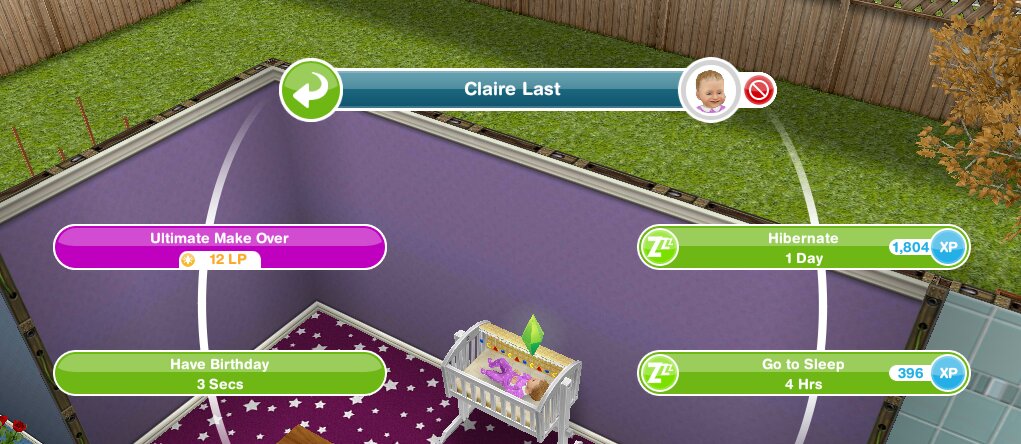
Now you need to click on the sim you want to age and you will see the option to have birthday:
image

Click on this and a pop up will appear, it will ask you if you want to use the birthday cake to age that sim.
image

 If you do, click yes.

If you don’t, click no.

Once you click yes your sim will magically grow up to the next life stage.

image

And that is how you age a sim using a birthday cake!

Do you need a cake for each sim you age or just one cake?
You need a cake for each, once your sim has aged the cake will have been used.

How can I find out how many birthday cakes I have stored?
If you click ‘have birthday’ on a sim it will say how many cakes are available, just click no if you don’t want to use a cake to age that sim.

Once I complete the life dreams quest do I still need birthday cakes?
No you don’t, you can advance a sims age early for 2LP but if you wait for them to complete their life dream for that stage or wait until they are ready to age automatically you can advance them to the next life stage for free.


Related Posts: Making LP QuicklyLife Dreams and Legacies Frequently Asked Questions


FIND THIS POST HELPFUL?

Buy Me a Coffee at ko-fi.com

THE SIMS FREEPLAY
©THEGIRLWHOGAMES.BLOG

The Sims Freeplay- Pet Store

The pet store is where you can buy cats and dogs to live in your sims houses.

You can find the pet store on the town map post to see where it is

Once you have built the store it will look like this:
image

Buying a pet

Firstly select the pet you want, click on the tabs to change between them and the arrow keys to select a breed.

The more expensive the dog or cat the more LPs and simoleons they will find.

DOGS

1 Star Dog

  • Greyhound- 5LPs

2 Star Dogs

  • German Shepherd- 18LPs
  • Labrador- 20LPs
  • Golden Retriever- 22LPs
  • Dalmatian- 25LPs

3 Star Dogs

  • Husky- 75LPs
  • Robo Dog- 80LPs
  • Poodle (if you completed the Puppy Pals hobby in the time limit)- 82LPs

PUPPIES- complete the A Puppy Odyssey Quest to unlock puppies

1 Star Puppy

  • Greyhound- S10,000

2 Star Puppies

  • German Shepherd- 14LPs
  • Labrador- 16LPs
  • Golden Retriever- 18LPs
  • Dalmatian- 20LPs

3 Star Puppies

  • Husky- 62LPs
  • Robo Dog- 66LPs
  • Poodle (if you completed the Puppy Pals hobby in the time limit)- 68LPs

CATS

1 Star Cat

  • British Shorthair- 6LPs

2 Star Cats

  • Maine Coon- 18LPs
  • Siamese- 22LPs
  • Toyger- 25LPs
  • Domestic Black- 30LPs

3 Star Cats

  • Bengal- 75LPs
  • Bejeweled Blitz’s Anchovy- 75LPs
  • Robocat- 80LPs
  • Persian (complete the Internet Kitten hobby)- 82LPs

KITTENS- complete the A Puppy Odyssey Quest to unlock kittens

1 Star Kitten

  • British Shorthair- S10,000

2 Star Kittens

  • Maine Coon- 14LPs
  • Siamese- 18LPs
  • Toyger- 20LPs
  • Domestic Black- 24LPs

3 Star Kittens

  • Bengal- 62LPs
  • Robocat- 66LPs
  • Persian (complete the Internet Kitten hobby)- 68LPs


Select the pet you want and click BUY
image

Then this list of your sims will appear so you can select the house for your new pet:
image

NOTE: You can only have 2 pets in each house.

If you completed the Royal Lineage Quest in the time limit you will have Fairies in your pet store, see that post for information on Fairies.

Please read my Guide to Pets for more information on what pets do, other pets and accessories you can buy for them

Thanks for reading!


© COPYRIGHT PROTECTED

http://smarturl.it/sfpggwg

The Sims Freeplay- Career Guide: Getting a Job, Sending a Sim to Work and Quitting

In this post I show you how to get a job, send your sims to work and how to quit a job. You can find information on each career on this page


Click here to head straight to:
Getting a JobSending a Sim to Work Quitting a JobFAQs


Getting a Job

Working is a great way to make money, to get a job you need to find the occupations tab (previously called the careers and education tab) which is the first one on the sim information panel.

Next to your sims picture it should say unemployed, click on the blue suitcase:

You will then open up the list of careers, as you unlock more workplaces you will unlock more careers, once you find the one you want click ‘accept job’

Sending a Sim to Work

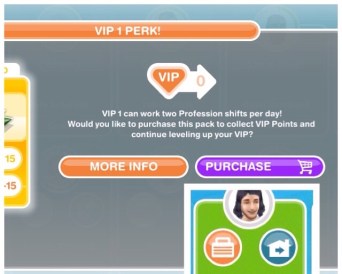
Once they have a job you can send your sims to work whenever you want during the day but only once a day if you are completing a normal career. You can then send your sims to work again at/after 12am as it is the start of a new day. If your sims are completing profession careers and you are VIP level 1 you can send them to work twice in a day (this will cost you 15LP) or you can wait until tomorrow and you will be able to send them to work again without being VIP.

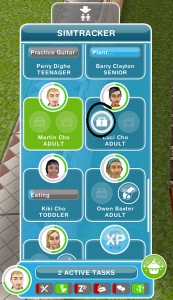
To send them to work, go to the simtracker and find the sim, you will see a pulsing suitcase under the image of them, as shown in the picture below:

20140905-162408.jpg

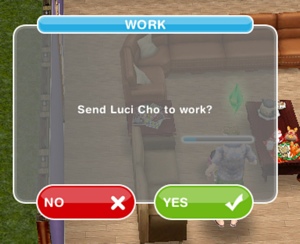
Click on the suitcase and you will be asked to confirm you want them to go to work:

20140905-162413.jpg

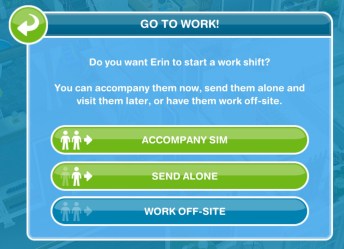
If they are completing a profession career you will be asked if you want to accompany sim (go to work with them), send alone (let them go alone but you can visit them at work later) or work off-site (which is like a normal career where you can’t visit them during their shift):

Want more information? Read: Guide to Profession Careers

Quitting a Job

Quitting is very similar to giving your sims a job.

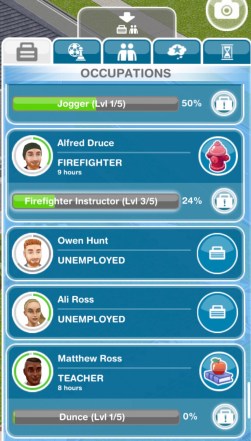
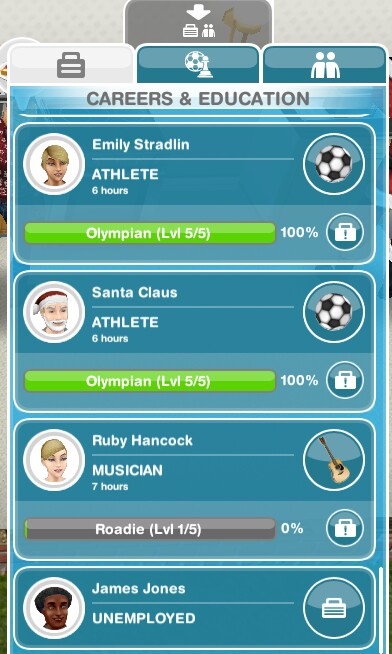
Go to the occupations tab of the information panel:

image

Click on the career icon of the sim you want to quit

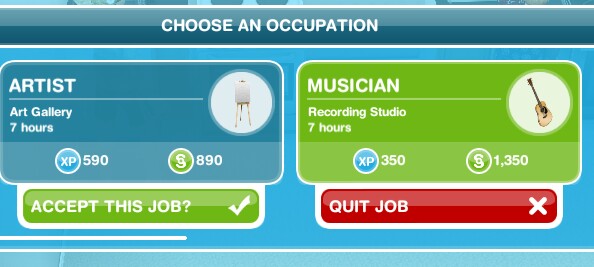
When the ‘choose an occupation’ screen appears you will see a red box under the job they have saying ‘quit job’ click that:

image

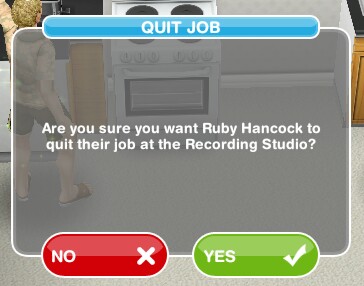
It will ask you if you are sure, say yes:

image

They will have quit their job

Should you change your sims career when you reach the highest level? I don’t recommend it as you earn less money until you reach the highest level again.

Which careers are normal and which are professions? Normal careers are: Artist, Athlete, Firefighter, Musician, Politician, Real Estate Agent, Scientist and Teacher

Profession careers are: Filmmaker, Medical Staff and Police

Can I send a sim to work automatically? No, you have to manually send them sometime during the day.

What happens if I don’t send my sim to work everyday, will they lose their job? No they don’t lose their job, nothing happens you just won’t earn any money or XP if you don’t send them to work.

My sim won’t go to work, why? They may be in a bad mood, improve their mood by fulfilling their needs and then try again.

How often can I send them to work? You can send them once a day if they are completing a normal career. You can send your sims to work again at/after 12am as it is the start of a new day.

If your sims are completing profession careers and you are VIP level 1 you can send them to work twice in a day (this will cost you 15LP) or you can wait until tomorrow and you will be able to send them to work again without being VIP:

Which career earns the most money? Find out here


Related: Guide to Profession Careers


FIND THIS POST HELPFUL?

Buy Me a Coffee at ko-fi.com

THE SIMS FREEPLAY
©THEGIRLWHOGAMES.BLOG

The Sims Freeplay- Costume and Swim Store

The costume and swim store is where you can buy new clothes for all life stages and once built you can access other items in the wardrobe.

Where is the costume and swim store?

The town map will show you were the store is located so you can build it

The picture below shows how the store looks when it has been built in your town:
Once the store is built and you have completed the It’s All Going Swimmingly Quest you will be able to find swimwear in your wardrobe

How do you use the store?

When you click on the store you will see the page below, it will show all of the sim life stages, there you can select the clothes, hair and makeup you want to buy for each life stage:

You can unlock new items to buy by building stores at the mall, check out my post here to find out what unlocks in each store

There is also the wardrobe tab, from here you can select one of your sims and customise them with the clothes and hair you already have available:

What can I buy from the store?

The items you can buy from the store will vary depending on how many stores you have unlocked at the mall

Once you complete the An Alien Concept: Weather Machines Quest you unlock umbrellas for all life stages except babies, the umbrellas are the same for all life stages:

The rest of the items available differ for each life stage, below you can see what is available for each life stage

The pictures below don’t contain all the items available to buy as I have already brought some of them
The life stages with lots of different colours of hair I have shown all the colours available in one style and one of each other hairstyle

Infants

  • Outfits section only, clothes vary by gender:

Toddlers

  • Tattoos and Makeup- face paint, same for both genders
  • Outfits- vary by gender
  • Umbrellas- same for all life stages, see above

Preteens

  • Hair- vary by gender
  • Eyes- same for both genders
  • Tattoos and Makeup- freckles, spots and plasters, eyeshadow for female preteens
  • Tops- vary by gender
  • Pants- vary by gender
  • Shoes- vary by gender
  • Outfits- vary by gender
  • Accessories- glasses and earrings, vary by gender
  • Umbrellas- same for all life stages, see above

Teens

  • Hair- vary by gender
  • Eyes- same for both genders
  • Tattoos and Makeup- eyebrows for male teens and makeup for female teens
  • Tops- vary by gender
  • Pants- vary by gender
  • Shoes- vary by gender
  • Outfits- no outfits for male teens but outfits for female teens
  • Umbrellas- same for all life stages, see above

Adults

  • Hats- same for both genders
  • Hair- vary by gender
  • Eyes- same for both genders
  • Tattoos and Makeup- facial hair, eyebrows and tattoos for male adults and makeup and tattoos for female adults
  • Tops- vary by gender
  • Pants- vary by gender
  • Shoes- vary by gender
  • Outfits- vary by gender
  • Accessories- glasses and earrings, vary by gender
  • Umbrellas- same for all life stages, see above

Seniors

  • Hair- vary by gender
  • Eyes- same for both genders
  • Tattoos and Makeup- facial hair and tattoos for male seniors and tattoos for female seniors
  • Tops- vary by gender
  • Pants- vary by gender
  • Shoes- vary by gender
  • Accessories- glasses, vary by gender
  • Umbrellas- same for all life stages, see above

The items you can buy from the store will vary depending on how many stores you have unlocked at the mall
The pictures above don’t contain all the items available to buy as I have already brought some of them

How do you buy items from the store?

Click on the item you want to buy, it will then no longer appear in your store, it will move to the wardrobe and can be worn by as many sims as you want in that life stage:
image

Once you have built the store you will also be able to find these clothes in your wardrobe:


THE SIMS FREEPLAY
©THEGIRLWHOGAMES.BLOG