The Sims Freeplay- Adding a Pool

Before you can get the tools to add a pool to your sims gardens you need to have completed the Its All Going Swimmingly Quest. Once that quest is complete in the garden section of the home store you will see the new pool tabs which includes building the pool, pool interior, pool paving, paver width and pool items.

20140917-155005.jpg

Building a pool is a lot like building a room but you need to remember you need at least one extra square around the pool for the paving so even though the pool can be as small as 3×3 with the paving its 5×5.

20140917-155102.jpg

What is the cheapest pool? A 3×3 (or 5×5 with the paving) will now cost S13,620

And unlike rooms you can join pools together to make different shapes!

20140917-155132.jpg

Once you have built the pool you can add items to it such as inflatables and a diving board (if you have completed the diving hobby collection for the first time) and items around the pool such as beach towels.

Building a pool with an island

Paver Width
Click on the paver width tab and select the width you want to increase/ decrease the paving around your pool, the picture below shows the widths:
image

If you have a weather machine at your house where your pool is when you put it on snow it freezes the pool so you can complete the figure skating hobby!

20140917-155159.jpg

Cleaning the pool

When the pool is green it will need to be cleaned, otherwise your sims will not be able to use the pool, click on the pool and select the option clean pool.

Watch this video for more information on cleaning pools and using the weather machine!

Adding Diving Boards

Diving boards have to be placed with one square over the water and 2 squares on land, like the picture below shows:
image

You can unlock diving boards by completing the diving hobby for the first time.

Using the pool

In the pool you can:
image

Go swimming, click somewhere in the pool and your sim will swim there:
image

If you have two sims you can interact with the other sim:

  • Flip- 4 seconds
  • Splash- 10 seconds
  • Chat- 4 minutes

image

Toddlers can play in the pool with the help of a teen, adult or senior.

NOTE: You need steps for your sims to be able to use the swimming pool

When you want your sim to get out of the pool click on the ground above some steps and they will get out and get changed.
image

Deleting a pool

To delete a pool go to the outdoor section of buy mode:
image

Then click on the pool, click the red simoleons symbol to sell it:
image


THE SIMS FREEPLAY
©THEGIRLWHOGAMES.BLOG

The Sims Freeplay- Birthday Cake Ageing

There are 3 ways of ageing a sim:

  1. Birthday Cake (which is what we are going to focus on in this post)
  2. Auto Ageing– once the life dreams and legacies quest has been completed
  3. Advancing age early– once the life dreams and legacies quest has been completed

Before the life dreams and legacies quest has been completed you will need to use birthday cakes if you want to age your sims but you can’t age every sim until a quest has been completed:

Once you have completed a quest for toddlers you will have unlocked the ability for your baby to become a toddler but you now need a birthday cake

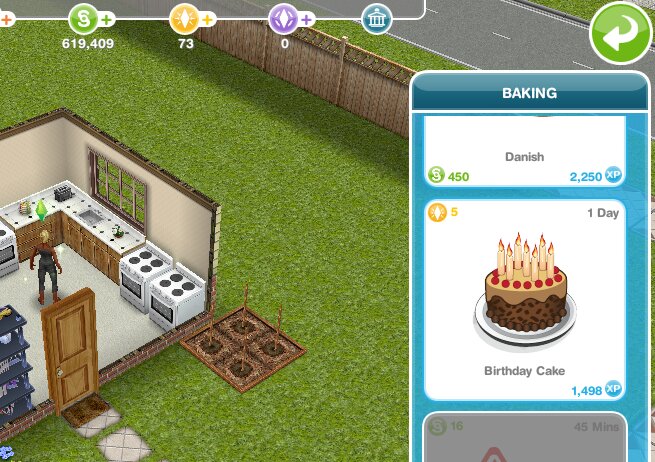
A birthday cake can be found under the baking section on a stove, it is near the bottom of the list and will cost you 5LP and takes one day to bake:

Once your sim has made the cake click on the symbol above the stove showing the cake to store it, you can then use it straight away or save it for later.
image

Now you need to click on the sim you want to age and you will see the option to have birthday:
image

Click on this and a pop up will appear, it will ask you if you want to use the birthday cake to age that sim.
image

 If you do, click yes.

If you don’t, click no.

Once you click yes your sim will magically grow up to the next life stage.

image

And that is how you age a sim using a birthday cake!

Do you need a cake for each sim you age or just one cake?
You need a cake for each, once your sim has aged the cake will have been used.

How can I find out how many birthday cakes I have stored?
If you click ‘have birthday’ on a sim it will say how many cakes are available, just click no if you don’t want to use a cake to age that sim.

Once I complete the life dreams quest do I still need birthday cakes?
No you don’t, you can advance a sims age early for 2LP but if you wait for them to complete their life dream for that stage or wait until they are ready to age automatically you can advance them to the next life stage for free.


Related Posts: Making LP QuicklyLife Dreams and Legacies Frequently Asked Questions


FIND THIS POST HELPFUL?

Buy Me a Coffee at ko-fi.com

THE SIMS FREEPLAY
©THEGIRLWHOGAMES.BLOG

The Sims Freeplay- Pet Store

The pet store is where you can buy cats and dogs to live in your sims houses.

You can find the pet store on the town map post to see where it is

Once you have built the store it will look like this:
image

Buying a pet

Firstly select the pet you want, click on the tabs to change between them and the arrow keys to select a breed.

The more expensive the dog or cat the more LPs and simoleons they will find.

DOGS

1 Star Dog

  • Greyhound- 5LPs

2 Star Dogs

  • German Shepherd- 18LPs
  • Labrador- 20LPs
  • Golden Retriever- 22LPs
  • Dalmatian- 25LPs

3 Star Dogs

  • Husky- 75LPs
  • Robo Dog- 80LPs
  • Poodle (if you completed the Puppy Pals hobby in the time limit)- 82LPs

PUPPIES- complete the A Puppy Odyssey Quest to unlock puppies

1 Star Puppy

  • Greyhound- S10,000

2 Star Puppies

  • German Shepherd- 14LPs
  • Labrador- 16LPs
  • Golden Retriever- 18LPs
  • Dalmatian- 20LPs

3 Star Puppies

  • Husky- 62LPs
  • Robo Dog- 66LPs
  • Poodle (if you completed the Puppy Pals hobby in the time limit)- 68LPs

CATS

1 Star Cat

  • British Shorthair- 6LPs

2 Star Cats

  • Maine Coon- 18LPs
  • Siamese- 22LPs
  • Toyger- 25LPs
  • Domestic Black- 30LPs

3 Star Cats

  • Bengal- 75LPs
  • Bejeweled Blitz’s Anchovy- 75LPs
  • Robocat- 80LPs
  • Persian (complete the Internet Kitten hobby)- 82LPs

KITTENS- complete the A Puppy Odyssey Quest to unlock kittens

1 Star Kitten

  • British Shorthair- S10,000

2 Star Kittens

  • Maine Coon- 14LPs
  • Siamese- 18LPs
  • Toyger- 20LPs
  • Domestic Black- 24LPs

3 Star Kittens

  • Bengal- 62LPs
  • Robocat- 66LPs
  • Persian (complete the Internet Kitten hobby)- 68LPs


Select the pet you want and click BUY
image

Then this list of your sims will appear so you can select the house for your new pet:
image

NOTE: You can only have 2 pets in each house.

If you completed the Royal Lineage Quest in the time limit you will have Fairies in your pet store, see that post for information on Fairies.

Please read my Guide to Pets for more information on what pets do, other pets and accessories you can buy for them

Thanks for reading!


© COPYRIGHT PROTECTED

http://smarturl.it/sfpggwg

The Sims Freeplay- Career Guide: Getting a Job, Sending a Sim to Work and Quitting

In this post I show you how to get a job, send your sims to work and how to quit a job. You can find information on each career on this page


Click here to head straight to:
Getting a JobSending a Sim to Work Quitting a JobFAQs


Getting a Job

Working is a great way to make money, to get a job you need to find the occupations tab (previously called the careers and education tab) which is the first one on the sim information panel.

Next to your sims picture it should say unemployed, click on the blue suitcase:

You will then open up the list of careers, as you unlock more workplaces you will unlock more careers, once you find the one you want click ‘accept job’

Sending a Sim to Work

Once they have a job you can send your sims to work whenever you want during the day but only once a day if you are completing a normal career. You can then send your sims to work again at/after 12am as it is the start of a new day. If your sims are completing profession careers and you are VIP level 1 you can send them to work twice in a day (this will cost you 15LP) or you can wait until tomorrow and you will be able to send them to work again without being VIP.

To send them to work, go to the simtracker and find the sim, you will see a pulsing suitcase under the image of them, as shown in the picture below:

20140905-162408.jpg

Click on the suitcase and you will be asked to confirm you want them to go to work:

20140905-162413.jpg

If they are completing a profession career you will be asked if you want to accompany sim (go to work with them), send alone (let them go alone but you can visit them at work later) or work off-site (which is like a normal career where you can’t visit them during their shift):

Want more information? Read: Guide to Profession Careers

Quitting a Job

Quitting is very similar to giving your sims a job.

Go to the occupations tab of the information panel:

image

Click on the career icon of the sim you want to quit

When the ‘choose an occupation’ screen appears you will see a red box under the job they have saying ‘quit job’ click that:

image

It will ask you if you are sure, say yes:

image

They will have quit their job

Should you change your sims career when you reach the highest level? I don’t recommend it as you earn less money until you reach the highest level again.

Which careers are normal and which are professions? Normal careers are: Artist, Athlete, Firefighter, Musician, Politician, Real Estate Agent, Scientist and Teacher

Profession careers are: Filmmaker, Medical Staff and Police

Can I send a sim to work automatically? No, you have to manually send them sometime during the day.

What happens if I don’t send my sim to work everyday, will they lose their job? No they don’t lose their job, nothing happens you just won’t earn any money or XP if you don’t send them to work.

My sim won’t go to work, why? They may be in a bad mood, improve their mood by fulfilling their needs and then try again.

How often can I send them to work? You can send them once a day if they are completing a normal career. You can send your sims to work again at/after 12am as it is the start of a new day.

If your sims are completing profession careers and you are VIP level 1 you can send them to work twice in a day (this will cost you 15LP) or you can wait until tomorrow and you will be able to send them to work again without being VIP:

Which career earns the most money? Find out here


Related: Guide to Profession Careers


FIND THIS POST HELPFUL?

Buy Me a Coffee at ko-fi.com

THE SIMS FREEPLAY
©THEGIRLWHOGAMES.BLOG