The Sims Freeplay- Teenagers Quest

LEVEL UNLOCKS: 18 UNLOCKS: teenagers TIME LIMIT: none


YOU NEED TO COMPLETE THE MULTI STORY RENOVATIONS QUEST BEFORE YOU CAN BEGIN THIS QUEST
This quest unlocks the ability to age your preteens into teens! There is no time limit for this quest so I recommend you take your time and save up some money for future quests
How long does this quest take to complete?

STUCK? CLICK HERE TO VIEW THE FREQUENTLY ASKED QUESTIONS ABOUT THIS QUEST

Time may vary depending on the star rating an item has and whether a sim is inspired or not.

  • Be nice to Osiris- 1 minute [click blue skip button to complete instantly]
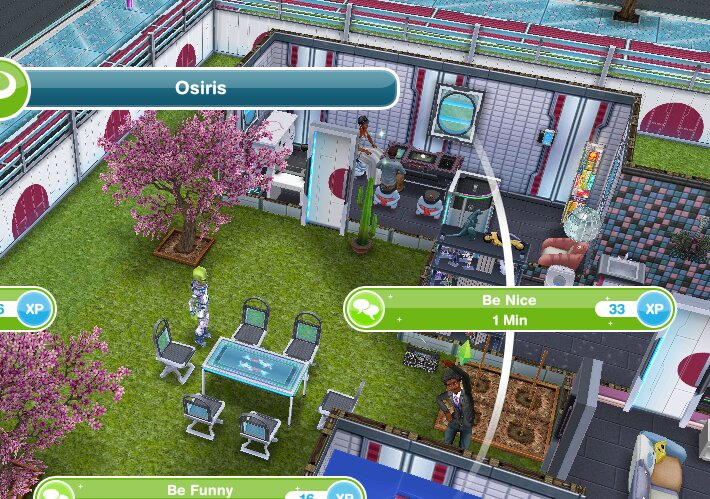
  • Be Nice to Osiris- 1 minute [click blue skip button to complete instantly]
  • Read the Big Book of Stuff- 19 hours [inspired: 18 hrs 3 mins] (can be started early)

  • Talk to a tree on a housing lot- 5 hours 30 minutes [inspired: 5 hrs 14 mins]

  • Be Nice to Osiris- 1 minute [click blue skip button to complete instantly]
  • Be Inconspicuous on a Park Bench (go to the park and click on a bench)- 2 minutes 42 seconds [click blue skip button to complete instantly]

QUEST IS COMPLETE!

You can now age your preteens into teenagers! This post explains all you need to know about Teens

NOTE: You will need a teenager for the Pirate and His Goddess Quest in two quests time

You can also adopt a teenage using the option on a phone for real money once this quest is complete:


Watch my step by step video of this quest here:


The next quest is Higher Education which unlocks school for teens!


FREQUENTLY ASKED QUESTIONS ABOUT THIS QUEST

please read before asking

I have missed this quest! Why can’t I start it yet?
You cannot miss main quests they have to be completed in order. You need to complete all previous quests (list can be found here) and reach level 18 before you can start this quest

Can I complete this quest even though I have passed level 18?
Yes, you just need to complete all previous quests then this quest will start automatically

What do you mean when you say a goal can be started early?
Any goal that you can normally do can be started early because you will have access to it and any goal that you can’t normally do you will have to wait until you get the goal to be able to complete it
The tip with this method is to put the sim doing that action early in a different house that you cannot go to until you get that goal or it will not work

Why do blue footprints appear when I try to use an item?
Blue footprints appear when your sim cannot access an item you want them to use, you need to either rotate the item or move an item that has been placed in front of it so they can use it

I don’t like this quest! Can I just skip it?
No, you have to complete this quest before you can move onto the next one

Some times are slightly different on my game, why is this?
Times may vary depending on the star rating of the item you are using, as the higher star rating an item has the quicker you will complete a goal

Some times are really off/ different goals show for me, why is this?
This will be because the quest has been updated recently, I try my best to keep these posts up to date but it is difficult as I cannot redo every quest each time the game is updated. If you notice any changes please let me know so I can update the post


The next quest is Higher Education which unlocks school for teens!


Last updated August 2025

FIND THIS POST HELPFUL?

Buy Me a Coffee at ko-fi.com

THE SIMS FREEPLAY
©THEGIRLWHOGAMES.BLOG

The Sims Freeplay- The Cloud: Saving the Game

Connecting to the cloud is how you save your game so if you ever have a problem with your device or want to change devices knowing how to connect to the cloud will stop you from losing your game, for example, if you wanted to change your device you would be able to get your game onto that new device within 7 days and you won’t have to start all over again- it is a good idea to do it everyday just as a back up in case! (it does automatically do it if you connect to the party boat but it is always useful to know how to do it yourself)

Connecting to the Cloud

To connect to the cloud you need to firstly be connected to Facebook, Apple, Game Center or Google Play Games (how to connect to Facebook and Game Center are covered in my Adding Neighbours post as both these can be used to add neighbours)

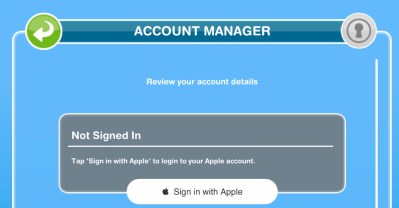
Sign in with Apple is a new option for Apple products so you can sign in with your Apple ID (on the settings screen- see under ‘uploading’ in this post- click on the key button (bottom right) to sign in with your Apple ID:

Sorry I no longer have an Android so I cannot show you how to connect your game to Google Play Games (this is where you download your games from)

Uploading

Once connected go into settings in the game (click on the green button with 3 white dots on it) you will then see these options:

Click on the cloud button and you will see this window appear:

image

Click upload save data and your game will be saved

Click here to watch my video on how to save to the cloud

Help! My neighbours can’t see an item in my town, why is that? They can’t see it because they aren’t seeing the most up to date version of your game, you need to connect to the cloud for them to see this version of your game.

Downloading

If you are transferring to a different device you can select on that device from in the game ‘download save data’ and you will have your game back as long as you are connected to the same account that you saved your game from on your other device:

20150311-141049.jpg

NOTE: if you are planning to go from an Android to an Apple or the other way around and you want to keep your game, make sure you save to Facebook as this is the only option to save available on both devices.

Unable to connect to the cloud?

If you can’t connect click on the Facebook icon in the settings and it will probably say unknown user so log out and log in again and it should work! If it still isn’t working you may want to contact the makers to see if there is anything they can do to fix this for you, this post explains how to contact them if you are unsure.


Related Posts: Adding Neighbours & Visiting Neighbours


FIND THIS POST HELPFUL?

Buy Me a Coffee at ko-fi.com

THE SIMS FREEPLAY
©THEGIRLWHOGAMES.BLOG
The Sims Freeplay- Adding Neighbours

Only have access to Another Sim Town? Find out what it contains here!


If you are playing on an Apple product you have the choice between Game Center and/or Facebook to add neighbours (although they have now made the Game Center option difficult) and if you are on an Android you will have the option of Facebook only as Google+ is no longer available.


Apple and Androids: Connecting The Sims Freeplay to Facebook

To add a neighbour using Facebook you need to have your game connected to your account, to do this log into the Facebook app then go to settings in the Sims Freeplay (the green button with 3 white dots in it) and you will see these options appear:

Click on the key button (bottom right) and it will say not signed in, press the green log in button and it will go to Facebook then come back to the game and you should see this (check that it is the right account):
image

NOTE: my Facebook account has been suspended so I am unable to add anymore players, sorry!

Facebook Adding

Once connected, when you add a friend on Facebook, if they play The Sims Freeplay and have connected their game they will be added to your party boat automatically.


Apple: Game Center Adding

NOTE: as of iOS 10 the Game Center app has been removed you can still add neighbours but they have made it a lot harder to do, you now have to iMessage the person you want to add or you can also allow nearby people to add you from Settings > Game Center > Allow nearby people to add you through WiFi or Bluetooth. If you don’t have iOS 10 or above the steps below should still work but you may find players on iOS 10 or above are unable to accept your requests.

Game Center is an app on your Apple product, it should already be on your device.
Open it up and you will see 5 tabs at the bottom of the screen

Me, Friends, Games, Challenges and Turns

  • In the me tab you can set your username, this is what people use to add you, you can also change your photo here.
  • In the friends tab you will see all of your friends you already have and any friend requests you have
  • In the games tab you will see all the games you play and all of your achievements

To add a player you need to know their username or email address, once you do go to the friends tab and in the top right hand corner there is a +

This will open up a new window, in the ‘to’ box write the players username or email and in the big box below you can add a message to that person.

 Once they have accepted your request if they have the game they will appear in your party boat.

You can have 500 friends on Game Center but only 100 appear in your party boat.

NOTE: as of iOS 10 the Game Center app has been removed you can still add neighbours but they have made it a lot harder to do, you now have to iMessage the person you want to add or you can also allow nearby people to add you from Settings > Game Center > Allow nearby people to add you through WiFi or Bluetooth.


Androids: Google Play Games Adding

Google+ has been removed so you can no longer add players this way on an Android (Facebook is your only option) but you can still save your game with Google Play Games


Deleting a Neighbour

To delete a neighbour you just need to delete them from Facebook and/or Game Center

Help! My neighbours can’t see an item in my town, why is that?

They can’t see it because they aren’t seeing the most up to date version of your game, you need to connect to the cloud for them to see this version of your game.


 Please note it can take a while for neighbours to appear in your party boat after adding so be patient!


What social tasks are there to complete? Find my social tasks list here!


Related Posts: Visiting Neighbours & Saving the Game


FIND THIS POST HELPFUL?

Buy Me a Coffee at ko-fi.com

THE SIMS FREEPLAY
©THEGIRLWHOGAMES.BLOG

The Sims Freeplay- Sous Judgemental Quest

LEVEL UNLOCKS: 16 UNLOCKS: restaurant TIME LIMIT: 3 days PRIZE: chef outfits


YOU NEED TO COMPLETE THE PREPARING FOR PRETEENS QUEST BEFORE YOU CAN BEGIN THIS QUEST
Completing this quest unlocks the restaurant once unlocked you can repair the restaurant like you repair the stables and then it will be ready to use! If you complete this quest in the time limit you will unlock the chef outfits for your adult sims. You can still complete this quest once the time is up to unlock the restaurant but you won’t get the chef outfits
HOW LONG DOES THIS QUEST TAKE TO COMPLETE?

STUCK? CLICK HERE TO VIEW THE FREQUENTLY ASKED QUESTIONS ABOUT THIS QUEST

Times may vary depending on the star rating an item has.

image
time and price varies depending on how many businesses you have already but these are the requirements I had
  • Call a sim to the restaurant
  • Be nice to the Grouch- 4 minutes

  • Taste the Grouch’s special dish- 1 minute (click on grouch)

image

  • Complain to the Grouch- 2 hours 10 minutes

image

  • Call the first judge on a phone- 3 minutes 12 seconds

image

  • Take Wumples’ order- 5 minutes (he will appear at the house you are at)

  • Cook any dish for Wumples’- 1 minute (cheese on toast)

Select cooking on stove, pick dish, click on bubble above sims head when dish is ready


    • Serve food to Wumples’- 10 minutes (click plate for the option)

image

  • Call the second judge on a phone- 3 minutes 12 seconds
  • Take Santa’s order- 5 minutes
  • Cook pizza for Santa- 40 minutes (you need to be level 2 at cooking and have a microwave)
  • Serve food to Santa- 10 minutes (click plate for the option)
  • Call the final judge on a phone- 3 minutes 12 seconds
  • Take the Grouch’s order- 8 hours 30 minutes
  • Make a quiche for the Grouch- 4 hours (you need to be level 4 at cooking and have a 2 star fridge and oven)
  • Serve food to Grouch- 10 minutes (click plate for option)
  • Investigate what the Grouch dropped- 5 minutes (blue X will appear at front of the house you are at)

  • Have a sim make a mud pie- 3 hours 30 minutes (using a garden patch)

image

  • Go to the restaurant
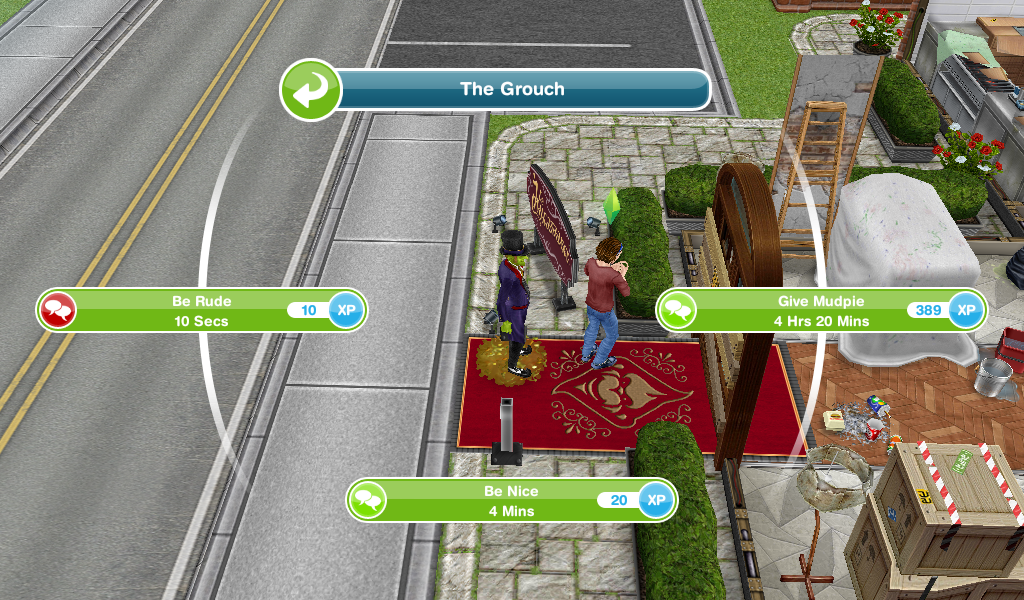
  • Give mud pie to Grouch- 4 hours 20 minutes

image

  • Open front door- S25,000- 1 hour 30 minutes

QUEST IS COMPLETE!

You can now repair the restaurant and make it look great! Click here for posts explaining Building and Using the Restaurant

Chopping Boards- complete the cooking hobby to unlock them! The cooking hobby post can be found here

Time Limited Prize: Chef Outfits
image

Is the prize worth it? The chef outfits are really cool and well worth completing the quest in time!
Where can I find them? In the wardrobe

Cost? Free


Watch my step by step video of this quest here:


The next quest brings weather to your sim town, An Alien Concept: Weather Machines 


FREQUENTLY ASKED QUESTIONS ABOUT THIS QUEST

please read before asking

I have missed this quest! Why can’t I start it yet?
You cannot miss main quests they have to be completed in order. You need to complete all previous quests (list can be found here) and reach level 16 before you can start this quest

Can I complete this quest even though I have passed level 16?
Yes, you just need to complete all previous quests then this quest will start automatically

I can’t afford the restaurant, how can I earn more simoleons?
This post may help

Can I build the restaurant early?
No, you cannot build the restaurant until you get the goal in this quest

How do I send my sim to the restaurant?
Go to the restaurant and click on the whistle next to a sim who isn’t busy on the simtracker, this post explains more about the simtracker

How do I taste the Grouchs special dish?
Click on the Grouch and select the option

How do I cook a dish for Wumples?
Click on a stove and select cooking, pick the dish (cheese on toast is the quickest but you will need a toaster) wait for it to be cooked and then click on the bubble that appears above your sims head when the dish is ready

Why do blue footprints appear when I try to use an item?
Blue footprints appear when your sim cannot access an item you want them to use, you need to either rotate the item or move an item that has been placed in front of it so they can use it

How do I serve the food?
Click on the plates and select the option

I cannot find Wumples/Santa/Grouch! What should I do?
Firstly restart your device then try looking around all your houses in simtown for them, they have got to be somewhere!

Pizza is locked, how do I cook it?
Your sim needs to be level 2 at cooking and have a microwave at that house

I cannot make the quiche, it is greyed out, why?
Your sim needs to be level 4 at cooking and have a 2 star fridge and stove

How do I give the mud pie to the Grouch? It disappeared!
You don’t see the mud pie, just click on the Grouch and select the option to give mudpie

My game says there is something under construction when I try to open the front door, what do I do?
Firstly you need to read the pop up as it tells you exactly what is under construction, once you have go there and click on it to finish building, then you will be able to open the front door to the restaurant (it will be something you have built previously but probably just haven’t clicked to finish building yet!)

What do I get if I complete this quest in the time limit?
Chef outfits

What happens if I don’t complete in the time limit, can I still finish this quest?
Yes you have to finish it to unlock the restaurant before you can move onto the next quest

I didn’t complete in the time limit, can I restart the quest?
No, you cannot redo quests

Can I still get the prize if I don’t complete in the time limit?
No, the only way to get the limited time prizes is by completing the quest in the time limit

I don’t like this quest! Can I just skip it?
No, you have to complete this quest before you can move onto the next one

Some times are slightly different on my game, why is this?
Times may vary depending on the star rating of the item you are using, as the higher star rating an item has the quicker you will complete a goal

Some times are really off/ different goals show for me, why is this?
This will be because the quest has been updated recently, I try my best to keep these posts up to date but it is difficult as I cannot redo every quest each time the game is updated. If you notice any changes please let me know so I can update the post


The next quest brings weather to your sim town, An Alien Concept: Weather Machines 


Last updated March 2020

FIND THIS POST HELPFUL?

Buy Me a Coffee at ko-fi.com

THE SIMS FREEPLAY
©THEGIRLWHOGAMES.BLOG

The Sims Freeplay- Bread Winner Quest

LEVEL UNLOCKS:UNLOCKS: cooking hobby TIME LIMIT: none


This is the first quest in the game, quests unlock new content and main quests have to be completed in order. This quest unlocks from level 6 and shows us how the cooking hobby works, once completed you will be able to earn LP quickly by completing the hobby
How long does this quest take to complete?

Stuck? Click here to view the Frequently Asked Questions about this Quest

Please note times may vary depending on the star rating an item has.

  • Watch SimChef on TV- 1 minute 30 seconds [inspired: 1 min 8 secs]

  • Buy a stove (kitchen section, after fridges costs S350)

image

  • Cook Bacon and Eggs on a stove- 5 minutes

imageyou will find an item for the cooking hobby collection when you click on the bubble above your sims head once they have finished cooking
image

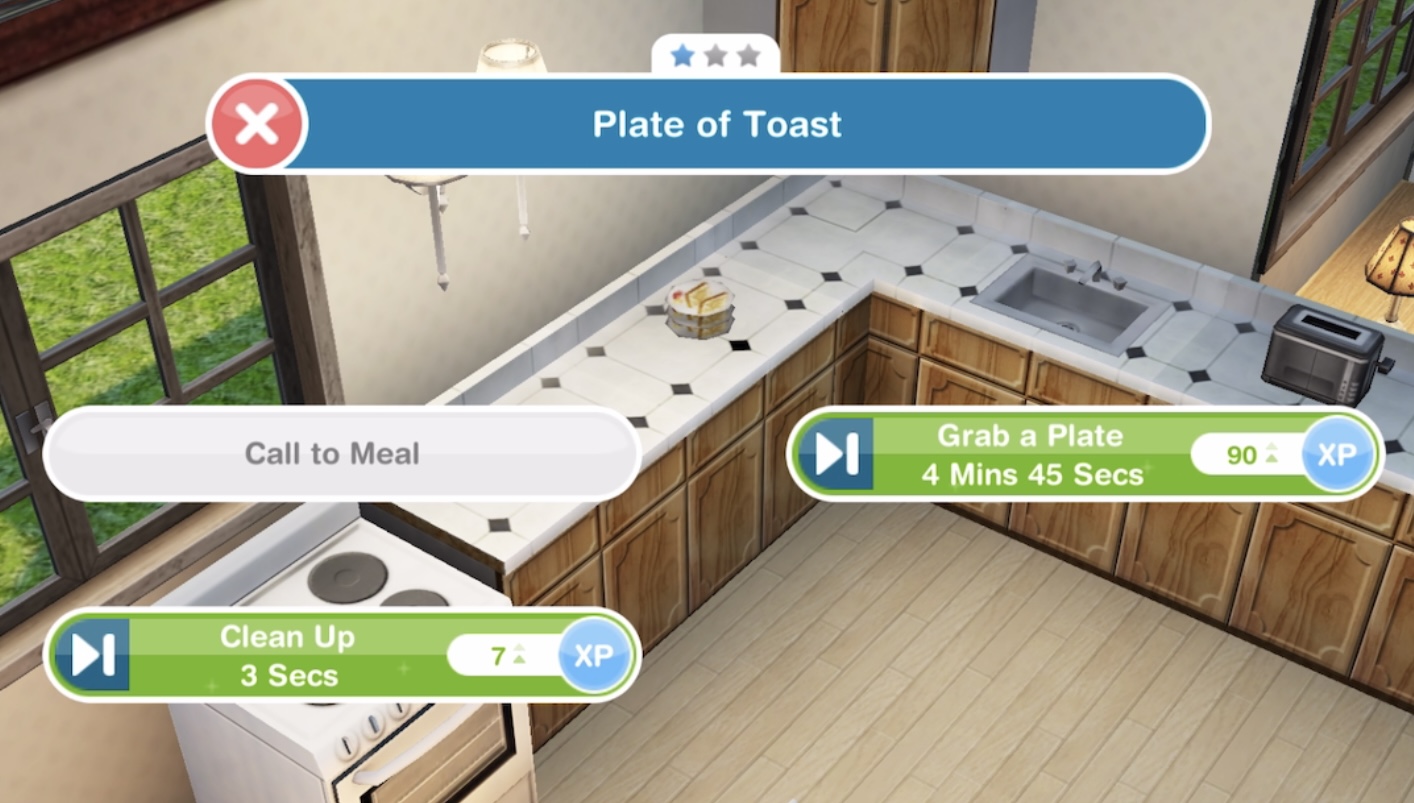
  • Grab a plate of Bacon and Eggs- 5 minutes (select the option on the plate) [inspired: 4 min 45 secs]

  • Clean up: Wash the dishes- 3 seconds (click on dish, select clean up)

image

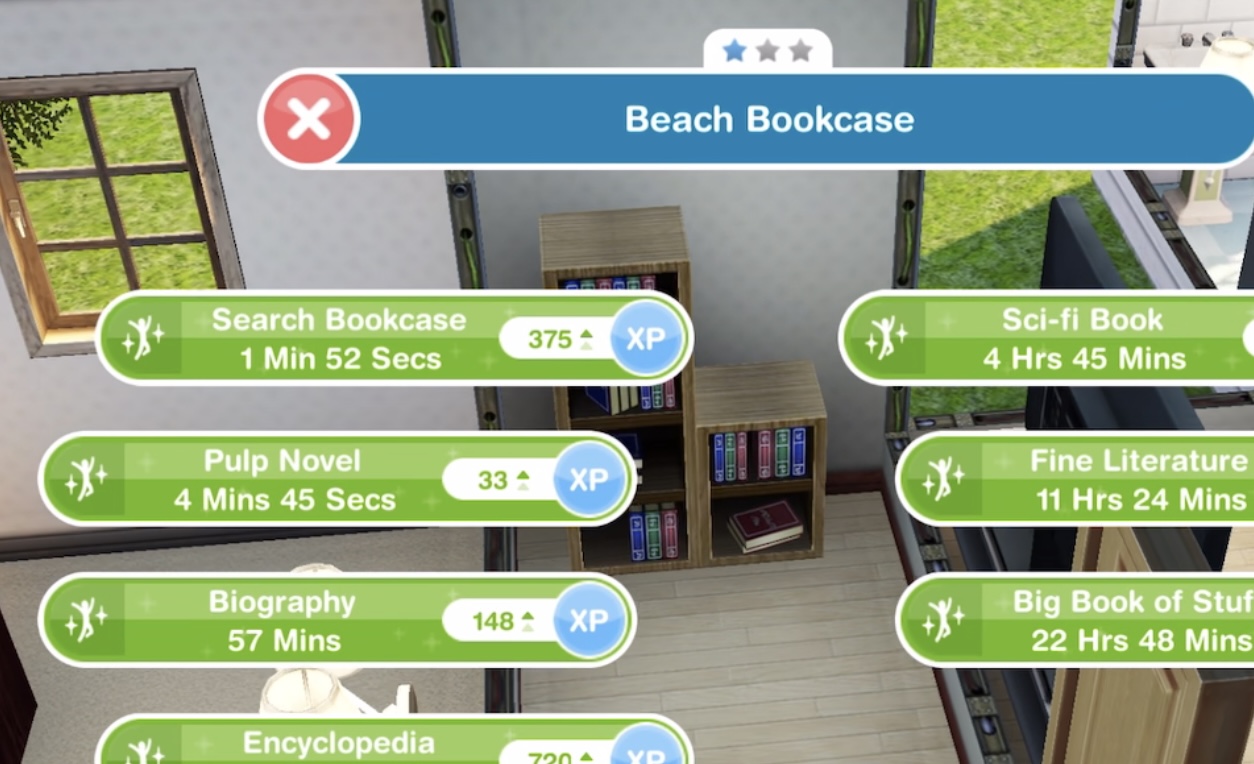
  • Search a bookcase- 2 minutes [inspired: 1 min 52 sec] (1 star bookcase already in first house)


  • Buy a toaster (kitchen section, after coffee machines, 1 star costs S750)

20140807-165913.jpg

  • Cook cheese and tomato on toast- 1 minute

image

if you use the same sim to cook both times you will reach level two in the cooking hobby

  • Have 2 sims in the same house: Invite a sim over (click on the whistle next to a sim who isn’t busy on the simtracker)

image

  • Call to meal (click on plate of cheese and toast)

  • Daydream on a couch- 1 minute 48 seconds [inspired: 1 min 42 secs]

image

QUEST IS COMPLETE!

You can now complete the Cooking Hobby! The cooking hobby is a great way to earn LPs- read this post for more details!

Chopping Boards- complete the cooking hobby for the first time to unlock them!


Watch my step by step video of this quest here(some steps have changed slightly since making this video):


The next quest is Money Grows On Trees which unlocks the simoleon sprout


FREQUENTLY ASKED QUESTIONS ABOUT THIS QUEST

please read before asking

I can’t start this quest yet, why?
You need to complete the tutorial and reach level 6 before you can start this quest

Can I complete this quest even though I have passed level 5?
Yes, you just need to complete the tutorial then this quest will start automatically

I don’t get the option to watch SimChef on tv, why?
You will not get the option until you get the goal when the quest starts

Why can’t I buy a toaster?
You need to place a toaster on a counter or table, it won’t let you buy it if you try to put it on the floor

I can’t make cheese on toast, why?
You need to have a stove and a toaster in your house to be able to make cheese on toast

Why do blue footprints appear when I try to use an item?
Blue footprints appear when your sim cannot access an item you want them to use, you need to either rotate the item or move an item that has been placed in front of it so they can use it

How do I invite a sim over?
Click on the whistle next to a sim who isn’t busy on the simtracker, this post explains more about the simtracker

Where can I find the chopping boards?
You need to complete the cooking hobby for the first time to unlock the chopping boards, they can then be found in the kitchen section of buy mode

I don’t like this quest! Can I just skip it?
No, you have to complete this quest before you can move onto the next one

Some times are slightly different on my game, why is this?
Times may vary depending on the star rating of the item you are using, as the higher star rating an item has the quicker you will complete a goal

Some times are really off/ different goals show for me, why is this?
This will be because the quest has been updated recently, I try my best to keep these posts up to date but it is difficult as I cannot redo every quest each time the game is updated. If you notice any changes please let me know so I can update the post


The next quest is Money Grows On Trees which unlocks the simoleon sprout


Last updated April 2025

FIND THIS POST HELPFUL?

Buy Me a Coffee at ko-fi.com

THE SIMS FREEPLAY
©THEGIRLWHOGAMES.BLOG