Hi everyone! I’m just wondering what you all think of these new profession careers (police and movie star), would you like the makers of the sims freeplay to add more to the game?
NOTE: I know I put ‘no they are boring!’ But even if you don’t think they are boring, they are time consuming or you have another reason for not liking them still vote no if you don’t want them to add anymore!
If you voted yes I would love to know why- I have heard a lot about why people have voted no but not much from the those who enjoy these new careers!
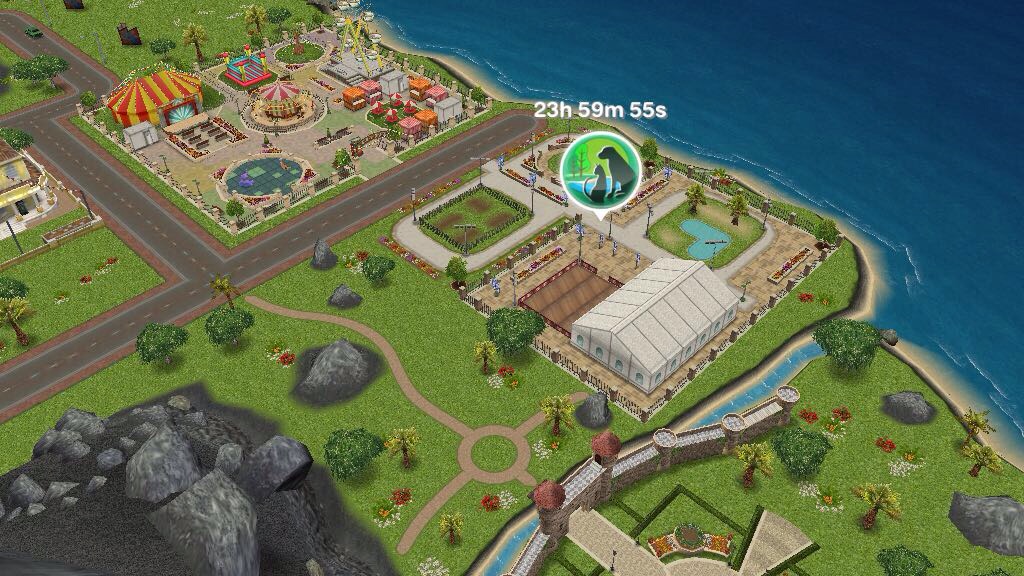
Once you unlock the pet park you unlock the Dog Obedience hobby for adults, seniors and teens
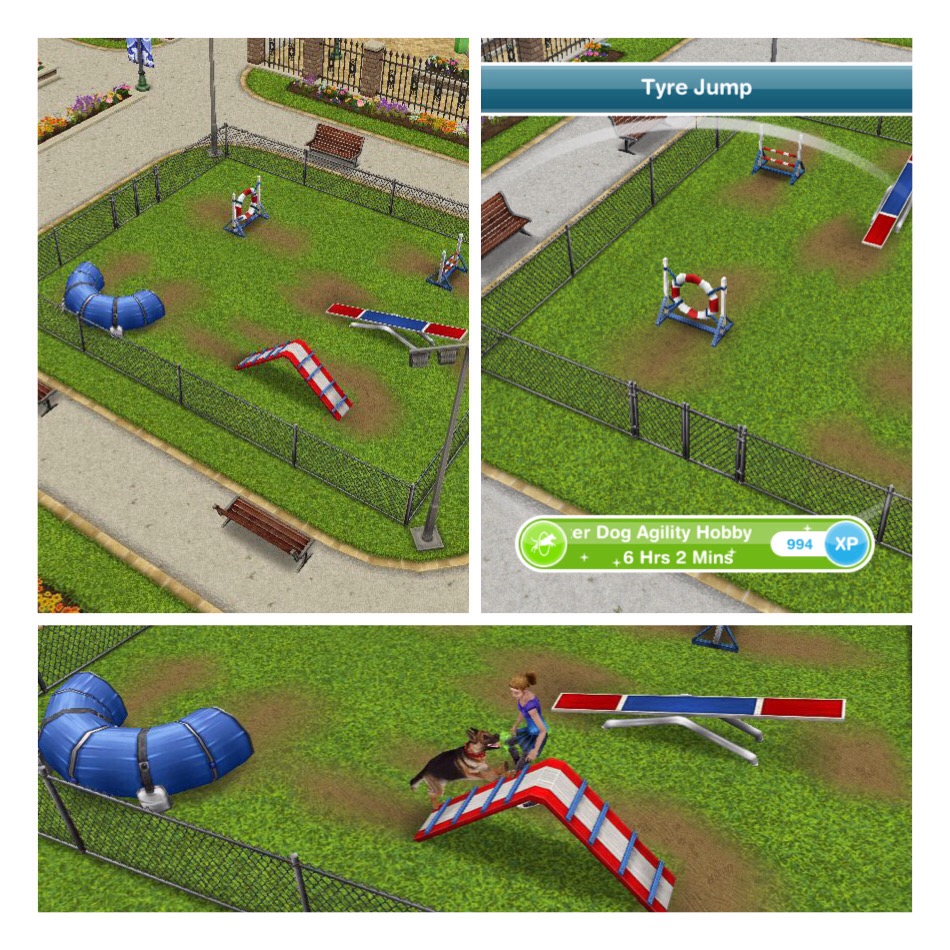
There are two other hobbies at the pet park, Dog Agility and Cat Show, these both require orbs to build the areas to start these hobbies:
Dog Agility: Requires 3 Silver Animal Fanatic Orbs and 2 Gold Animal Fanatic Orbs
You can have sims judge and watch the cat show but you do not need them to complete this hobby, you only need a sim to partake in the cat show hobby
What else is at the pet park?
One final area requires orbs to build
Nine Lives Cafe: Requires 2 Silver Animal Fanatic Orbs and 3 Gold Animal Fanatic Orbs to build
A sim can wait on tables while another sim waits for coffee, there is also a cat run in the cafe for your cats to use while they are at the pet park The dog pool unlocks when you build the pet park, this can be used by your dogs
How do I send my dogs and cats to the pet park?
To be able to send them to the pet park they need to be wearing collars, you can buy collars for them from the Pet Salon. Once they have a collar click on that pet and select ‘send to pet park’
I really like that cats and dogs can be included in the game more when you build the pet park however it does seem to take a long time to build all the places in this park so I would recommend only using Animal Fanatic Orbs to build the park, use the other orbs to pause your sims.
There are now four profession careers; Police, Filmmaker, Medical Staff and Spa Staff so I thought it would be a good idea to make a post explaining how these profession careers work.
What is the difference between professions and normal careers?
Professions are still careers but you can go with your sim to the workplace and while they are there they help sims to earn resources, these resources are used to build and upgrade areas inside the workplace called workstations.
Professions Training Quest
Once you have built a profession workplace the Professions Training Quest will begin (there is no time limit to this you just have to complete it before you can send anymore sims to work there- and yes you can complete it at the same time as other quests)
It is more of a tutorial than a quest
NOTE: you will only receive this quest the first time you build a profession workplace so when you reach level 6 in another profession it will not appear again, this quest below shows the police profession but it is the same for all professions.
Visit the police station
Send a sim to work at the police station (give them a job at the police station the same way you usually give them a job then click on the suitcase to send a sim to work- select accompany sim to go to the station with them)
Help a sim at the police station- tap a bubble that appears over a sims head and complete one of the tasks
Help again at the police station- complete the second task on the bubble
Check workplace overview (found in the profession menu in the top left on your screen while at the police station)
Check workplace storage (second tab in the profession menu)
Help a sim at the police station
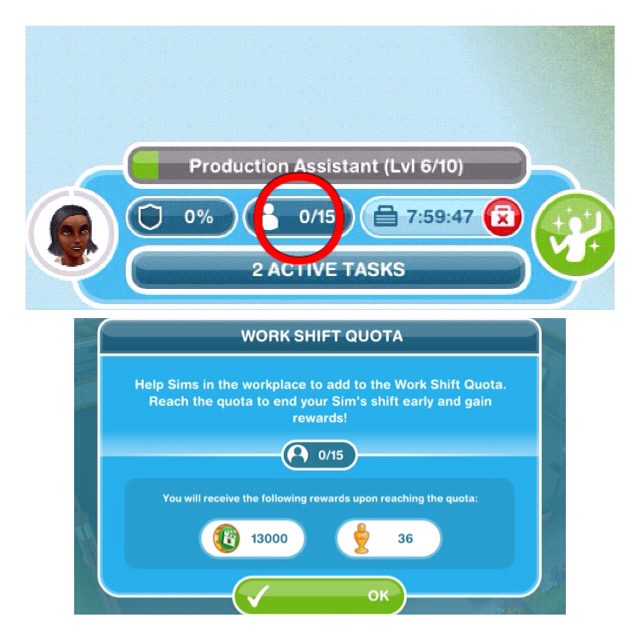
Check the work shift quota- this can be found on the work bar:
Fulfil special requests- this is a task where the bubble shows a question mark instead of the resource, complete the tasks to find out what resource you will be rewarded
Trade resources (third tab in the profession menu)
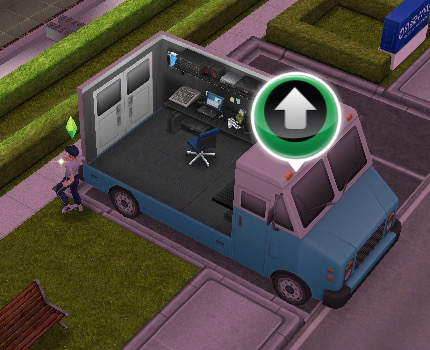
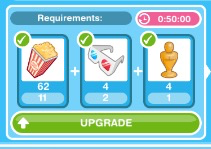
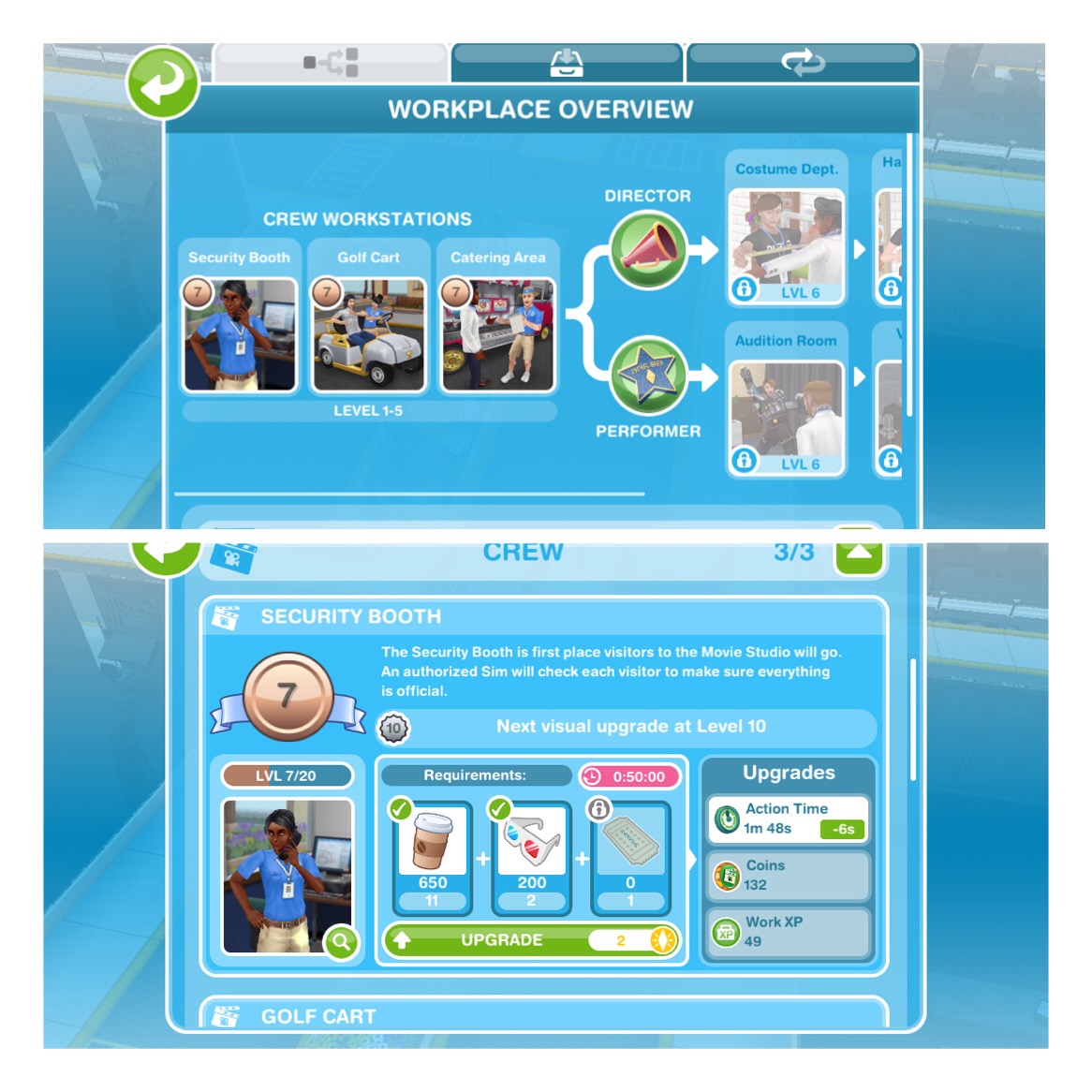
Upgrade a workstation- click on a green arrow at one of the workstations to get the option to upgrade it
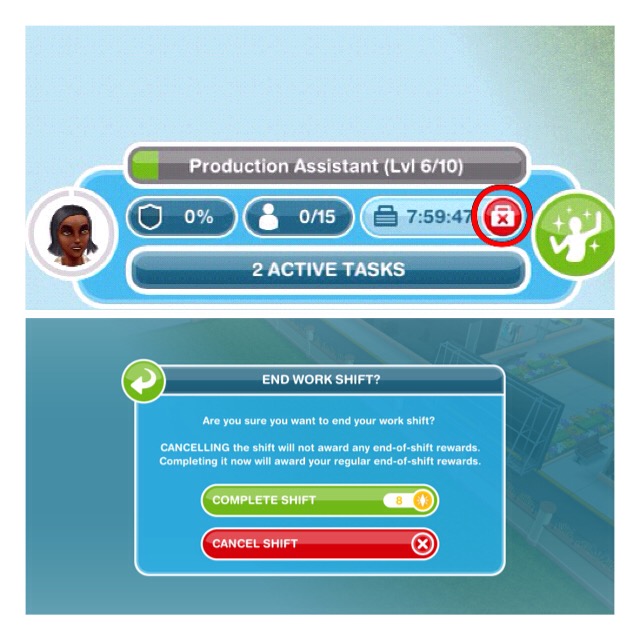
Complete the remaining work day- either keep helping sims, leave your sim to work or click on the red cross on the work bar and then on complete shift (this will usually cost you LPs
QUEST IS COMPLETE!
Once you complete the quest you can send other sims to work there
How do I help sims?
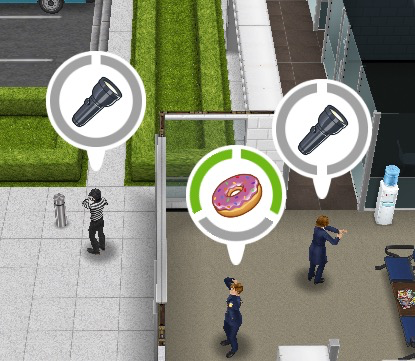
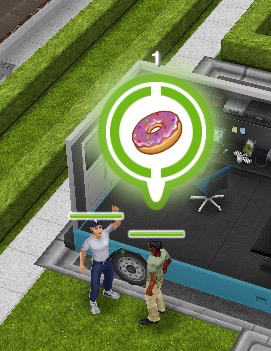
When you send a sim to work sims will enter with bubbles above their heads, you need to click on this bubble and select one of the tasks that appears, the amount of grey sections there are tells you how many tasks you have to complete before you earn the reward (which is a resource) that is pictured in the middle of the bubble:
Each task has to be completed in a different workstation and only one sim can use a workstation at one time (new tasks will be added when you unlock new workstations)
Each time your sims complete a task (that section will turn from grey to green) a coin bubble will appear above their head, click this and they will earn coins and XPs, the experience points are towards levelling up, so they will level up quicker than if you just sent them to work.
Once all the tasks have been completed all the grey sections will now appear green, click on this to receive your reward.
Sometimes you may see a question mark appear in the bubble instead of a resource, this is a mystery resource, you will find out what it is when you complete the tasks:
these are important sims needed to collect badges
Does the same sim have to complete all the tasks when they help a sim?
No they don’t
Can I send one of the sims away if I don’t want to help them right now?
No, they will stay at the workplace until you help them
What are resources used for?
The resources are used to build and upgrade the different workstations within the workplace. Build new workstations to unlock new resources
What are coins used for?
Coins are used to increase your storage and trade for resources
Can I send my sim to work on their own like a normal career? Will they still collect resources?
Yes you can send them to work on their own and they will still level up however they will level up slower than if they help sims and they will not collect any resources.
What is the work shift quota?
The work shift quota shows how many sims you need to help within the shift to finish their shift early and earn bonus resources What are the workstations?
Once your sim reaches level 6 you can decide which career to specialise them in: either Metro Police or Special Agent, you will need to have a sim as each to be able to unlock the other workstations
Metro Police:
Squad Car- level 6 Metro Police
Jail Cells- level 7 Metro Police
K-9 Unit- level 8 Metro Police
Chiefs Office- level 9 Metro Police
Only the metro police officer will be able to complete tasks to help sims that require one of the workstations above
Special Agent:
Interview Room- level 6 Special Agent
Sketch Room- level 7 Special Agent
Forensics Lab- level 8 Special Agent
Division 51- level 9 Special Agent
Only the special agent will be able to complete tasks to help sims that require one of the workstations above
Once your sim reaches level 6 you can decide which career to specialise them in: either Director or Performer, you will need to have a sim as each to be able to unlock the other workstations
Director:
Costume Department- level 6 Director
Hair and Makeup Department- level 7 Director
Stunt Set- level 8 Director
Directors Trailer- level 9 Director
Only the director will be able to complete tasks to help sims that require one of the workstations above
Performer:
Audition Room- level 6 Performer
Voice-over Booth- level 7 Performer
Film Set- level 8 Performer
A-list Celebrity Trailer- level 9 Performer
Only the performer will be able to complete tasks to help sims that require one of the workstations above
Once your sim reaches level 6 you can decide which career to specialise them in: either Nurse or Doctor, you will need to have a sim as each to be able to unlock the other workstations
NOTE: you can only have one sim as a nurse and one sim as a doctor
Nurse:
Pharmacy- level 6 Nurse
Triage- level 7 Nurse
Radiology- level 8 Nurse
Ward- level 9 Nurse
Only the nurse will be able to complete tasks to help sims that require one of the workstations above
Doctor:
General Practice- level 6 Doctor
Psychiatrist’s Office- level 7 Doctor
Research Laboratory- level 8 Doctor
Surgery Room- level 9 Doctor
Only the doctor will be able to complete tasks to help sims that require one of the workstations above
What do you get for upgrading workstations?
Each time you upgrade a workstation one of the following will happen:
The time taken to complete the task will decrease
The amount of coins you receive will increase
The amount of XPs you receive will increase
YOU WILL NOT GET ALL OF THESE UPGRADES EACH TIME, ONLY ONE
Why do I need to be VIP 7 to upgrade a workstation?
You don’t! If you are VIP 7 you can upgrade two workstations at once, if you aren’t you will need to wait for the previous workstation upgrade to complete before upgrading the next.
Why is it costing me LPs to build a workstation?
This is because you do not have enough resources to build or upgrade the workstation yet, just help sims and collect the resources to be able to build without it costing you LPs Can I buy another one of each workstation?
No you cannot
How can I earn the resources I need quicker?
Watch this video:
Professions Menu
You can access this using the button in the top left hand corner of your screen when you are at the profession workplace
Workplace Overview- here you can see the workstations you have currently unlocked, what level you are on and what resources you need to upgrade them
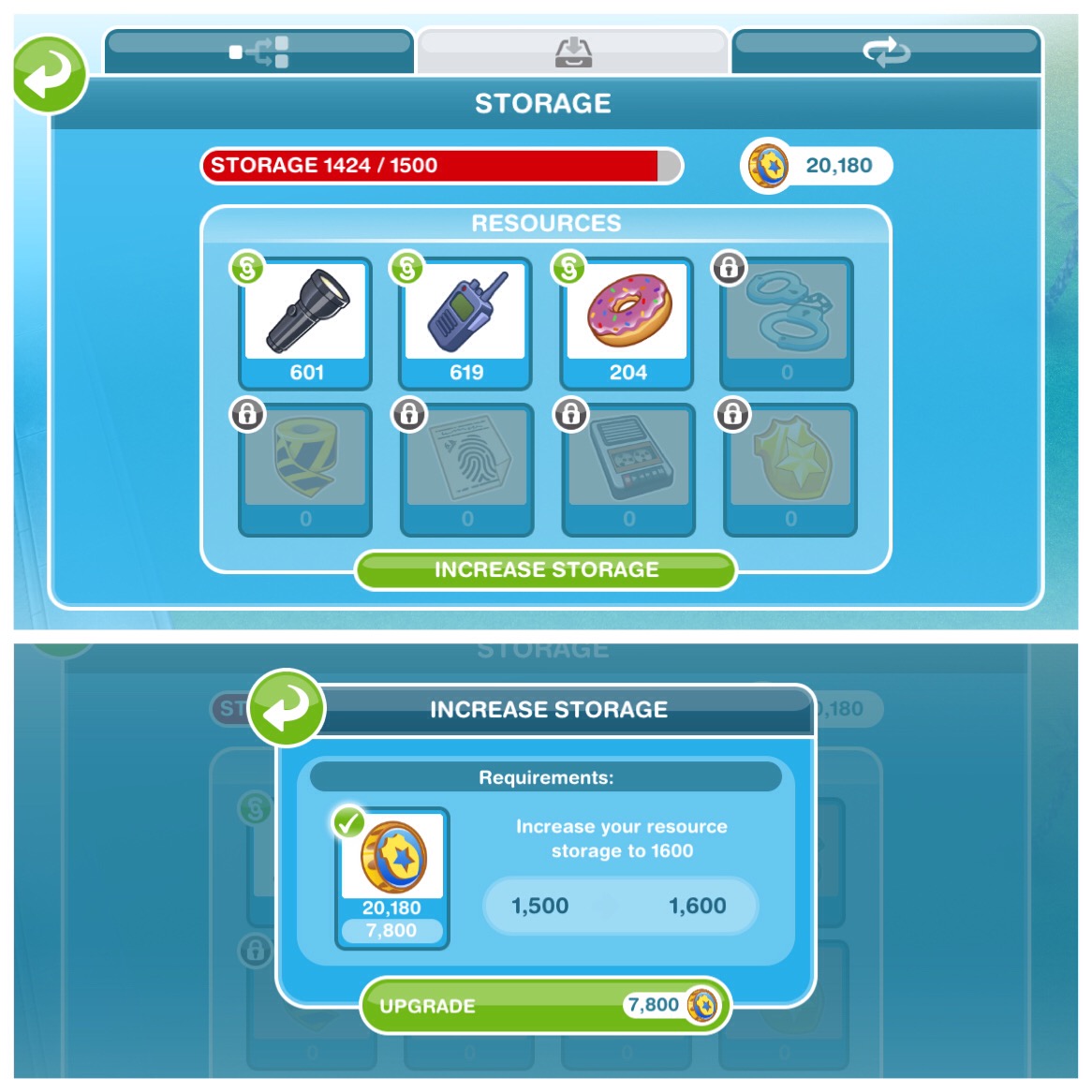
Storage- this is where you see your current resources collected and on the right hand side is your coins, the coins are used to increase your storage if you need to and trade for resources (which is in the next tab)
How do I increase my storage space?
Go to the Storage tab and click on increase storage, this will cost you coins:
NOTE: if you don’t have enough coins this will cost you LPs, just collect more coins and you will be able to use the coins to upgrade your storage
What is the maximum storage space for each profession career?
Police is 5000, Filmmaker and Medical Staff are both 2600
What should I do if I run out of storage space?
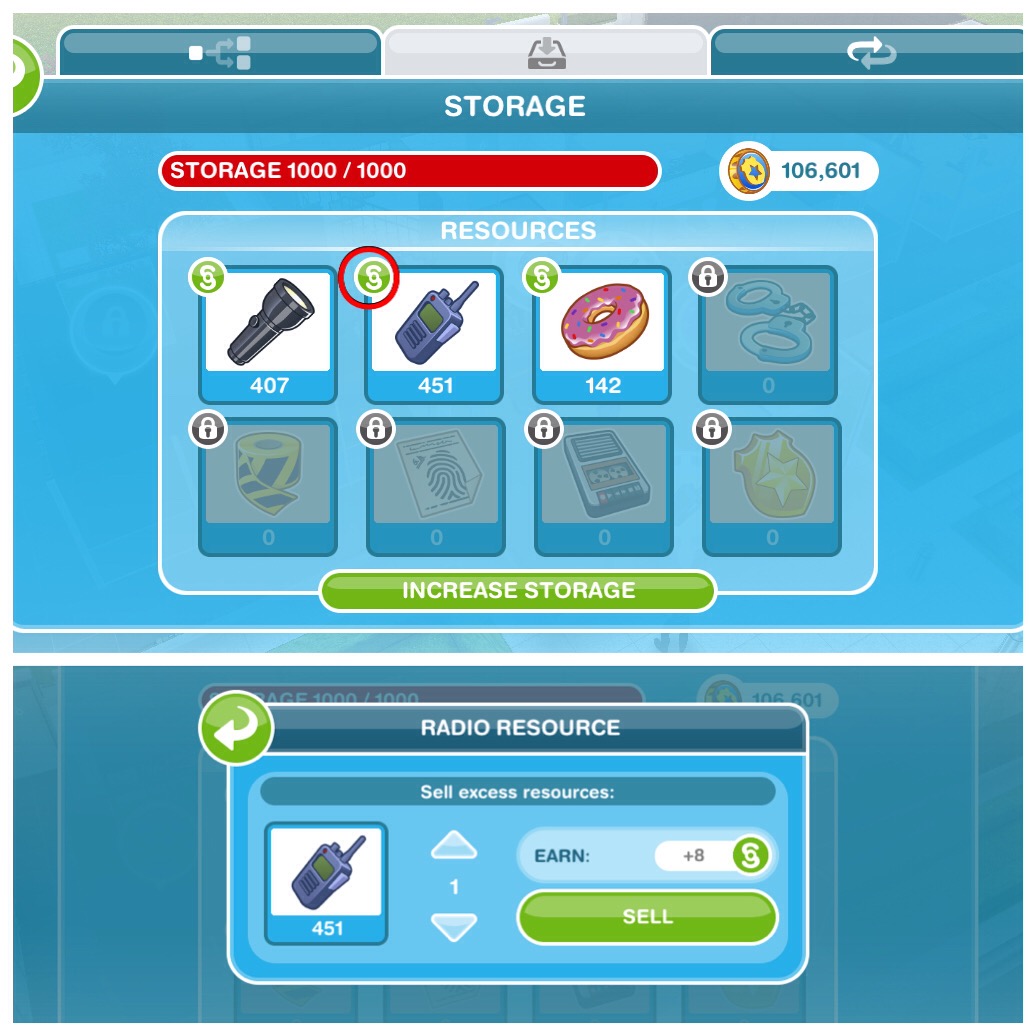
You can sell any unwanted resources, go to the storage tab and click on the simoleon symbol next to a resource and select the amount you want to sell for simoleons:
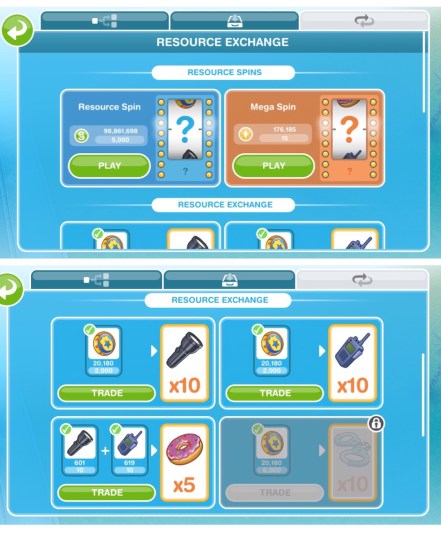
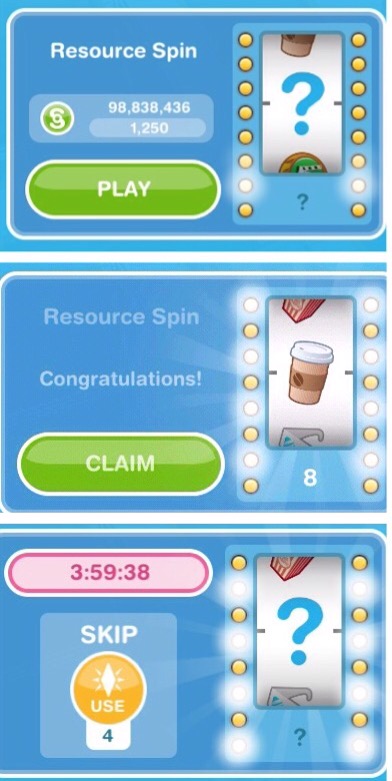
Resource Exchange- here you can either spin for resources using simoleons or LPs for the mega spin as well as trade coins for resources
How does the resource spin work?
There are two resource spins:
Resource spin costing simoleons- available for everyone, click to spin and it will spin and then you can claim your resources
Mega spin costing LPs- only available for VIP level 2 players, works the same as the other spin but will give you more resources.
NOTE: You can only use both of these every 4 hours unless you pay 4LPs to spin again straight away How does trading for resources work?
On the left you have the item you are trading and on the right you have the item you will receive for trading, click trade
Reaching Level 6- Specialising a Sim
Once you reach level 6 for the first time a new quest will begin (it isn’t really a quest and yes you can do it at the same time as other quests) It shows you how to select the specialist for your sim and how to get promoted
Professions: Specialisation Training
Assign a specialist to a level 6 sim- click on the occupations (career) tab, find the level 6 sim and choose one of the two options for that career:
NOTE: you can only have one sim on each of these options
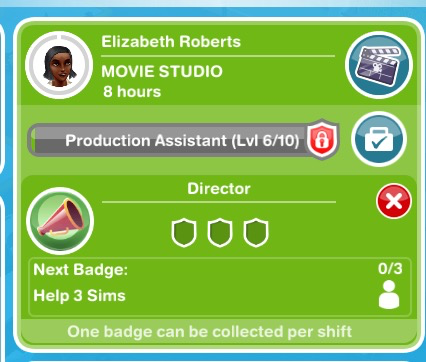
Fulfil a profession badge- check the occupations tab to find out what you need to do to complete this, I had help 3 sims, to complete this I needed to help 3 sims that came to the workplace by completing all of the tasks
Each sim can only earn one badge per shift and you need all badges before you will be able to level up in that career
If you don’t manage to complete a badge in a shift the progress for that badge will reset and you will have start again on the next shift (for example, if your task is to help 2 important sims and you only help one, in your next shift it will reset so you will have to help 2 important sims in that shift to get the badge)
Each level requires you to complete more badges, you cannot level up until all the badges have been collected.
Build a workstation at a profession workplace- if you do not have the right amount of resources it will say it costs LPs to build- just help sims to gain resources and it won’t cost you LPs
Who are the important sims I need to help to get a badge?
These are the sims with question marks in the bubbles above their heads
Reaching Level 10
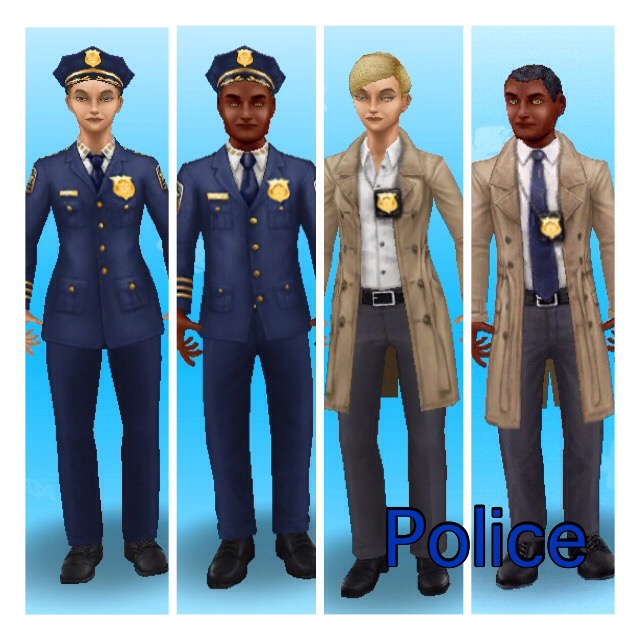
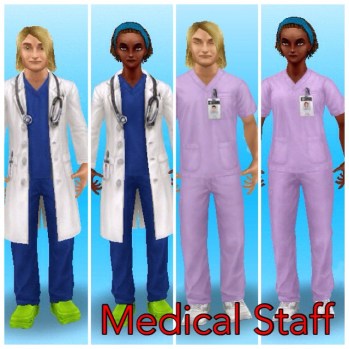
When you reach level 10 in a profession career you unlock the work outfit in that specialist for a female and male adult sim to wear at any time!
Left- metro police outfits Right- special agent outfitsLeft- director outfits Right- actor outfitsLeft- doctor outfits Right- nurse outfits
Find them in the wardrobe under outfits once you reach level 10
Orange Suitcase? Can’t send your sims to work?
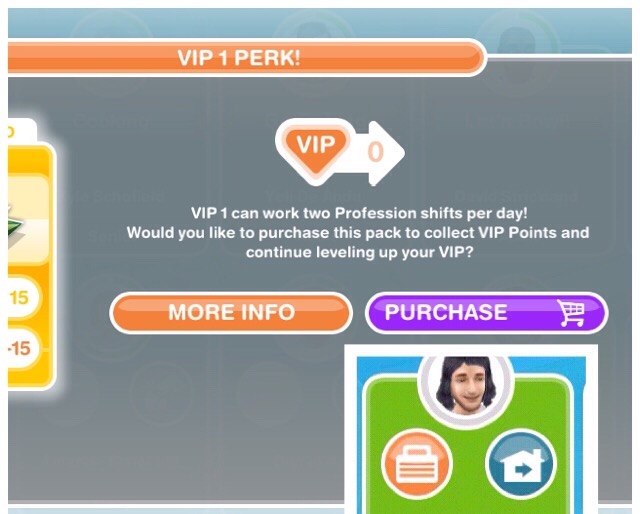
This is because you have already sent them to work once today, if you are VIP level 1 you can send them to work twice in a day (this will cost you 15LPs still if you are VIP)
Wait until tomorrow and you will be able to send them to work again without being VIP.
Do I need to be VIP to use profession workplaces?
NO!If you are VIP you can send your sims to work twice a day (VIP level 1), upgrade more than one workstation at a time (VIP level 7) and use the mega spin (VIP level 2) but you do not need to be VIP
How do I cancel a work shift?
Click on the red cross on the sims need bar and select cancel shift My sims are ageing to seniors before they have reached the highest level, what can I do?
You could reverse their ageing (again read the post linked above) when they come to the end of their time as an adult but this is going to cost you a lot of LPs! It may be worth doing this while you are working on getting a platinum orb so you don’t have to start from level 1 with another sim and have to go through the ageing all over again!
How do you level up quicker?
The only way to level up quicker is to go to work each day and help the amount of sims needed to fulfil your work quota each day but you need to remember that each time you level up it will take you longer to reach the next level
If you are trying to complete the movie star career quicker you can use the movie camera from the promotions r store to level them up quicker
TIP: the higher level a workstation is the more career experience points you will to level up quicker
Who is this sim (pictured below) who appears?
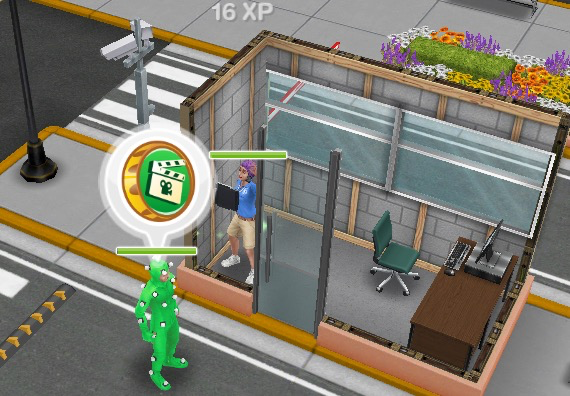
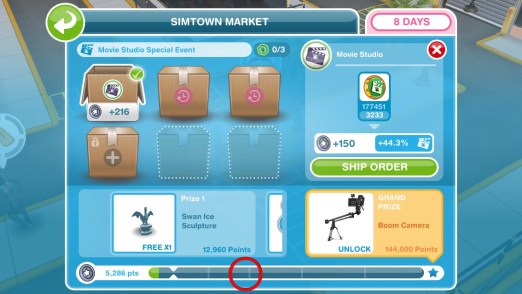
He is the courier for the simtown market event, he will appear at the profession workplace where the event is taking place. If you complete all the tasks he has before the time above the bubble is up you will earn a market token needed to ship some orders (other orders need workplace resources to ship) You need to ship orders to fill up the bar and earn prizes:
You can only send two sims to work to help sims, all other sims will be working ‘offsite’ so they will still go to work but you will not see them, like normal careers (even when your level increases you can still only have two there)
Only one sim can use a workstation at a time
Important sims are the ones with question marks in the bubbles above their heads
If you send a sim to work without going with them they will still level up but just slower than if they help sims and they will not earn any resources
You can only upgrade one workstation at a time unless you are VIP 7
Each workstation can be upgraded 20 times
It will cost you LPs to build a workstation if you do not have enough resources, help more sims to collect the resources to build the workstation without LPs
You can only have one sim in each specialism
Only the sim in that specialism can use the workstations, for example only the Performer can complete the Film Set actions
If you are VIP you get some perks but you don’t need to be VIP!
There is no time limit on completing a profession career and workplace, you can take as long as you like!
Thanks for reading!
Frequently Asked Questions About Profession Careers:
I have been asked many times if I could add to each post how long each quest takes to complete if you did each task back to back, I decided it would be easier to just list them all in one post, that way I can just add a link to each post.
THIS MAY NOT BE ACCURATE FOR YOU- Four things to remember:
You may be using a lower star rated item (which takes longer) so this will not be as accurate for you
If a quest involves building a place I cannot add in how long it will take because the time taken depends on how many buildings you already have built, this will be stated next to the time on this post
Times may change- every update each quest seems to change slightly so the times may not be accurate if no one has told me of the changes to a quest I cannot update this post (all times are correct for the latest version I have posted)
Some quests have two versions at the moment so please read the quest post to find out which version you have
Neither version includes time taken to build the stables as it varies depending on how many places you have already built
I have also included the times for clearing the stable as it would be if you had 8 sims clearing it at one time which is 10 hours, it would take you 1 day 5 hours 5 minutes and 30 seconds if you only used one sim to clean it
There was only one difference between versions for this quest so you may have noticed only one version is shown in the post, the only difference is the task talk to a tree on a housing lot, in version 1 it takes 5 hours 30 minutes and in version 2 it takes 12 hours
The back to back times for this quest only go up to write a song as it is impossible to say how long it will take you to complete the rest of the tasks as for those you need to complete the teen idol hobby
I have included the times for clearing the plants mess as it would be if you had 3 sims clearing it at one time which is 5 hours 30 minutes, it would take you 7 hours 30 minutes if you only used one sim to clean it
Teachers Pet– 5 days 16 hours 3 minutes 10 seconds
Time limit- 8 days
I have included the times for cleaning up if you had the maximum number of sims completing those tasks at the same time and if you have 5 pairs of sims confessing at once
I have included the times for tasks that require more than one sim to complete as if you had the maximum number of sims completing those tasks at the same time
I will update this post as soon as possible after there are been changes in the quest
These are the most common questions I get asked about Life Dreams and Legacies.
Once you begin the life dreams and legacies quest your sims will start to age automatically. You can also give your sims personalities, to work towards life dreams, if your sim completes all their life dreams in each stage of their life when they die they will leave an orb behind, orbs are used to pause a sims life or build new places.
FROM NOW ON ALL OF YOUR SIMS WILL AGE AUTOMATICALLY AND DIE
Why can’t I give my sims a personality?
You need to complete the life dreams and legacies quest before you can give personalities to your sims.
If I don’t give my sim a personality or life dream will they still age?
Yes they will regardless.
How long does a sim last in each stage before they automatically age?
Baby- 5 days
Toddler- 7 days
Preteen- 8 days
Teen- 12 days
Adult- 24 days
Senior- 9 days
A sim will only age when you are on the game and these times do not mean your sim will age after its been that many days, they need to do the amount of actions that add up to that many days first.
Why can’t I give my sim a life dream?
Complete the life dreams and legacies quest then give your sim a personality to be able to give them a life dream.
How do I give my sim a personality?
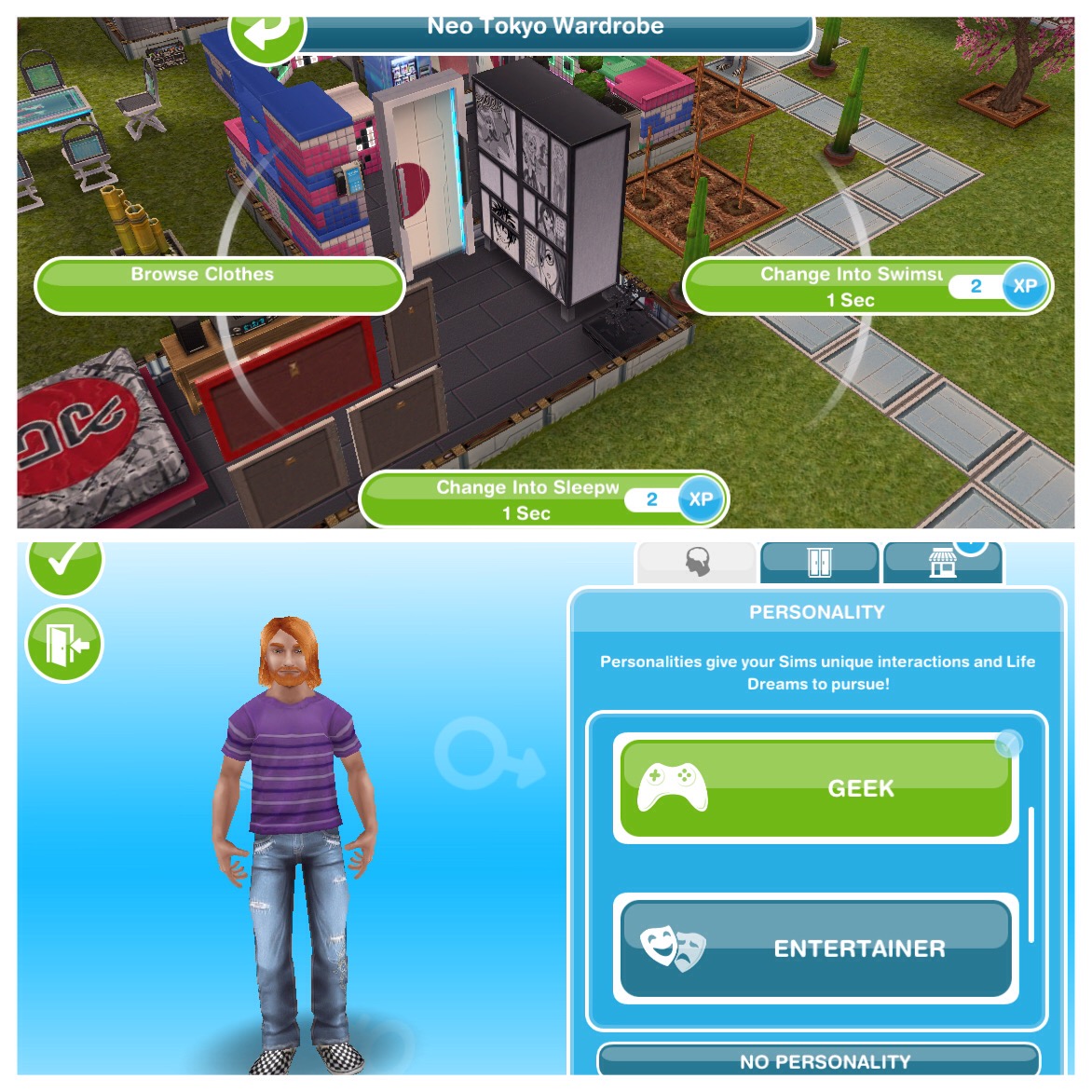
In create a sim or if you want to give an existing sim a personality by selecting the browse clothes option on a wardrobe, personality is the first tab.
giving an existing sim a personality
How do I give my sim a life dream?
Once they have a personality you need to go to the life dreams menu, find that sim and click choose a life dream:
3 options will appear, if you don’t like any of those options click not now and try again:
Where is the life dreams tab?
On the sim information panel (which shows your sims jobs, hobbies and relationships) one of the tabs now shows your sims life dreams.
Can I change my sims personality?
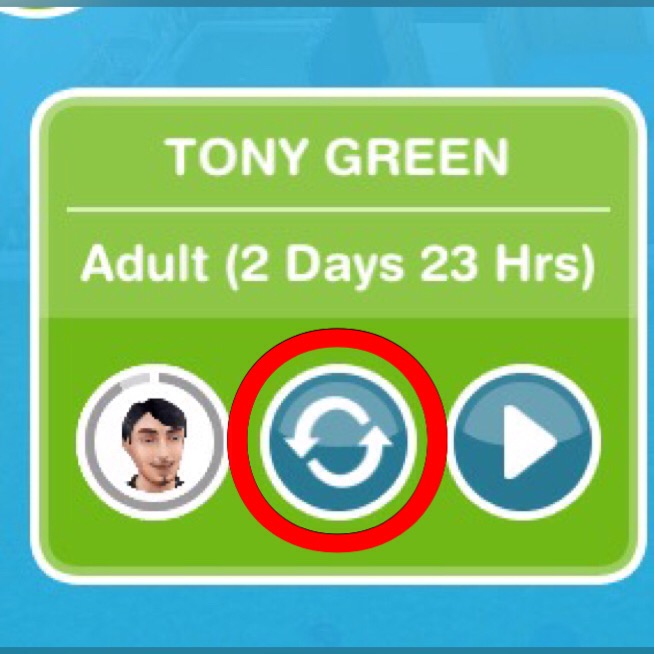
Yes you can, on the life dreams menu, click on the head with the arrows around it as shown in the picture below, this will take you back to the personality menu for you to pick a different one.
NOTE: all progress towards that life dream will be lost and you will need to start again from 0%
Can I change my sims life dream?
You can but only by changing the sims personality as explained above, you need to change it to a different personality then back again to be able to choose a new life dream.
NOTE: all progress towards that life dream will be lost and you will need to start again from 0%
What happens if I change the personality of my sim who I previously gave a life orb to? Do I lose that life orb or does it go to my inventory?
You won’t lose the orb, you will find it on the ground next to the sim whose personality you changed so you can place it back in your inventory.
Will life dreams take up all my sims time?
No, they shouldn’t do.
Are relationships worthwhile when trying to complete life dreams?
Honestly no, getting married just for your sims to pass on and die isn’t really worth the 10LPs it costs you for the best ring! Personally I don’t bother about relationships while I am trying to build all the places that require orbs, once I have, I can start earning platinum orbs to build my town up with sims who cannot age and then they can have relationships and families again.
Does completing tasks with lower star rated items (action takes longer) give you more life dream points to complete life dreams faster than higher star rated items?
No, you get the same amount of life dreams points regardless of the star rating the item has.
When choosing a life dream, is it better to choose longer tasks or shorter ones?
I always go for the longer ones, as I cannot play all day to put each sim on their life dream task several times but it is personal preference, I find it easier doing longer tasks but you may be able to play on the game for longer each day so you prefer shorter tasks.
Can I fulfil a sims life dreams in one life stage?
If you start life as a toddler don’t expect to have the life dream completed by the time you reach your preteen years, you can only do so much at each stage before you have to age up to complete the next section of the bar.
Unless you give a senior sim a personality then they will have to complete one life dream to fill up the whole bar in only that stage.
What is this bar they have to fill up and how much can they fill up at each stage?
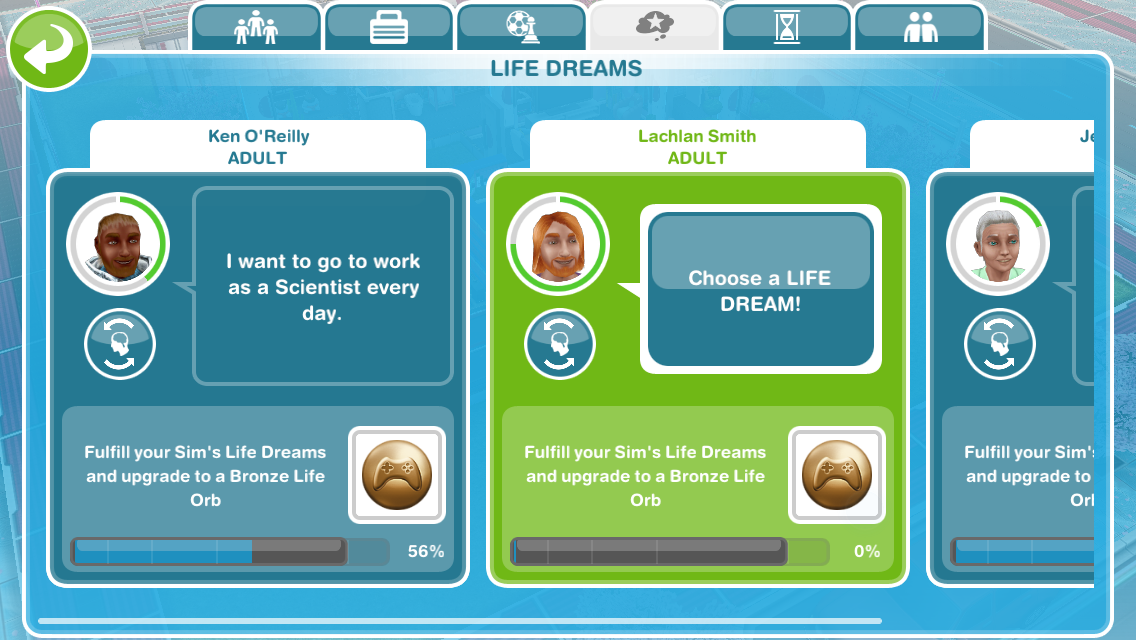
On the life dreams menu underneath where you choose and see their life dream there is a bar that has lines on it, the lines each represent a life stage:
As you complete a sims life dream the bar will fill up. The bar used to fill up to the line of that life stage but now it fills up fully for each life stage when you have completed their life dream:
The bar will then go back down when you age your sim, so my sim has become a senior so he only has the last section of the bar to fill before he can earn his bronze orb:
If a sim doesn’t complete a life dream at one stage can they catch up on the next?
Yes! Don’t worry if you don’t manage to complete your toddlers life dream, there is plenty of time left to catch up.
When you start working towards a life dream as an adult sim you will have to complete each stage you missed previously (so you will have to fill up the whole bar to the fourth line, it seems like it takes longer but I find it much easier)
Does completing life dreams at the earlier stages count towards the overall amount needed to complete the orb?
Yes, as mentioned above, it definitely does!
At which life stage is it best to start earning an orb?
Everyone has a different opinion on this, I personally prefer adding new adults to empty houses and start working towards a life dream from that stage, the downside to this is they don’t have much time left to do anything other than their life dream (which is why I choose career life dreams when possible) but its cheaper than adding a new baby each time and it means they don’t have to have 5 different life dreams throughout their life, they will just have 2.
NOTE: a baby cannot have a life dream
If a sim started working towards a life dream as an adult, would it take more time to complete their life dream than a sim that had been working on earning an orb since they were a toddler?
Yes it would take more time because they are having to fill the bar right from the start.
Can I get orbs without killing off my sims?
Yes, but you can only use these orbs to build places you cannot give them to another sim to upgrade them until your sim passes on
NOTE: they have to be a senior in order to have earned an orb to use
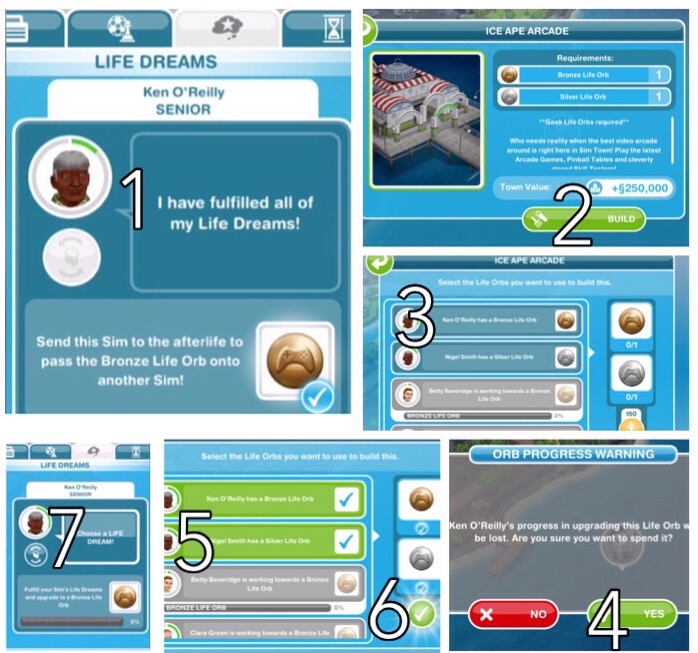
To get an orb off a sim to build a place:
All sims that have the orbs you require to build a place need to have completed their life dreams and earned an orb
Find the place you want to build and click build
Select the orb you want to use, if a sim has it it will say ‘[sims name] has a life orb’ click on this
A pop up warning will appear, click yes to use the orb or click no to cancel
Repeat steps 3 and 4 for all orbs you need
Once you have all the orbs you need you can click on the green tick to build
Your sim will then be able to choose a new life dream and work towards a new bronze orb if they have the time
What places can I build with orbs?
Arcade
1 Bronze Geeky Orb
1 Silver Geeky Orb
Complete geeky life dreams by giving your sim the geeky personality to earn these orbs
Beach
2 Bronze Sporty Orbs
2 Silver Sporty Orbs
Complete sporty life dreams by giving your sim the sporty personality to earn these orbs
Carnival
5 Bronze Entertainer Orbs
2 Silver Entertainer Orbs
Complete entertainer life dreams by giving your sim the entertainer personality to earn these orbs
Pet Park
2 Bronze Animal Fanatic Orbs
4 Silver Animal Fanatic Orbs
Complete animal fanatic life dreams by giving your sim the animal fanatic personality to earn these orbs
Do I need to use simoleons or LPs to build these places as well as orbs?
No you don’t, if you don’t have enough orbs though you can use LPs instead but you will need a lot of LPs!
What is the age controller and how does it work?
The age controller is the tab that allows you to age a sim early, reverse a sim to the beginning of that stage or pause a sims life.
1-reverses or advances a sims age:
a- reverse
b-advance
2-pauses a sim at that life stage
Keep reading for an explanation on each of these
Does it cost LPs to age a sim?
Only if they haven’t completed their life dream for that stage yet or they aren’t ready to age. Once their timer turns red or they have completed their life dream at that stage you can age them for free.
You need to go to the age controller, find the sim you want to pause and click on the pause button
A life orb allocation pop up will appear, select the orb you want, then click the green tick
Click yes to confirm you want to pause ageing
Your sim is now paused!
NOTE: the sim you are pausing does not have to have the same personality as the orb you are using to pause them, they don’t even need a personality to pause them and they can be any age!
How long do different orbs pause a sims life for?
Bronze- 3 days
Silver- 7 days
Gold- 16 days
Platinum- paused forever (its definitely worth getting a platinum orb to pause your favourite sims)
Do I need an orb for each sim I want to pause or can I pause them all with one?
You need an orb for each sim, so if you had 20 sims and you wanted to pause them all forever you would need 20 platinum orbs (scroll down for how to earn platinum orbs)
If I pause a sim can I change my mind and make them age again?
Yes you can, go back into the age controller and select the play button (where the pause button was) then on the life orb allocation pop up select resume ageing:
NOTE: you will lose the orb you used if you make them start ageing again
Can I make a paused sim reach the next life stage without turning ageing back on?
Yes you can, just click on the advance ageing button on the age controller:
Keep reading for information on how to advance a sim to the next stage
How does reversing a sims age work?
On the age controller you can choose to reverse a sim back to the beginning of that life stage, this is useful if you want to keep your sim alive and at a certain age while you are trying to earn a platinum orb to pause them forever, it can also be used to give a sim longer to complete their life dream at that stage if they haven’t managed it yet.
It will cost you a certain amount of LPs if you choose to reverse them back to the beginning of that stage, the amount depends on how far along their timer is (the circles at the top of this picture represent how far along the timer is):
NOTE: Reversing will only reverse them back to the beginning of that life stage, you cannot go back a life stage; for example, you cannot make a preteen a toddler
On the age controller you can choose to advance a sim to their next life stage before their timer turns red:
You can age them early for free once they have completed their life dream for that stage which is useful if you want to earn orbs fairly quickly or if they are at the end of that stage. It will cost you 2LPs if you choose to age them early before they have completed their life dream for that stage or are ready to age.
If I have them plant after work, does that age them sooner?
Yes they will because they will be busier completing actions for longer.
When sims automatically age, what happens to their hobbies?
If a hobby is still available at the next stage of their life then they will keep their hobby, for example, a teen with the cooking hobby will still have the hobby when she becomes an adult and also when she becomes a senior.
If the hobby isn’t available at the next stage, for example, a toddler with the finger painting hobby would have to pick a new hobby when they become a preteen.
BUT if they reached the highest level in that hobby before ageing all the collectibles will still be unlocked so the next sim could complete the collection without having to reach the highest level. If they didn’t reach the highest level before ageing then a new sim would have to level up from level 1 to be able to complete the collection. This post explains hobbies in more details.
How long does it take to fulfil a life dream?
It depends on what the life dream is and what orb they are working towards, platinum orbs take a lot longer than bronze orbs!
How can I see how long my sim has left in that life stage?
Around their face on the simtracker there is a circle, the more actions they complete the more the green line will spread clockwise around the circle, when it reaches red you know that your sim will age soon:
Will my sims age when I’m not playing?
No, your sims will only age when you are on the game.
My sim has completed their life dream for that stage, can I age them before their timer is up?
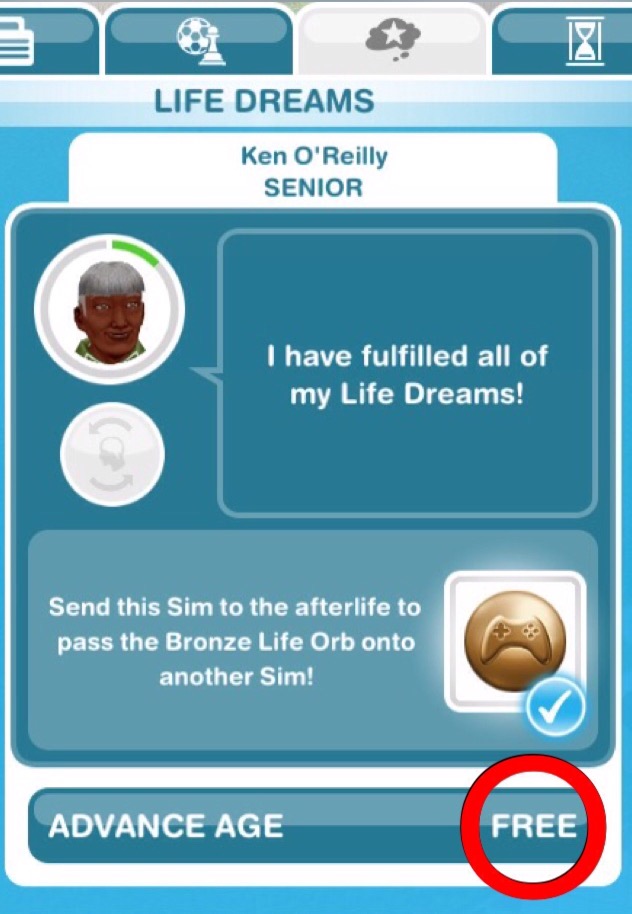
Yes, you can advance them for free by clicking ‘advance age’ underneath their life dream on the life dream tab or by selecting ‘advance age’ on the age controller.
advancing age from the life dreams tab
Why didn’t my sim get an orb when they died?
If your sim didn’t complete their life dreams by the time they died then they will not leave behind an orb.
If I have gone from a silver life orb to a gold life orb, do I now have 2 life orbs, or do I only have one?
You only have one because you are upgrading the silver to a gold, so the silver orb becomes a gold orb.
How do I get a bronze orb?
To get a bronze orb you first need to give a sim a personality (the personality needs to be the same as you want the orb to be)
Then you can choose a life dream and work towards it
Once you have completed all life dreams for your sim and they pass on to the afterlife you will get the bronze orb to upgrade or use to build places
How do I get a silver orb?
To get a silver orb you need to upgrade a bronze orb (If you don’t have a bronze orb yet, follow the steps above)
Once you have your bronze orb you need to give it to a new sim (this is explained later in this post) In the wardrobe click on personalities and select the personality that is the same as the orb you need to upgrade
You can then select that bronze orb and choose a life dream and work towards it
Once you have completed all life dreams for your sim and they pass on to the afterlife you will get the silver orb to upgrade or use to build places
How do I get a gold orb?
To get a gold orb you need to upgrade a silver orb (If you don’t have a silver orb yet, follow the steps above)
Once you have your silver orb you need to give it to a new sim (this is explained later in this post) In the wardrobe click on personalities and select the personality that is the same as the orb you need to upgrade
You can then select that silver orb and choose a life dream and work towards it
Once you have completed all life dreams for your sim and they pass on to the afterlife you will get the gold orb to upgrade or use to build places
How do I get a platinum orb?
To get a platinum orb you need to upgrade a gold orb (If you don’t have a gold orb yet, follow the steps above)
Once you have your gold orb you need to give it to a new sim (this is explained later in this post) In the wardrobe click on personalities and select the personality that is the same as the orb you need to upgrade
You can then select that gold orb and choose a life dream and work towards it
Once you have completed all life dreams for your sim and they pass on to the afterlife you will get the platinum orb to pause sims or use to build places
NOTE: it takes 4 sims each completing their set of life dreams to earn a platinum orb
How do I give my sim an orb to upgrade?
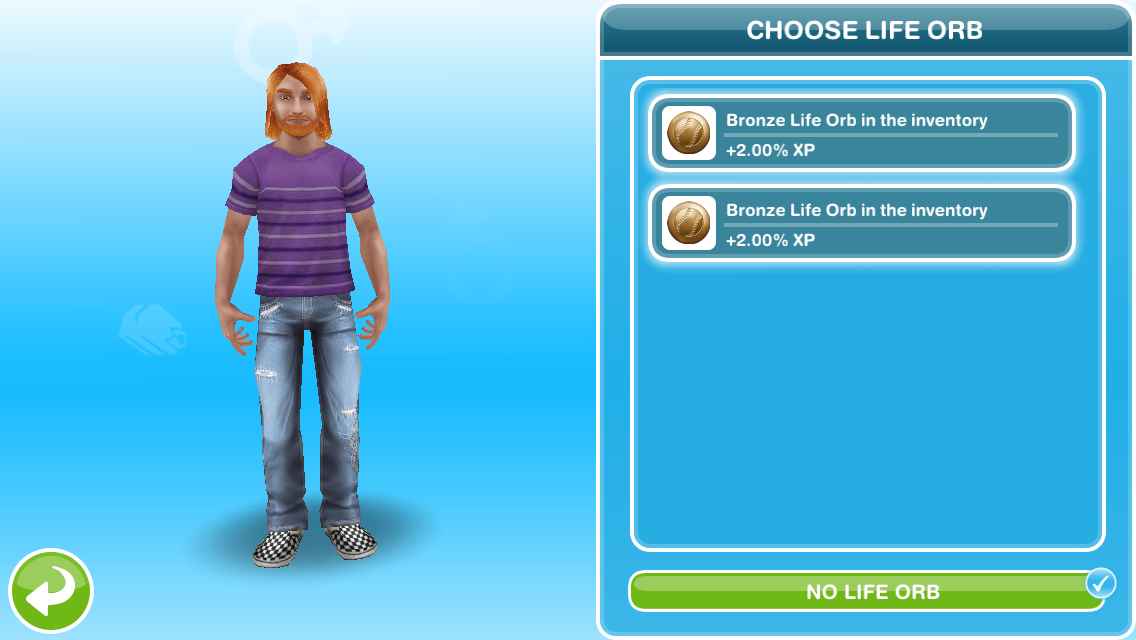
You do this the same way you give a sim a personality but this time instead of just choosing the personality any stored orbs will be shown here, for example you can see from the picture below that I have 2 sporty orbs available:
If you click on the sporty personality you can then choose a bronze life orb which can be upgraded to a silver:
Or select no life orb to start earning a bronze:
How many times can you use an orb?
Orbs can only be used once.
I’ve paused my sim with a platinum orb but it wants me to pick a new life dream, would I be able to get the orb off that sim without them dying?
If you still need to build places then yes as you will be able to get the orb off the sim without them dying (how to do this is explained earlier in this post) but they will need to be paused as a senior to earn the orb and if you have built all the places there is no reason to give your paused sims a personality as you will not be able to give any orb they earn to another sim without passing on.
How do I store an orb?
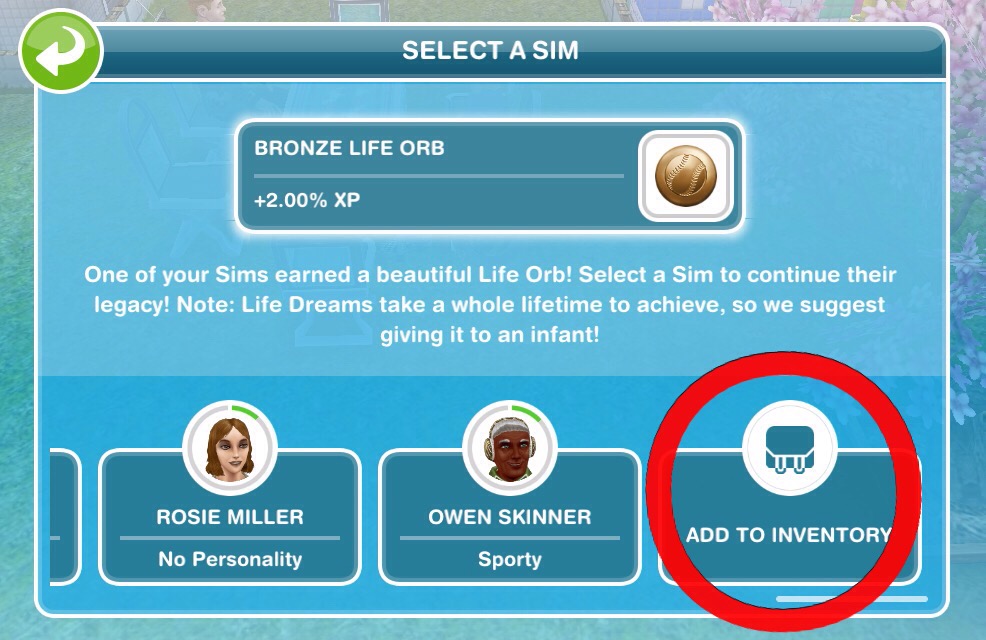
You can do this two ways, once your sim passes on:
Click on the orb and select add to inventory:
OR
2.Open buy mode, select the orb and click the inventory symbol on the orb to store it:
1.If your sim has just died and left the orb in their place, open buy mode, select the orb, then click on the red simoleon symbol to sell
OR
2.If you want to sell one that you have stored, again open buy mode, select the orb and it will appear like any other item you place in a house, from there you can click on the red simoleon symbol to sell it
Why is the grim reaper at a senior sims house?
The grim reaper shows up just before your senior sims timer is up, he is there to pass your sim on to the afterlife.
NOTE: he will stay there if another senior is also about to pass on
How do you send a sim to the afterlife?
Once their timer is up an exclamation mark will appear above their head, click on it, select yes when the pop up below appears:
Then the grim reaper will come and send them to the afterlife, leaving the orb (if they earned one) in their place.
Does the game restart when all your sims die?
No, when a sim dies your sim count will go down so you can replace them by adding a new sim.
Should I complete the life dreams and legacies quest?
I get asked this question all the time and it is incredibly difficult to answer. I can’t really tell you what to do and my opinion may be completely different to yours. All I can say is; if you don’t want your sims to die, don’t complete this quest, you can always change your mind and do it later!
Can I just not complete the life dreams and legacies quest so my sims don’t die?
Yes, you could do that but you need to stay on the previous quest (in stitches quest)
What happens if I don’t complete the quest?
Nothing happens apart from your sims won’t age and you won’t be able to build the arcade, beach, carnival or pet park.
Can I still do discovery quests if I don’t do this one?
Yes you can, the life dreams and legacies quest is the last main quest, all discovery quests can be completed whatever stage of the game you are at, even if you are on a main quest. A list of discovery quests can be found here
I have just started the quest, why are my sims already ageing?
Your sims will start ageing as soon as you start this quest so that is why you need to stay on the previous quest if you don’t want your sims to die.
Should I give all my remaining sims life dreams once I complete the quest?
If you want to start working towards life orbs straight away then yes, there is no time limit to earning them but they will automatically age anyway, with or without a life dream.
Are there any ways I can stop my sims dying?
Pause a sims life using a platinum orb as explained above
Reverse a sim back to the start of that life stage using LPs, again as explained above
If you have special sims that you don’t want to die but you are still working on getting a platinum orb you can just leave them not completing any action because as long as they aren’t doing anything they will not age, then when you are ready to pause them they can start doing things again, such as gardening or going to work.
Is hibernating doing something?
Yes any action in the game will cause your sims to age, do not waste hours of their life hibernating if you don’t need to.
Are there any ways to age a sim quicker?
Once your sim has completed their life dreams for that stage you can advance them to the next stage for free in the age controller or from the life dreams tab, as explained above
You can have them do longer tasks to make them age faster
You can also age them early from the age controller but this will cost you 2LPs if you haven’t completed their life dream for that stage yet, again this is explained above
Do I still need birthday cakes once I complete the quest?
No you don’t, you can if you want to bake a cake still but it is cheaper to advance a sims age using the method explained earlier in this post.
Can sims die at any other stage?
No, sims can only die once they complete their life stage as a senior.
What happens to your senior sims house if they die and no one else lives in the house? Does the house get deleted?
No, the house will remain it will just be empty, when you click on the house you can select the option to add a new adult sim, this is free or you can relocate an existing sim or family and that costs money.
What happens to pets when their owner passes on? Do they die?
Pets will remain in the house they live at, they can’t die. If you want to move a pet to another family click on the pet and select relocate.
Can I move a toddler to another house? His parents passed away and I want to use that house for a new family.
Yes you can, children can be adopted by an adult sim when both their parents have died (does not work if one parent is still alive) They need to be good friends to get the option to adopt them
Do sims grieve when one of them dies?
No, your sims will no longer grieve when another one dies.
Can you get a sim back once they pass on?
No you can’t, they will be gone forever unfortunately.
Will a new sim be added automatically when one dies?
No, but your sim count will go down so you can add a new sim.
How much do babies cost once you finish this quest?
They now cost simoleons, the amount varies depending on how many sims you already have in your town.
If you can think of anymore questions about life dreams I haven’t answered please comment below and I will add them to the post.


















 As you complete a sims life dream the bar will fill up. The bar used to fill up to the line of that life stage but now it fills up fully for each life stage when you have completed their life dream:









 The Girl Who Games