I have created this basic birds eye view map of the mysterious island for those of you who are having trouble finding a certain building, it is all colour coded with a key below to help.
BREAD WINNER QUEST – STOVE – TEEN, ADULT AND SENIOR SIMS – PRIZE: CHOPPING BOARDS AND 5LP
Once you complete the Bread Winner Quest your teen, adult and senior sims will be able to complete the cooking hobby by using kitchen equipment such as the stove, toaster and fridge that you can buy from the kitchen section of the home store or you can use the restaurant kitchen once you have completed the Sous Judgemental Quest and built the restaurant (you will need different equipment depending on the dish you are making in the hobby)
To begin select cooking on an oven to open up the list of dishes:
Cheese and Tomato on Toast- 1 minute (needs 1 star toaster)
Bacon and Eggs- 5 minutes
Level 2- Burgers- 20 minutes (cooking level 2 and needs 1 star toaster)
Level 2- Pizza- 40 minutes (cooking level 2 and needs 1 star microwave)
Level 3- Chili Con Carne- 1 hour (cooking level 3 and needs 2 star microwave)
Level 3- Spaghetti- 2 hours (cooking level 3 and needs a 1 star chopping board)
Level 4- Quiche- 3 hours (cooking level 4 and needs a 2 star fridge)
Level 4- Nachos- 5 hours (cooking level 4 and needs a 1 star chopping board)
Level 5- Spicy Tuna Rolls- 8 hours (cooking level 5 and needs a 3 star fridge)
Level 5- Chicken Salad- 2 hours (cooking level 5 and needs a 1 star fridge)
Level 6- Tacos- 12 hours (cooking level 6 and needs a 1 star chopping board)
Level 6- Roast Beef- 1 Day (cooking level 6 and needs a 3 star stove)
Complete restaurant to unlock- Lobster Thermidor- 5 hours- costs 3LP (can only be cooked at the restaurant)
When each of your sims first start the cooking hobby they won’t be able to make all of the dishes above even if you have the the right equipment in that house as they will need to level up in the hobby too (it will say on the greyed out box for that dish what you need to do before you can make that dish)
TIP: I only make cheese and tomato on toast as the level up percentage increases the same for all dishes so its more beneficial to make the cheese on toast as it only takes 1 minute!
After the time has passed come back and click the food plate bubble above your sims head, they will put the plate down and you will find one of the cooking utensil collectibles. Every time your sims cook their cooking hobby skill level up percentage will increase, once you reach 100% you will level up, there are 6 levels. You need to reach level 6 to be able to unlock all of the cooking utensil collectibles, once unlocked you will be able to find them.
The table below shows the level up percentage:
This may change in future updates
LEVEL
Cheese and Toast- 1 minute
1-2
50%
2-3
25%
3-4
12%
4-5
7%
5-6
3%
The next table shows you for each level what new dishes you can make, the cooking utensil collectibles you unlock (so you can then find those ones too) and also the level up reward that a second and future sims will receive when they level up in this hobby:
LEVEL
TITLE
DISHES UNLOCKED
1st TIME LEVEL UP UNLOCKS
2nd+ TIMES LEVEL UP REWARD
1
Water Burner
Bacon and Eggs
Cheese on Toast
Bronzed Spatula, Silver Spatula and Gold Spatulaare unlocked in the hobby collection
–
2
Hot Mess Maker
Burgers
Pizza
Bronzed Grater, Silver Grater and Gold Grater are now unlocked in the hobby collection
250XP
3
Ready Meal Maestro
Chili Con Carne
Spaghetti
Bronzed Chef’s Knife, Silver Chef’s Knife and Gold Chef’s Knife are now unlocked in the hobby collection
500XP
4
Home Cooking Hero
Quiche
Nachos
Bronzed Whisk, Silver Whisk and Gold Whisk are now unlocked in the hobby collection
S750
5
Flavour Savior
Spicy Tuna Rolls
Chicken Salad
Bronzed Rolling Pin, Silver Rolling Pin and Gold Rolling Pin are now unlocked in the hobby collection
10,000 Town Value
6
Hail to the Chef
Tacos
Roast Beef
Bronzed Measuring Spoons, Silver Measuring Spoons and Gold Measuring Spoons are now unlocked in the hobby collection.
You can now complete the collection!
1LP
NOTE: only the first sim completing this hobby needs to get to level 6 to unlock all the collectibles, future sims will be able to find any collectible even if they are only on level 1 in this hobby but all sims need to level up to be able to cook all of the dishes
You won’t find a new collectible each time, you will get repeats, if this happens just keep going, you will find them eventually! If it is still taking too long you can use the lucky spin on the row where you cannot find the item, this will cost LPs, when you click on the LP button it will clear the row and give you a random collectible on that row so you aren’t guaranteed a new item (you will get back any other collectibles you already had in that row) Need to earn some LPs to use the lucky spin?
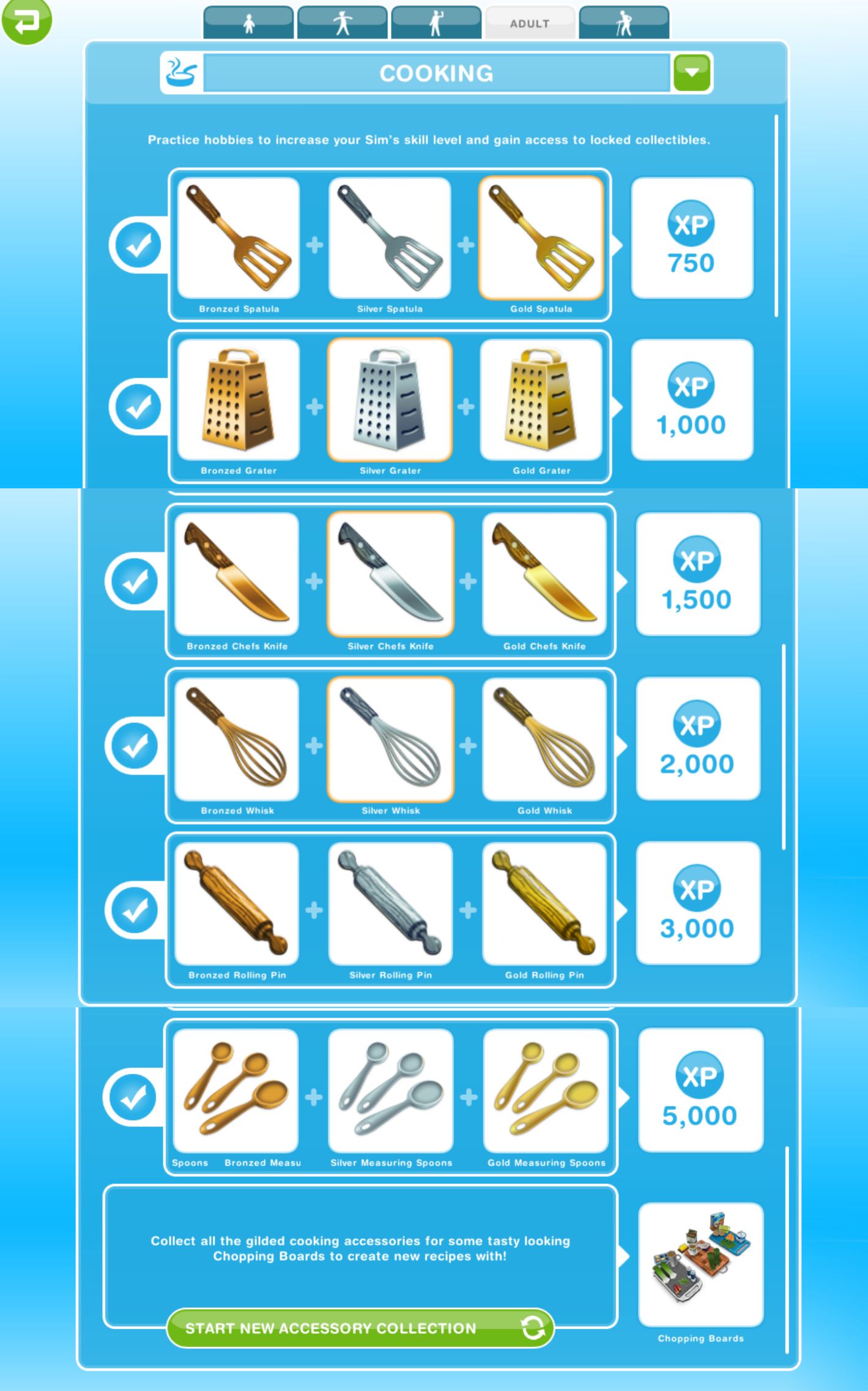
The completed cooking collection is shown below, once you complete the collection you need to click ‘start a new collection’ at the top of the hobby collection screen, this clears the board so you can complete the collection again to earn more rewards (you will only get the option to restart the hobby collection when you have completed the collection):
You will earn XPs when you complete a row in the hobby but tocomplete the collection you need to find all 18 of the collectibles
The rewards for completing this collection are chopping boards and 5LP:
The first time you complete the collection you unlock chopping boards which can be found in the kitchen section:
From the second time onwards each time you complete the collection you will earn 5LP
This is my favourite hobby as its really quick to get LPs and money by doing it, you just need several sims in a room with a stove and toaster for each person and then do the 1 minute option over and over and within about an hour or so (depending on how many sims you have) you should be able to find all the utensils as long as you have unlocked all 6 levels! But there will be so many dishes laying around you should have a few sims there to clean them up BUT if you completed the HANs On Quest and unlocked the dishwasher you will be able to load all plates instantly! How Do I Have So Many LPs explains in more detail.
Patrick says: “have all ten Sims in the room cooking and cleaning. That second it takes to present the dish can be used by the previous Sim to clean. I know it seems small, but over the course of that hour, ten Sims as opposed to six will yield a lot of money. ” And if you send your level six chefs to do another hobby then, restart them on the cooking hobby to get more money and an LP (as they will start at level one again they will get the rewards for levelling up)
TOP TIP from Anon: Get a fridge. I use the fridge to send every Sim ‘Cooking’ It stops the screen shifting, and you don’t need to swipe to click on every oven, just use the 1 Fridge every time to make your cheese on toast.
LIFE DREAMS AND LEGACIES QUEST – ARCADE: ARCADE MACHINES – TEEN SIMS ONLY – PRIZES: ARCADE MACHINE AND 5LP
Once you complete the Life Dreams and Legacies Quest you will be able to use orbs to build the Arcade, once the Arcade is built your teen sim will be able to use the arcade machines.
Have a teen click on the first arcade machine:
Play Stellar Interlopes- 1 hour
When you start you will only be able to use the first machine, you need to find all 3 different rankings on stellar interlopes to complete the first row in the arcade gamer collection to unlock the second machine to find those 3 rankings to unlock the third machine, you then need to find the 3 rankings to unlock the fourth machine and find the 3 rankings on that machine to unlock the fifth machine once you have found those 3 rankings you will unlock the final machine which is the street puncher 2 machine to find the last three to complete the collection
Stellar Interlopes- 1 hour
Digging Douglas- 2 hours
Pursuit H.Q- 4 hours
Virtual Smiter 5- 6 hours
Spooks n Spectres- 8 hours
Street Puncher 2- 12 hours
Once you complete the collection for the first time you can use the machines in any order but you will still need to do each option to find the different rankings to complete each row
OPTION
FIND
TO UNLOCK:
STELLAR INTERLOPES
3rd Rank on Stellar Interlopes
2nd Rank on Stellar Interlopes
1st Rank on Stellar Interlopes
3rd Rank on Digging Douglas
2nd Rank on Digging Douglas
1st Rank on Digging Douglas
USING DIGGING DOUGLAS MACHINE
DIGGING DOUGLAS
3rd Rank on Digging Douglas
2nd Rank on Digging Douglas
1st Rank on Digging Douglas
3rd Rank on Pursuit HQ
2nd Rank on Pursuit HQ
1st Rank on Pursuit HQ
USING PURSUIT HQ MACHINE
PURSUIT HQ
3rd Rank on Pursuit HQ
2nd Rank on Pursuit HQ
1st Rank on Pursuit HQ
3rd Rank on Virtual Smiter 5
2nd Rank on Virtual Smiter 5
1st Rank on Virtual Smiter 5
USING VIRTUAL SMITER 5 MACHINE
VIRTUAL SMITER 5
3rd Rank on Virtual Smiter 5
2nd Rank on Virtual Smiter 5
1st Rank on Virtual Smiter 5
3rd Rank on Spooks N Spectres
2nd Rank on Spooks N Spectres
1st Rank on Spooks N Spectres
USING SPOOKS N SPECTRES MACHINE
SPOOKS N SPECTRES
3rd Rank on Spooks N Spectres
2nd Rank on Spooks N Spectres
1st Rank on Spooks N Spectres
3rd Rank on Street Puncher 2
2nd Rank on Street Puncher 2
1st Rank on Street Puncher 2
USING STREET PUNCHER 2 MACHINE
STREET PUNCHER 2
3rd Rank on Street Puncher 2
2nd Rank on Street Puncher 2
1st Rank on Street Puncher 2
You can now complete the collection!
Once you complete the collection once you can use all 6 machines so 6 teens can complete this hobby at once
After the time has passed come back and click the exclamation mark above your sims head to find one of the arcade gamer collectibles in that row. You still level up in this hobby but the hobby level up percentage isn’t important as the arcade gamer collectibles don’t unlock depending on your level, when you finish a row of arcade gamer collectibles you will unlock the ability to use the next machine to find the ranks in the next row.
The table below shows you the level up reward that your sims will receive when they level up in this hobby:
LEVEL
TITLE
1st TIME LEVEL UP REWARD
1
Button Masher
–
2
Quarter Muncher
250XP
3
High Scorer
500XP
4
Local Hero
S750
5
Kill Screen Hunter
10,000 Town Value
6
World Record Holder
1LP
You won’t find a new collectible each time, you will get repeats, if this happens just keep going, you will find them eventually! If it is still taking too long you can use the lucky spin on the row where you cannot find the item, this will cost LPs, when you click on the LP button it will clear the row and give you a random collectible on that row so you aren’t guaranteed a new item (you will get back any other collectibles you already had in that row) Need to earn some LPs to use the lucky spin?
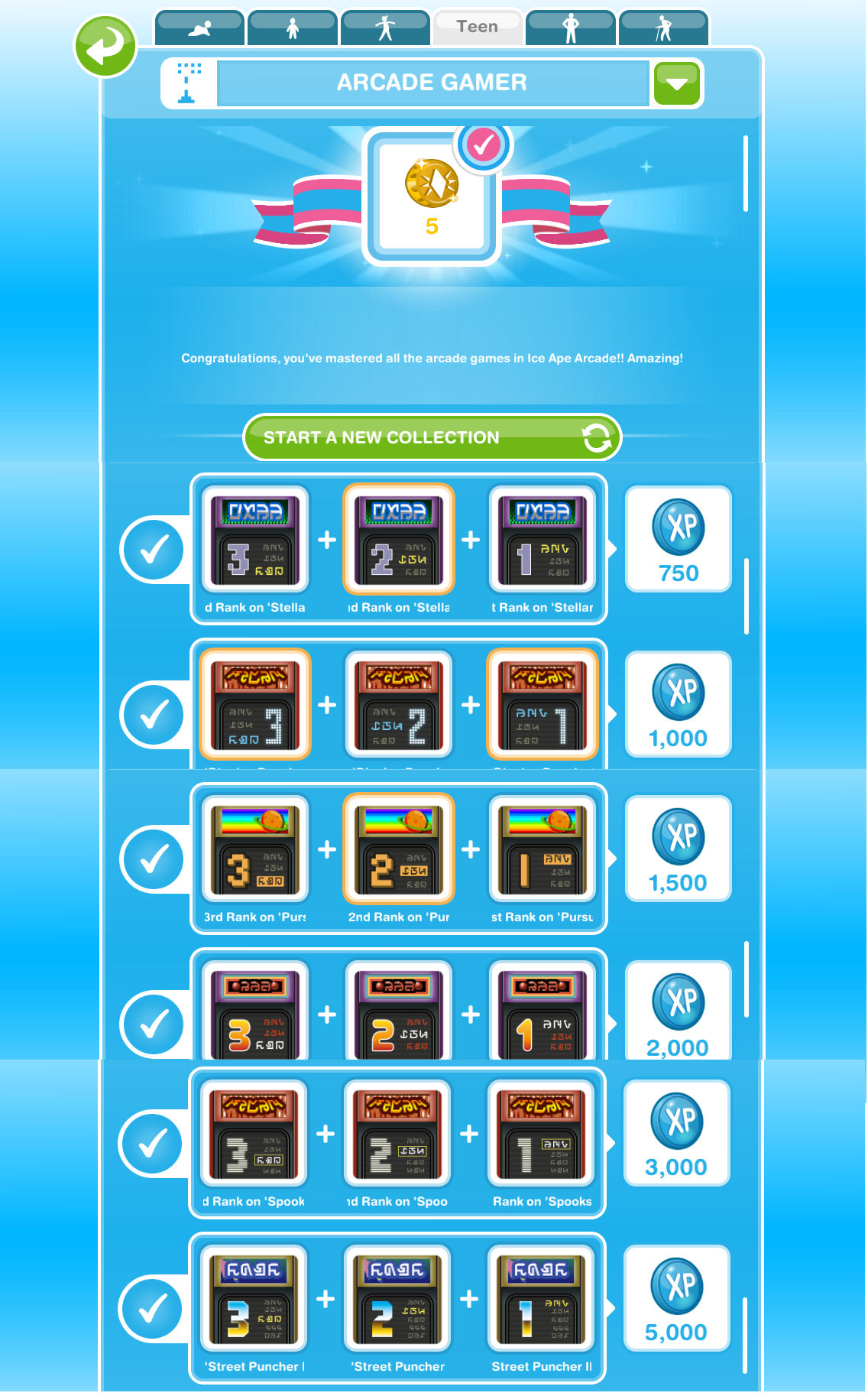
The completed arcade gamer collection is shown below, once you complete the collection you need to click ‘start a new collection’ at the top of the hobby collection screen, this clears the board so you can complete the collection again to earn more rewards (you will only get the option to restart the hobby collection when you have completed the collection):
The first time you complete a row you will unlock a new machine to find the next row of arcade gamer rankings, further times you will earn XPs when you complete a row in the hobby but tocomplete the collection you need to find all 18 of the collectibles
The rewards for completing this collection are the arcade machine and 5LP:
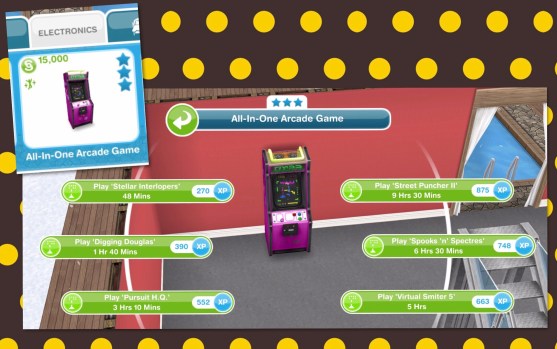
The first time you complete the skill tester collection you will unlock the all in one arcade machine containing all 6 game options for your home, this costs S15,000 and can be found in the electronics section:
From the second time onwards each time you complete the collection you will earn 5LP
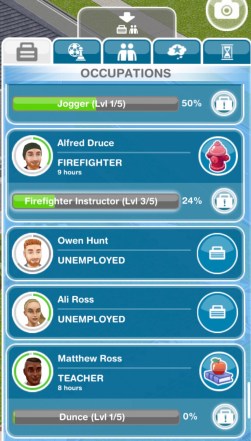
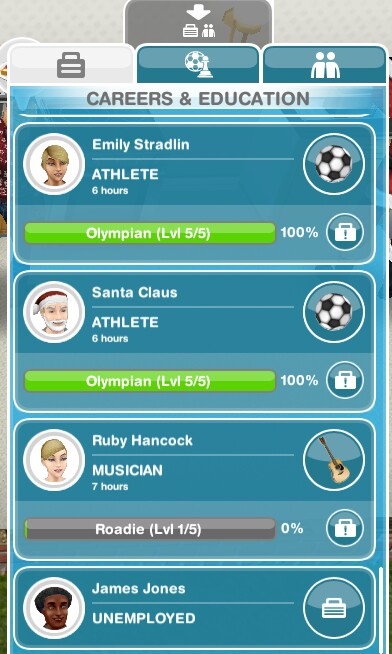
Working is a great way to make money, to get a job you need to find the occupations tab (previously called the careers and education tab) which is the first one on the sim information panel.
Next to your sims picture it should say unemployed, click on the blue suitcase:
You will then open up the list of careers, as you unlock more workplaces you will unlock more careers, once you find the one you want click ‘accept job’
Sending a Sim to Work
Once they have a job you can send your sims to work whenever you want during the day but only once a day if you are completing a normal career. You can then send your sims to work again at/after 12am as it is the start of a new day. If your sims are completing profession careers and you are VIP level 1 you can send them to work twice in a day (this will cost you 15LP) or you can wait until tomorrow and you will be able to send them to work again without being VIP.
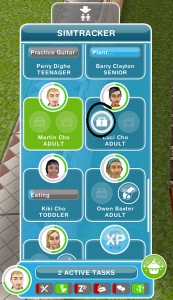
To send them to work, go to the simtracker and find the sim, you will see a pulsing suitcase under the image of them, as shown in the picture below:
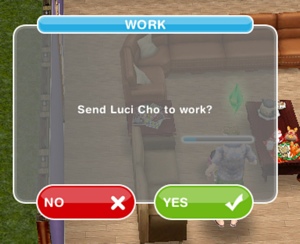
Click on the suitcase and you will be asked to confirm you want them to go to work:
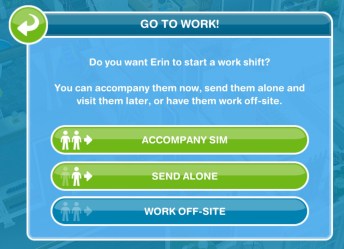
If they are completing a profession career you will be asked if you want to accompany sim (go to work with them), send alone (let them go alone but you can visit them at work later) or work off-site (which is like a normal career where you can’t visit them during their shift):
Quitting is very similar to giving your sims a job.
Go to the occupations tab of the information panel:
Click on the career icon of the sim you want to quit
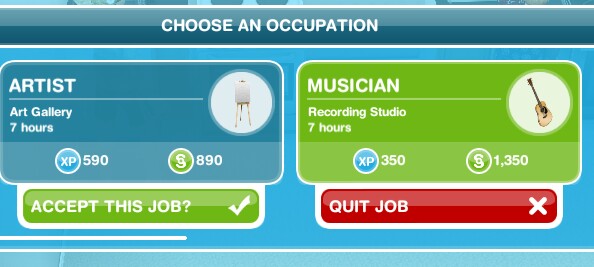
When the ‘choose an occupation’ screen appears you will see a red box under the job they have saying ‘quit job’ click that:
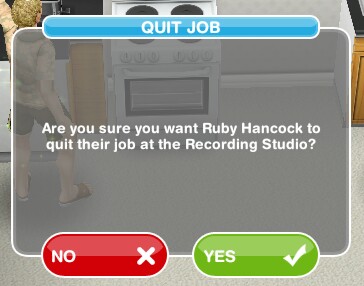
It will ask you if you are sure, say yes:
They will have quit their job
Should you change your sims career when you reach the highest level? I don’t recommend it as you earn less money until you reach the highest level again.
Can I send a sim to work automatically? No, you have to manually send them sometime during the day.
What happens if I don’t send my sim to work everyday, will they lose their job? No they don’t lose their job, nothing happens you just won’t earn any money or XP if you don’t send them to work.
My sim won’t go to work, why? They may be in a bad mood, improve their mood by fulfilling their needs and then try again.
How often can I send them to work? You can send them once a day if they are completing a normal career. You can send your sims to work again at/after 12am as it is the start of a new day.
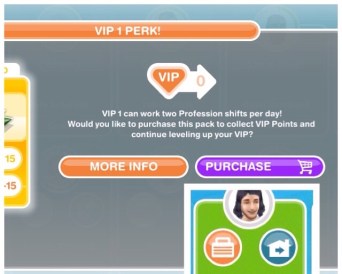
If your sims are completing profession careers and you are VIP level 1 you can send them to work twice in a day (this will cost you 15LP) or you can wait until tomorrow and you will be able to send them to work again without being VIP:
ROAD TO FAME QUEST – MUSICAL INSTRUMENTS – TEEN SIMS ONLY – PRIZE: 3LP
The goals in the Road to Fame Quest allow you to complete this hobby for the first time, once you complete the hobby you complete the quest! You will need a teenage sim to be able to complete this hobby using the musical instruments you unlock as you complete the quest, once the quest is complete you will be able to complete the hobby with up to 5 teen sims at one time using all the instruments.
On the keyboard select ‘write song’ for 1 hour
You will need to find 3 different notes on the keyboard to unlock the bass guitar to find the next 3 notes. Once you have found all 3 notes on the bass guitar you will unlock the drum kit to find the next 3 notes, once you find all 3 notes on the drum kit you will unlock the guitar to find the next 3 notes. Once you have found those 3 new notes you will unlock the final instrument which is the microphone to find the last 3 notes:
Using the Keyboard: Write Song- 1 hour, 54 minutes or 48 minutes
Using the Bass Guitar: Write Song- 2 hours, 1 hour 50 minutes or 1 hour 40 minutes
Using the Drum Kit: Write Song (drums)- 3 hours, 2 hours 40 minutes or 2 hours 20 minutes
Using the Guitar: Write Song- 4 hours, 3 hours 40 minutes or 3 hours 10 minutes
Using the Microphone: Write Song (sing)- 5 hours, 4 hours 30 minutes or 4 hours
NOTE: the time varies depending on the star rating the instrument has
Once you complete the collection for the first time you can use the instruments in any order but you will still need to use all the instruments to find the different notes to complete each row
USING
FIND
TO UNLOCK:
KEYBOARD
Basic Melody
Ballad
Tear Jerking Key Change
Slappin’ Rhythm, Finger Pickin’ Good Lick and Flyin’ Fingers of Funkstown
ON THE BASS GUITAR
BASS GUITAR
Slappin’ Rhythm
Finger Pickin’ Good Lick
Flyin’ Fingers of Funkstown
Drum Roll, Cymbal Choke and 28min Cowbell Solo
ON THE DRUM KIT
DRUM KIT
Drum Roll
Cymbal Choke
28min Cowbell Solo
Bar Chord, Blues Riff in B and Heartfelt Solo
ON THE GUITAR
GUITAR
Bar Chord
Blues Riff in B
Heartfelt Solo
Vocal Melody, Backup Vocal and Vocal Overdub
MICROPHONE
Vocal Melody
Backup Vocal
Vocal Overdub
You can now complete the collection!
After the time has passed come back and click the exclamation mark above your sims head to find one of the note collectibles in that row. You still level up in this hobby but the hobby level up percentage isn’t important as the note collectibles don’t unlock depending on your level, when you finish a row of note collectibles you will unlock the ability to find the notes in the next row.
The table below shows you the level up reward that your sims will receive when they level up in this hobby:
LEVEL
TITLE
1st TIME LEVEL UP REWARD
1
What’s an Instrument?
–
2
Karaoke Specialist
250XP
3
Support Act
500XP
4
Triple Treat
S750
5
Virtuoso
10,000 Town Value
6
Em-TV Award Winner
1LP
You won’t find a new collectible each time, you will get repeats, if this happens just keep going, you will find them eventually! If it is still taking too long you can use the lucky spin on the row where you cannot find the item, this will cost LPs, when you click on the LP button it will clear the row and give you a random collectible on that row so you aren’t guaranteed a new item (you will get back any other collectibles you already had in that row) Need to earn some LPs to use the lucky spin?
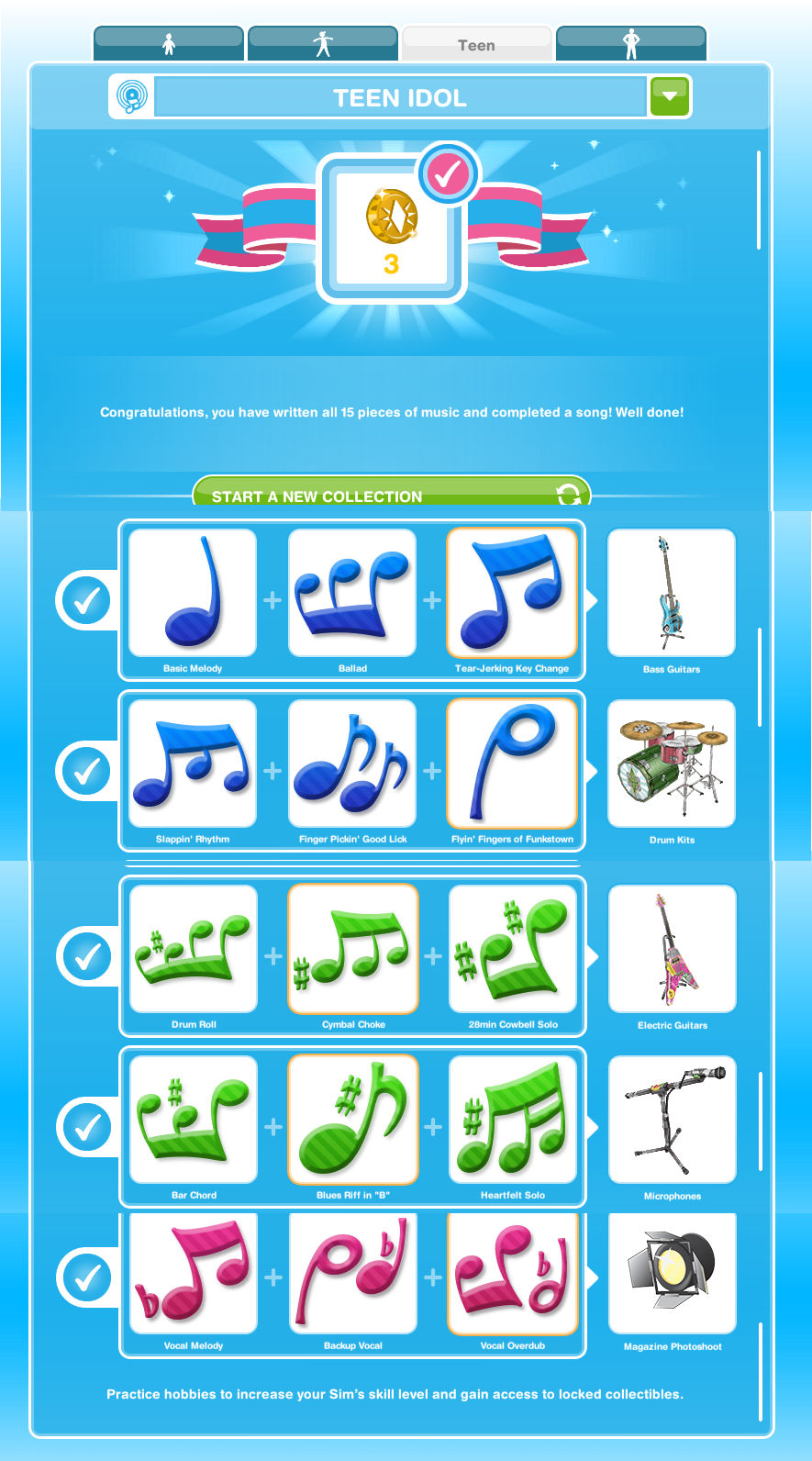
The completed teen idol collection is shown below, once you complete the collection you need to click ‘start a new collection’ at the top of the hobby collection screen, this clears the board so you can complete the collection again to earn more rewards (you will only get the option to restart the hobby collection when you have completed the collection):
The first time you complete a row you will unlock a new instrument, further times you will earn XPs for the first two rows then for completing the drum kit row you will earn 1 TV Show Cameo, the guitar you earn 1 Radio Interview and the microphone row you unlock 1 Magazine Photoshoot (all these 3 resources are used to upgrade the Sim Sign- read this post for more information) but tocomplete the collection you need to find all 15 of the collectibles
The rewards for completing this collection are you complete the road to fame quest and 3LP:
The first time you complete this collection during the road to fame quest so once you complete the collection you complete the quest!
From the second time onwards each time you complete the collection you will earn 3LP
Time Limited Hobby Events– the teen idol hobby has appeared in a time limited hobby event before, to complete these you have to complete the teen idol hobby a certain amount of times during the time limit to unlock all of the prizes, you can find a list of time limited hobby events here.








 The Girl Who Games