The Sims Freeplay- Pregnancy Event Daily Goals and Support Tasks List

In this post I have listed the daily goals and support tasks that appear in Pregnancy Events and how to complete them, you won’t get all of these goals in each event and the times they take to complete do vary for everyone

If you are having trouble finding a pregnancy event action they can be easily found as they have the symbol of a pregnant sim with a heart in their bump, completing any of these actions will complete a daily goal or support task:

Want to see an example of a full 9 day pregnancy event and tips to completing one? Click here to read my completing a pregnancy event post

Daily Goals

These have to be completed by the pregnant sim, if the task is to communicate with another sim for example, discuss pregnancy with another sim then the pregnant sim has to select this interaction on the other sim

You will not be able to complete these goals if the plumbob is not above the pregnant sims head when you click on a sim or object

NOTE: I have put them roughly in order of the days they appear but some tasks can appear on many different days and I haven’t included the times as they vary a lot depending on the day they appear on for you as it is different for everyone

  • Write letters announcing the pregnancy from a dining table (select announce pregnancy option on a dining chair)
  • Talk to a sim to discuss home births (select discuss home births interaction on another sim)
  • Throw up in a toilet. Thank you morning sickness! (select morning sickness option on a toilet)
  • Sit on a couch and contemplate the upcoming pregnancy (select contemplate pregnancy option on a couch)
  • Eat odd food combinations from a fridge (select eat odd food combinations option on a fridge)

  • Call some friends on a phone and share the pregnancy news (select share pregnancy news option on a phone)
  • Consider simvitation designs for the baby shower on a couch (select simvitation designs option on a couch)
  • Appointment: use a phone to call a doctor to your home to check on the baby’s progress (select call doctor option on a phone, the doctor will then arrive at the house, select have a checkup or thorough checkup) TIP: If you cannot afford the simoleons for the appointments select the LP option instead, this post may help if you need to earn some LP quickly!

  • Watch home birthing videos from a tv (select watch home birthing videos option on a tv)
  • Grab some carrots from a fridge and eat them (select eat carrots option on a fridge)
  • Use a computer to send emails announcing the pregnancy (select announce pregnancy option on a computer)
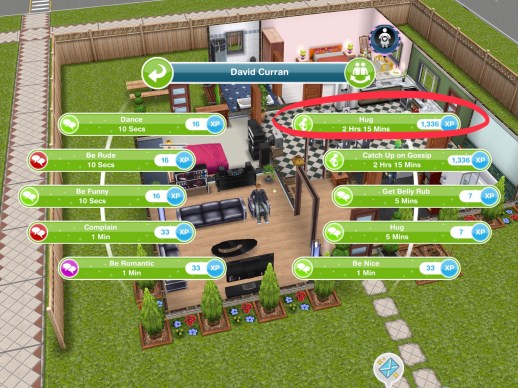
  • Hug another sim to celebrate pregnancy (select the hug interaction with the pregnancy event symbol on it, not the social symbol)
  • Chat with another sim to catch up on all the latest gossip (select catch up on latest gossip interaction on another sim)
  • Research superfoods on a computer (select research superfoods option on a computer)
  • Gorge on some brownies from a fridge (select eat brownies option on a fridge)
  • Discuss ways to ease morning sickness with another sim (select discuss morning sickness interaction on another sim)
  • Discuss the pregnancy with another sim (select discuss pregnancy interaction on another sim)
  • Create simvitations for the baby shower at a dining table (select create simvitations option on a dining chair)
  • Phone a friend for some pregnancy advice (select ask for pregnancy advice option on a phone)
  • Chill out on a couch and bond with the baby (select bond with baby option on a couch)
  • Research pregnancy supplements on a computer (select research supplements on a computer)
  • Appointment: use a phone to call the yoga instructor to your home to start meditative yoga session (select call yoga instructor option on a phone, the yoga instructor will then arrive at the house, select start yoga session or full body session) TIP: If you cannot afford the simoleons for the appointments select the LP option instead, this post may help if you need to earn some LP quickly!

  • Eat some leftover fries from a fridge (select eat fries option on a fridge)
  • Eat some cupcakes from a fridge (select eat cupcakes option on a fridge)
  • Get creative on a computer and design simvitations for the baby shower (select create design simvitations option on a computer)
  • Ask for a hug to help deal with mood swings (select ask for hug interaction on another sim)
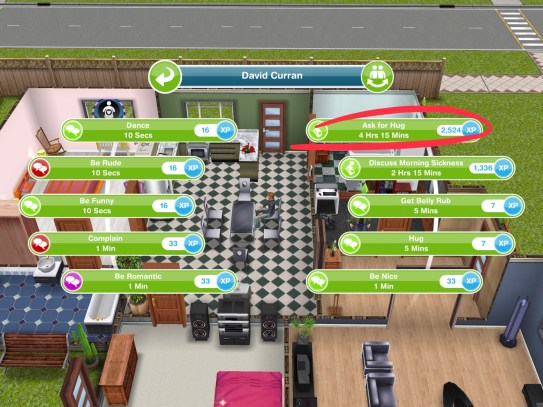
  • Call a sim on a phone and brainstorm baby names (select brainstorm baby names option on a phone)
  • Relax on a couch and consider baby names (select consider baby names option on a couch)
  • Practice making baby formula on a stove (select practice making baby formula option on a stove)
  • Create a snazzy Simterest board on a computer (select create simterest board on a computer)
  • Practice burping a dummy baby on a couch (select practice burping option on a couch)
  • Call a sim on a phone and discuss ways to ease morning sickness (select discuss morning sickness option on a phone)
  • Phone a friend and discuss muffin recipes (select discuss muffin recipes option on a phone)
  • Call a friend on a phone to discuss home births (select discuss home births option on a phone)
  • Chat with another sim to catch up on the latest gossip (select catch up on gossip interaction on another sim)
  • Get some apples from the fridge and eat them (select eat apples option on a fridge)
  • Grab some cake from a fridge and eat it (select eat cake option on a fridge)
  • Phone an order for healthy take away food (select order food in on a phone)

  • Eat some superfoods from a fridge (select eat superfoods option on a fridge)
  • Relax on a couch and sing to the baby bump (select sing to baby bump option on a couch)
  • Eat some mini burgers from a fridge (select eat mini burgers option on a fridge)
  • Lay on a couch and rest those tired feet (select rest feet option on a couch)
  • Write a letter to the future baby from a dining table (select write baby letter option on a dining chair)
  • Eat some corn from a fridge (select the eat corn option on a fridge)
  • Show off the baby bump to another sim (select show off baby bump interaction on another sim)

  • Practice heating baby bottles on a stove (select practice heating baby bottles on an oven)
  • Discuss pregnancy with another sim (select discuss pregnancy interaction on another sim)
  • Grab some tomatoes from a fridge and eat them (select eat tomatoes option on a fridge)
  • Take a selfie in the bathroom from a sink  (select take selfie option on a sink)

  • Discuss nursery ideas with another sim (select discuss nursery ideas interaction on another sim)
  • Phone a friend for some pregnancy advice (select pregnancy advice option on a phone)
  • Take a relaxing walk around the lake in the park by tapping on the water near the fishing rod (select relaxing walk option on the lake in the park)

  • Read ‘nice nurseries’ from a bookshelf (select nice nurseries option on a bookcase)
  • Talk to another sim to help decide on nursery themes (select nursery themes interaction on another sim)
  • Check a fridge to make sure it is baby proof (select check if baby proof option on a fridge)

  • Discuss nursery plans/ideas with another sim (select nursery plans/ideas interaction on another sim)
  • Relax in a bath to ease that aching back (select relax aching back on a bath)
  • Ask a sim for a shoulder massage (select ask for shoulder massage interaction on another sim)
  • Research some nursery ideas from a computer (select research nursery ideas on a computer)
  • Sit at a dining table and start drawing up a nursery layout (select plan nursery layout option on a dining chair)

  • Sit on a couch and practice feeding a dummy baby (select practice feeding option on a couch)
  • Phone a friend and discuss nursery themes (select discuss nursery themes option on a phone)
  • Ask a sim for a back massage (select ask for back massage interaction on another sim)
  • Use a phone and call a friend to discuss cookie recipes (select discuss cookie recipes option on a phone)
  • Set up a night light in the nursery (buy or place any light from the lighting section)
  • Put up some new wallpaper in the nursery (pick some new wallpaper in the home store and place it in a room)
  • Talk to a sim and ask them to help plan some meals (select ask for meal help interaction on another sim)
  • Phone a friend and discuss belly casts (select discuss belly cast option on a phone)
  • Look at babymoon holidays in a simsaway’ magazine (select babymoon holidays option on a magazine stack)

  • Relax on a couch and practice nursing a dummy baby (select practice nursing option on a couch)
  • Put down some new flooring in the nursery (select some new flooring in the home store and place it in a room)
  • Use a phone and call a friend and discuss baby shower games (select discuss baby shower games option on a phone)
  • Read ‘super baby foods’ from a bookshelf (select super baby foods option on a bookcase)

  • Ask another sim for some baby advice (select ask for baby advice interaction on another sim)
  • Use a phone to get a quote for dining supplies (select quote for supplies option on a phone)
  • Ponder on a couch and try to remember what was planned for today (select remember what planned for today option on a couch)
  • Read the ‘super foods’ magazine to learn about healthy pregnancies (select superfoods option on a magazine stack)
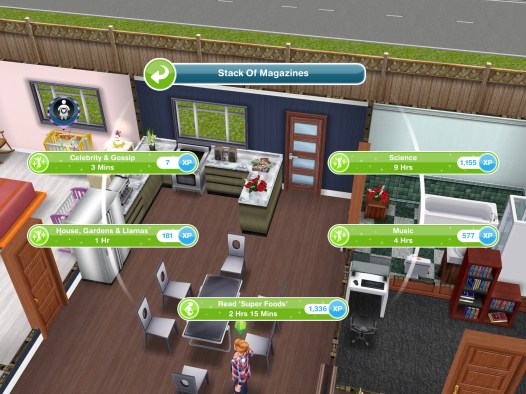
  • Phone some friends to see who is coming to the baby shower (select check baby shower guests option on a phone)
  • Brainstorm baby names with another sim (select brainstorm baby names interaction on another sim)
  • Bake a ‘baby shower cake’ in an oven (select baby shower cake option on an oven)
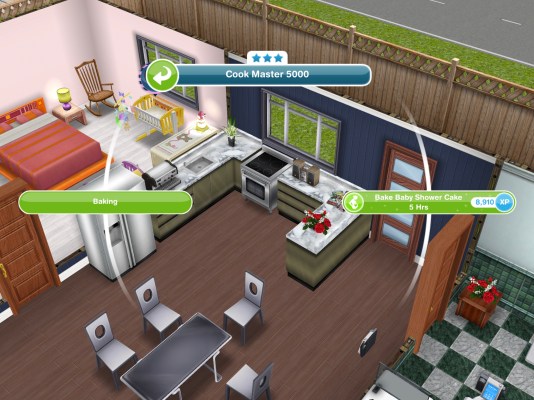
  • Research superfoods on a computer (select research superfoods option on a computer)
  • Phone a friend to see if they can help at the baby shower (select ask for help at baby shower option on a phone)
  • Sit on a couch and consider decorations for the baby shower (select consider decorations option on a couch)
  • Use a stereo and perform a ‘pregnancy dance’ (select pregnancy dance on a stereo)
  • Write in a baby journal at a dining table (select write in baby journal option on a dining chair)
  • Ask another sim to help check RSVPs for the baby shower (select ask for RSVP help interaction on another sim)
  • Ponder about food for the baby shower on a couch (select ponder about food option on a couch)
  • Discuss colours for the baby with a sim (select discuss baby colours interaction on another sim)

  • Talk to another sim to help choose baby shower decorations (select discuss decorations interaction on another sim)
  • Contemplate themes for the baby shower on a couch (select contemplate baby shower themes on a couch)
  • Call a friend on a phone to discuss some nursery ideas (select discuss nursery ideas)
  • Phone a sim to discuss baby shower themes (select discuss baby shower themes option on a phone)
  • Discuss food plans for the baby shower with a sim (select discuss food plans interaction on another sim)
  • Practice bathing a dummy baby in a bath (select practice bathing option on a bath)
  • Practice lamaze breathing on a couch (select practice lamaze breathing on a couch)

  • Ask another sim to photograph belly (select photograph belly interaction on another sim)
  • Use a computer to email questions about pregnancy to another sim (select email questions option on a computer)
  • Send 5 sims to your house (use the whistle on the simtracker to bring them to the house)
  • Talk to a guest and open a present (select open present interaction on another sim)
  • Play ‘is it a boy or girl?’ with one of the guests (select play is it a boy or girl? interaction on another sim)

  • Talk to another sim and see if they can help bake a cake (select discuss help with cake interaction on another sim)
  • Play ‘guess my belly size’ with another sim (select play guess my belly size interaction on another sim)
  • Take a photo with one of the guests at the baby shower (select take photo interaction on another sim)
  • Hug one of the guests at the baby shower (select the hug interaction with the pregnancy event symbol on it, not the social symbol)

  • Accept a gift from another sim at the baby shower (select accept gift interaction on another sim)
  • Dance with one of the guests at the baby shower (select dance with guest interaction on another sim)

If you have any goals that aren’t in the list let me know and I will add them to this post

Support Tasks

These tasks are completed by any sim, all these have to be completed a number of times so with the task ‘have 10 sims practice calming a tired sim on a phone’ you can complete this using 10 sims at the same time to complete it quicker but every pregnancy event is different so you may need more or less sims than listed below

Times may vary depending on the star rating of the item

  • Sit on a couch and sew 15 clothes for the baby- 3 hours 20 minutes (select the option sew clothes on a couch)
  • Have 16 sims practice calming a tired sim on a phone- 6 hours (select the option practice calming on a phone)
  • Have 17 sims get a morning sickness snack from a fridge- 13 hours 30 minutes (select the option snack for morning sickness on a fridge)
  • Have 17 sims plan a baby budget at a dining table- 6 hours (select the option plan baby budget on a dining chair)
  • Have 18 sims phone a nurse for advice and tips- 2 hours (select the option phone nurse on a phone)
  • Knit 15 baby items for the baby on a couch- 6 hours 30 minutes (select the option knit baby items on a couch)
  • Have 18 sims help plan a girls night in using a phone- 2 hours 50 minutes (select the option plan girls night in on a phone)
  • Practice preparing baby formula on a stove 15 times- 1 hour 50 minutes (select the option practice preparing formula on an oven)
  • Have 15 sims generate nursery ideas at a dining table- 5 hours (select the option generate nursery ideas on a dining chair)
  • Sit on a couch and knit 16 woollies for baby- 7 hours (select the option knit woollies for baby on a couch)
  • Have 13 sims share parenting advice with another sim- 4 hours 35 minutes (select the interaction share parenting advice on another sim)
  • Like sims simterest post 18 times on a computer- 3 hours (select the option like simterest post on a computer)
  • Have 13 sims wash the dishes- 8 hours (select the option wash dishes on a sink)

How do I get Pregnancy Events? You need to complete the A Bump-y Ride Discovery Quest to unlock pregnancy and events

Still confused about Pregnancy? Check out my Guide to Pregnancy here!

Want to see an example of a full 9 day pregnancy event and tips to completing one? Click here to read my completing a pregnancy event post

Want to see all the prizes for each maternity pack? Check out my post here

If you don’t manage to complete the event in the time limit you will miss out on the baby bonus but the baby will still be born!
FIND THIS POST HELPFUL?

THE SIMS FREEPLAY
©THEGIRLWHOGAMES.BLOG

The Sims Freeplay- Hair Today, Gone Tomorrow Live Event

THIS EVENT IS OVER

The Hair Today, Gone Tomorrow Live Event is back! You have 10 days to unlock the hairstyles and salon themed items!

Live Events are very similar to a community event but this time you don’t need help from everyone who plays the sims freeplay to unlock the prizes, there are only personal prizes this time!

Check out my Guide to Completing Live Events (including tips!) HERE!

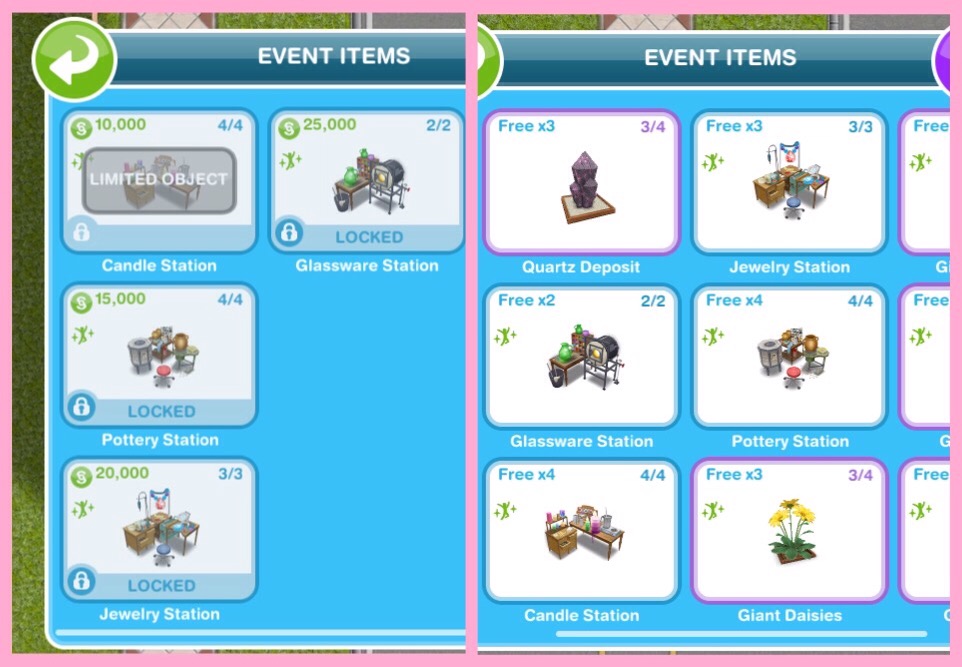
This event is only here for 10 days and the aim of it is to collect enough arts and crafts items from the arts and crafts stations (found in the event tab of buy mode) to unlock all the items in this event

NOTE: if you did another Live Event then you will find your arts and crafts stations in your inventory (or in the house you left them at) you will only be able to use the candle ones until you unlock the other stations in this event

Can’t find your arts and crafts stations? Click on the craft station in your event tab to get the option to find your station, it will take you to the house where your stations can be found!


Place a crafting station (find the candle station in the events tab of buy mode (or your inventory)- you can only buy 4)

Make some arts and crafts items (click on the candle station to make)- 23 seconds

This takes you to the prize progress tab (you can get to it by clicking on the hair event button in the corner of the screen)

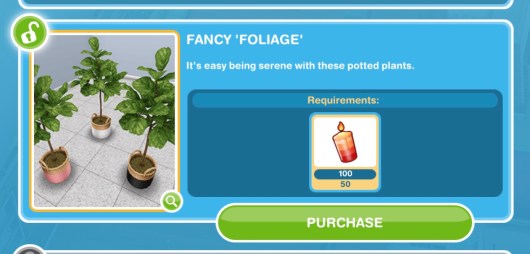
Here you will see you have collected enough items to unlock the Fancy ‘Foliage’ pack! When you unlock each pack, before the items are available in your home store you need to purchase them with the arts and crafts items you make- this goal is coming up!

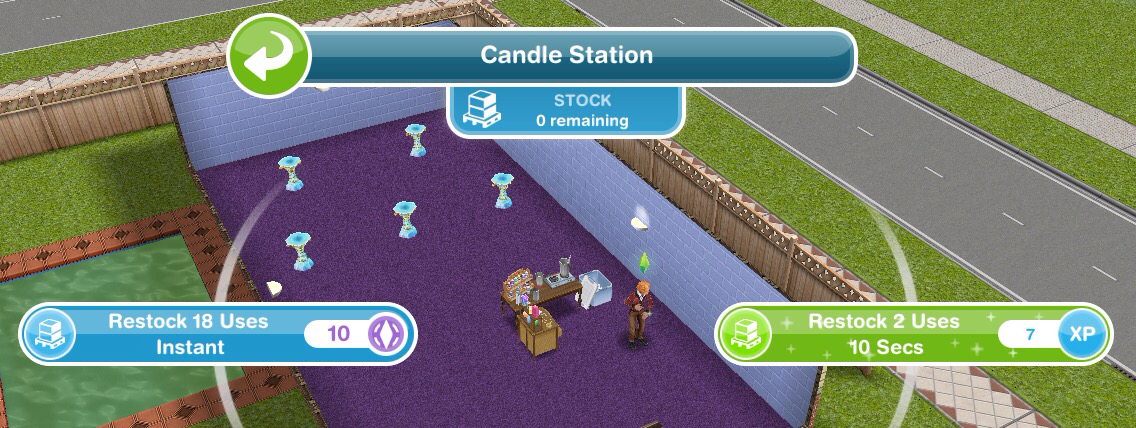
Restock a crafting station (when the stock runs out you will have to restock before you can make anymore arts and crafts items)- You can restock instantly for 18 uses for 10SPs or restock for 2 uses which will take 10 seconds this time

Buy the fancy ‘foliage’ pack (click on the hair event button, scroll down and click purchase- this will cost you 50 candles)

Use a coin flower patch (buy the coin flower patch from the event tab and select the spin plant option)

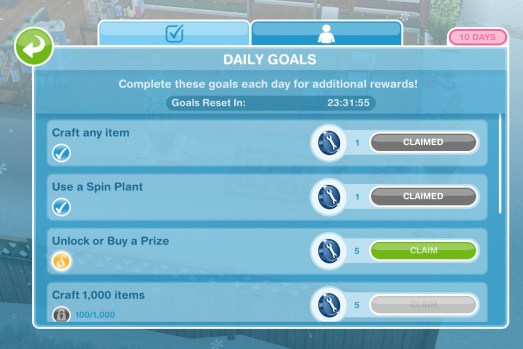
Check the daily goals (click on the closet event button and find the daily goals tab- claim the ones you can!)

Remember to claim your rewards each day!

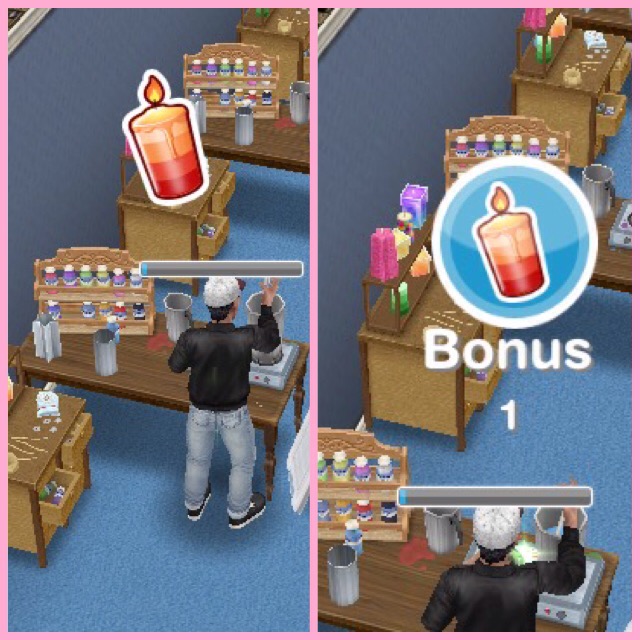
Collect bonuses (while collecting after a certain amount of time you will see the arts and crafts item appear above that sims head, click to collect the bonus item!)

Continue collecting arts and crafts items- this is the last step but the event is not over, keep collecting the arts and crafts to unlock everything!

If you want to speed up a collecting arts and crafts action it will cost you SPs, you will get the bonus resources as well if you speed it up!

Stuck on these tasks? Watch my video here:


Arts and Crafts Stations

Candle Station costs:

1st- Free
2nd- S2,000
3rd- S4,000
4th- S10,000

(maximum of 4)

  • Collect 250 Candles- 2 hours 30 minutes
  • Collect 360 Candles- 4 hours 30 minutes
  • Collect 455 Candles- 6 hours 30 minutes
  • Collect 510 Candles- 8 hours 30 minutes

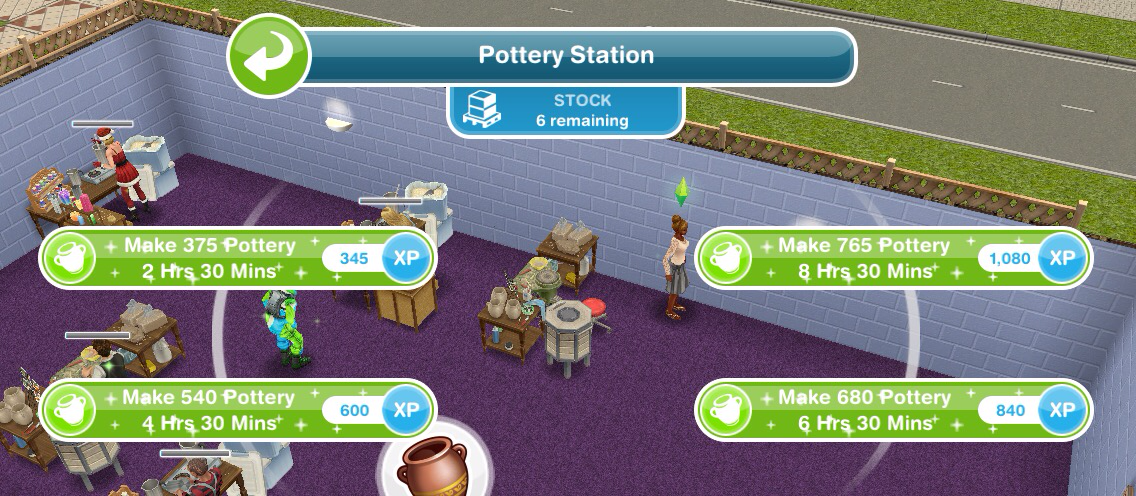
Pottery Station costs:

1st- S5,000
2nd- S7,500
3rd- S10,000
4th- S15,000

(maximum of 4)

  • Collect 375 Pottery- 2 hours 30 minutes
  • Collect 540 Pottery- 4 hours 30 minutes
  • Collect 680 Pottery- 6 hours 30 minutes
  • Collect 765 Pottery- 8 hours 30 minutes

Jewelry Station costs:

1st- S7,500
2nd- S15,000
3rd- S20,000

(maximum of 3)

  • Collect 565 Jewelry- 2 hours 30 minutes
  • Collect 810 Jewelry- 4 hours 30 minutes
  • Collect 1025 Jewelry- 6 hours 30 minutes
  • Collect 1150 Jewelry- 8 hours 30 minutes

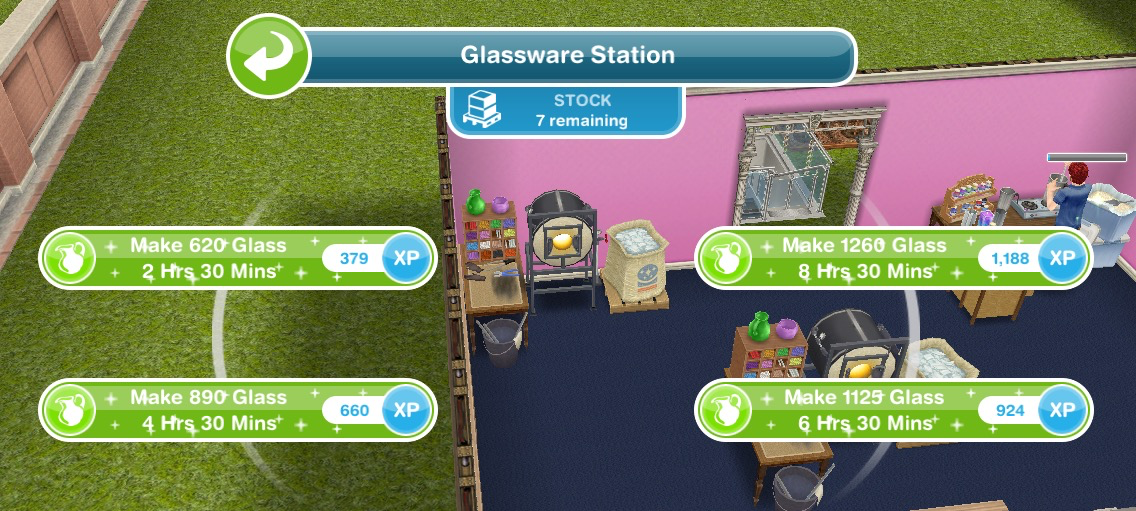
Glassware Station costs:

1st- S7,500
2nd- S25,000

(maximum of 2)

  • Collect 620 Glass- 2 hours 30 minutes
  • Collect 890 Glass- 4 hours 30 minutes
  • Collect 1125 Glass- 6 hours 30 minutes
  • Collect  1260 Glass- 8 hours 30 minutes

Restocking

Each station (apart from the first candle one) comes with a stock of 9 which means you can use the station 9 times before it needs to be restocked (if you got your stations out of your inventory they will all need restocking first (apart from the first candle one)) When you need to restock you will have two options:

  • Restock 18 uses which happens instantly but will cost you 10SPs

or

  • Restock 9 uses which will take you 2 hours 30 minutes but will be free

NOTE:

  • if you store the station you will lose all the stock so when you place it again you will need to restock
  • if you cancel making something using a station you will lose that stock so if you had one stock left and then you cancelled that action you would need to restock before you can create anymore arts and crafts items

Your Progress:

Click the hair button in the top corner of your game to see your progress

Daily Goals

Check on the first tab every day because if you complete all the daily goals you will get additional constructor coins

NOTE: remember to click CLAIM once you have completed a daily goal to collect the reward and remember to claim your free constructor coins and free items each day!

Prize Progress

The prize progress is how far you have got on this event, the more arts and crafts items you make the more prizes you will unlock

NOTE: the bar at the top of the personal progress tab shows you how close you are to unlocking an item, the more arts and crafts items you collect the more the bar will fill up. Once you have unlocked an item on the bar at the top you will be able to use the arts and crafts items you have collected and constructor coins to purchase that pack which you will then be able to find in the home store.

Prizes:

1. Fancy ‘Foliage’- requires 50 candles to buy

Trees, Plants and Flowers: Black (S5,000) Pink (S6,000) and White (S7,000) Pots

2.3 Constructor Coins

3.3 Constructor Coins

4.Waiting Room Wonderland- Wall prints, magazine racks and coat racks and mirrors

Wall prints and magazine racks- requires 750 candles and 5 constructor coins to buy

Decorations: Chrome (S5,000) Rose Gold (S5,500) Silver (S6,000) Wall Racks

Noir (S6,000) Infinity (6LP) and Tryptic (7LP) Wall Prints

Your sims can admire the wall prints for 4 seconds

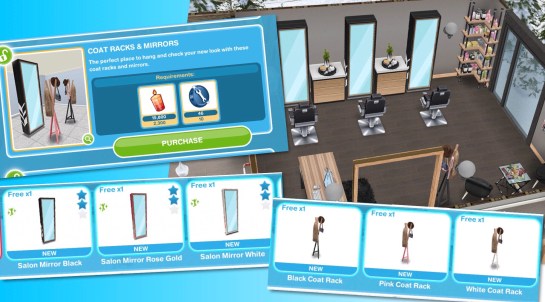
Coat racks and mirrors- requires 2,300 candles and 10 constructor coins to buy

Decorations: Salon Mirror Black (S13,000) Rose Gold (6LP) and White (7LP)

Black (S15,000) Pink (S16,000) and White (S17,000) Coat Racks

5.Pottery Station

6.4 Constructor Coins

7.4 Constructor Coins

8.Decorations and Shelves- Side tables and table decorations and product shelves

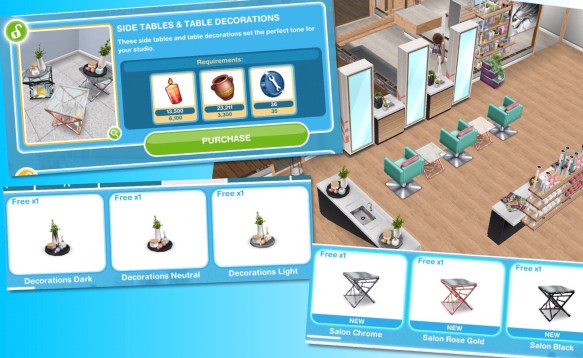
Side tables and table decorations- requires 6,100 candles, 3,300 pottery and 35 constructor coins to buy

Decorations: Decorations Dark (S6,000) Neutral (4LP) and Light (4LP)

Bedroom: Salon Chrome (S8,000) Rose Gold (2SP) and Black (3SP)

Product Shelves- requires 9,100 candles, 5,000 pottery and 50 constructor coins to buy

Decorations:

High Struts in Black (5LP) Mint (S32,000) and White (S30,000)

Shelves Struts in Black (3LP) Mint (S22,500) and White (S20,000)

Plant Struts in Black (6LP) Mint (S38,000) and White (S35,000)

Corner Struts in Black (9LP) Mint (S43,000) and White (S40,000)

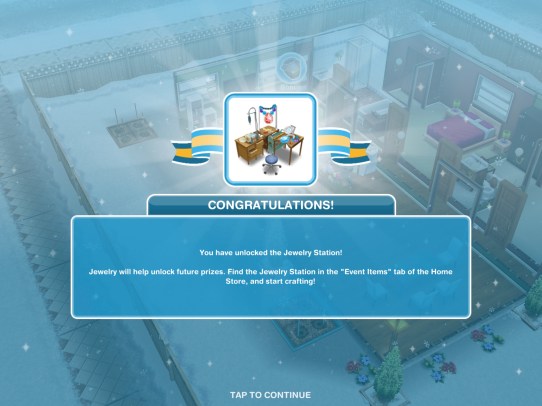
9.Jewelry Station

10.5 Constructor Coins

11.2 Social Points

12.5 Constructor Coins

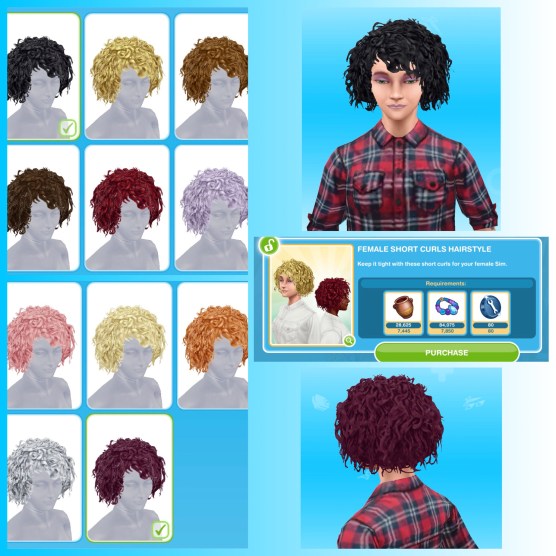
13. Dangerous Curls and The ‘fro Hawk- female short curl hairstyle and male ‘frohawk hairstyle

Female Short Curls Hairstyle- requires 7,445 pottery, 7,850 jewelry and 80 constructor coins to buy

Can be found in the wardrobe for adult sims for free

Male ‘Frohawk Hairstyle- requires 10,000 pottery, 10,000 jewelry and 105 constructor coins to buy

Can be found in the wardrobe for adult sims for free

14.Glassware Station

15.7 Constructor Coins

16.2 Social Points

17.7 Constructor Coins

18.Welcome Reception- angled corner seats and reception desks

Angled Corner Seats- requires 12,500 pottery, 13,000 jewelry, 13,000 glassware and 130 constructor coins to buy

Living Room: Angled Mint (S15,000) Beige (S15,000) Grey (S15,000) Maroon (3SP) Black (4SP)

Reception Desks- requires 13,000 pottery, 14,000 jewelry, 14,000 glassware and 140 constructor coins to buy

Decorations: Reception Black (S35,000) Pink (6LP) and White (7LP)

Your sims can manage reception for 4 minutes using the desk

19.10 Constructor Coins

20.2 Social Points

21.10 Constructor Coins

22.Hair and Wash- male and female hair and hairwashing station and hair

Male and Female Hair- requires 14,000 pottery, 15,000 jewelry, 15,000 glassware and 145 constructor coins to buy

Can be found in the wardrobe for adult sims for free

Hairwashing Station and Hair-requires 15,500 pottery, 16,500 jewelry, 16,500 glassware and 165 constructor coins to buy

Decorations: Hair Wash Black (S70,000) Mint (16SP) and White (17SP)

One sim selects wait for hair wash and the second sim selects wash hair for 16 minutes

You can find the hairstyles in the wardrobe for adult sims for free

23.15 Constructor Coins

24.2 Social Points

25.15 Constructor Coins

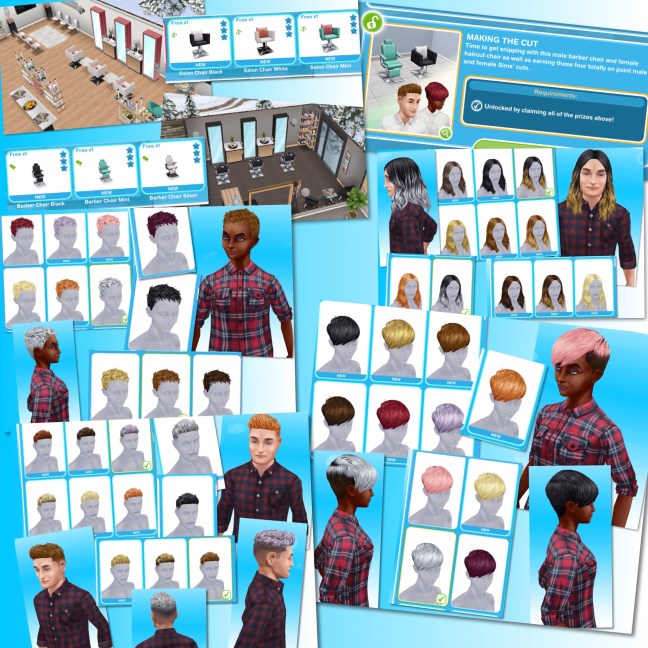
26.Making the Cut- salon and barber chairs and more hair

you will only be able to unlock this final set if you purchase all these other prizes

Once you purchase all the other prizes you will be able to claim this pack for free, in this pack you unlock salon chairs, barber chairs and more hairstyles

Decorations: Salon Chair Black (S80,000) White (12SP) and Mint (10SP)

One sim selects wait to get hair styled and the second sim selects style hair for 16 minutes

Decorations: Barber Chair Black (S60,000) Mint (14SP) and Silver (12SP)

One sim selects get shave and the second sim selects shave individual for 16 minutes

You can find the hairstyles in the wardrobe for adult sims for free

You can now create your own Salon! I used the Snow Chalet template to make mine (the chalet was from the Christmas 2017 quest)

Watch the tour of my salon here:

Good Luck Everyone!


Constructor Coins

You earn constructor coins by:

Personal Progress prizes

Completing Daily Goals

Coin Plant Patches

Earning Construtor Coins? Previously on these events I used social points on the Mega Spin Plant to win constructor points. I earn social points by completing the cooking hobby and earning LPs, I can then turn the LPs into SPs using the social point plant on a normal garden patch- this was when it cost 5LPs- the social point plant now costs 20LPs so you may want to try the option below first instead:

Or you can use 450 candles for the Spin Plant (a good way to use up any spare candles) which will also earn you constructor coins but the amounts are less than they are from the Mega Spin Plant

What is the minimum and maximum amount of coins you can earn on the mega spin plant? The minimum is 10 and the maximum is 500

Now on the coin flower patch you can see the chances of getting the different combinations on each spin plant, click on the green i button to see:


Laura Craft? You may have noticed at the front of one of your houses there is a board with a bubble of a person holding arts and crafts items above it, this is Laura Craft, you can buy her for real money to help you complete the event. When you buy her, you select the item you want her to make from the options: 200 candles,  300 pottery, 450 jewelry or 500 glassware (the amounts seem to differ for most of you and I have no idea why that is!) (you will unlock all the options once you have unlocked all the stations) and you will be able to collect them after 2 hours.


Do I think she is worth it? They have improved Laura Craft a lot since the first event (although it would be great if she made constructor coins) she used to be able to collect every 8 hours, they have now changed this to 2 hours so she is more useful now so if you are struggling then you may want to splash out and give her a try but remember you will only get her for this event, you will have to buy her again to use her for a live event in the future.

If I brought Laura Craft in the last event do I get her for free or do I have to buy her again? You have to buy her again for this event.

Check out my Guide to Completing Live Events (including tips!) HERE!


Find this post helpful?

© COPYRIGHT PROTECTED

http://smarturl.it/sfpggwg

The Sims Freeplay- Community Challenges Explained!

Community Challenges are a weekly task that we all perform in order to reach a community target, once we reach the target we all unlock a prize! These were added to the game on the 21st May, the Spring Love Community Challenge contains 4 weeks of challenges, in this post I will explain how they work and how to complete them

The aim of Community Challenges is The Sims Freeplay team set a challenge on the Monday for everyone playing to complete before the following Sunday, so The Spring Love Community Challenge started on the 21st May and will end on the 27th May.

The community (everyone who plays) needs to complete the challenge in the time limit for everyone to receive a special reward, so we are all working together to unlock the prize, in The Spring Love Community Challenge we will all unlock the Harajuku Hair Pack if we purchase 5 million outfits from the mall

A pop up appears at the start of the week to show you what the reward is but you can also find out on The Sims Freeplay’s facebook and twitter pages if you miss the pop up

You will also be able to see the progress of the challenge in pop ups that appear when you open the game throughout the week but strangely you cannot see the progress any other way in the game

The Spring Community Challenge Week 1- Love Yourself: Purchase 5 million items in the mall

Prize: Harajuku Hair Pack

How do I complete this? If you have built the mall and some stores you can click on browse clothes on a wardrobe then click on the second tab which is store, from there you can find items to buy to contribute to this challenge. If we reach 5 million before the week ends on Sunday we will unlock the Harajuku Hair Pack

NOTE: You don’t have to purchase all 5 million yourself, everyone who plays is completing this

Spring Community Challenge Week 2- The Perfect Spring Date: Perform 3 million ‘be romantic’ actions in the restaurant or nightclub

Prize: Spring Romance Bundle and 1 key!

How do I complete this? Send two sims to the restaurant or nightclub and select a pink ‘be romantic- 1 minute’ interaction between the two sims

NOTE: You don’t have to do all 3 million interactions yourself, everyone who plays is completing this

We completed week 2’s challenge! You have 3 days to claim your prize from the online store for 1 simoleon:

What happens if I already have the prize? Unfortunately there are currently no other prizes so if you have the prize already you won’t receive anything

Do I still get the prize if I don’t participate? Yes, if we reach the goal but you don’t take part you can still get the prize

Where can I see the progress? The only way to see the progress is when the pop up appears throughout the week on day 3, 5 and 6, some people say they can see it on the billboard by the park on the town map but I can’t,  I only see the pop up

Where do I get the prize? If we complete in the time limit you can find them in the online store

What do I think about this? The idea seems good but it definitely feels rushed, we all complained about the preteen boxes costing 4 keys each so we have been given this as some sort of apology! I think reducing the amount of keys needed would have been better (update- they have now done this so these boxes cost one key instead of 4, if you brought with 4 keys you will get 3 keys back!) It would be improved if we could see a progress bar on the game instead of waiting for pop ups to appear, I think if we could see how we are doing we would have more incentive to partake in it and more people would join in as I think some people might have missed this.

If you have any other questions about community challenges let me know and I will try and find out the answer for you!

Thanks for reading!


Find this post helpful?

© COPYRIGHT PROTECTED

http://smarturl.it/sfpggwg

The Sims Mobile- World of Luxury Event

THIS EVENT IS OVER

A new time limited event has started in The Sims Mobile! The aim of this event is to earn enough deluxe coins to buy the ornate boxes to unlock all the world of luxury items in the 14 day time limit!

How do you earn deluxe coins?

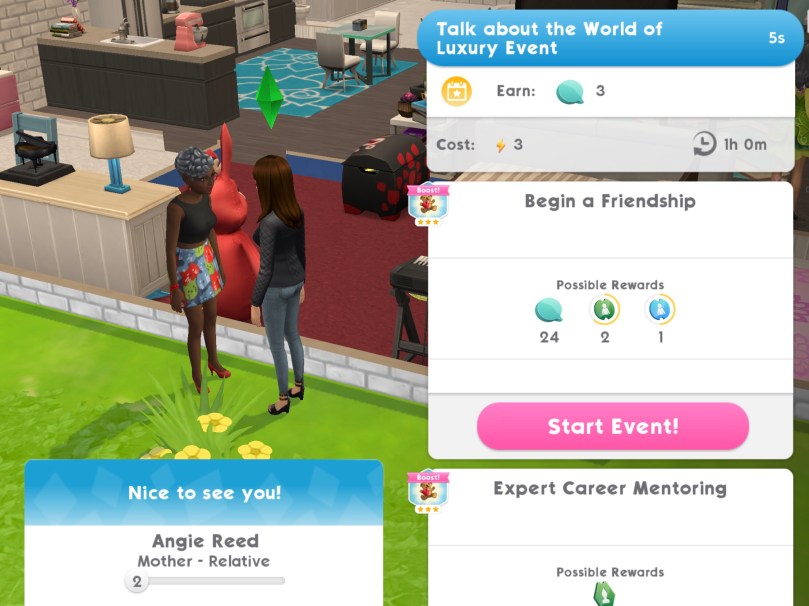
  • Completing the Luxurious Leisure Event (click on a sofa at home)- every 20 hours
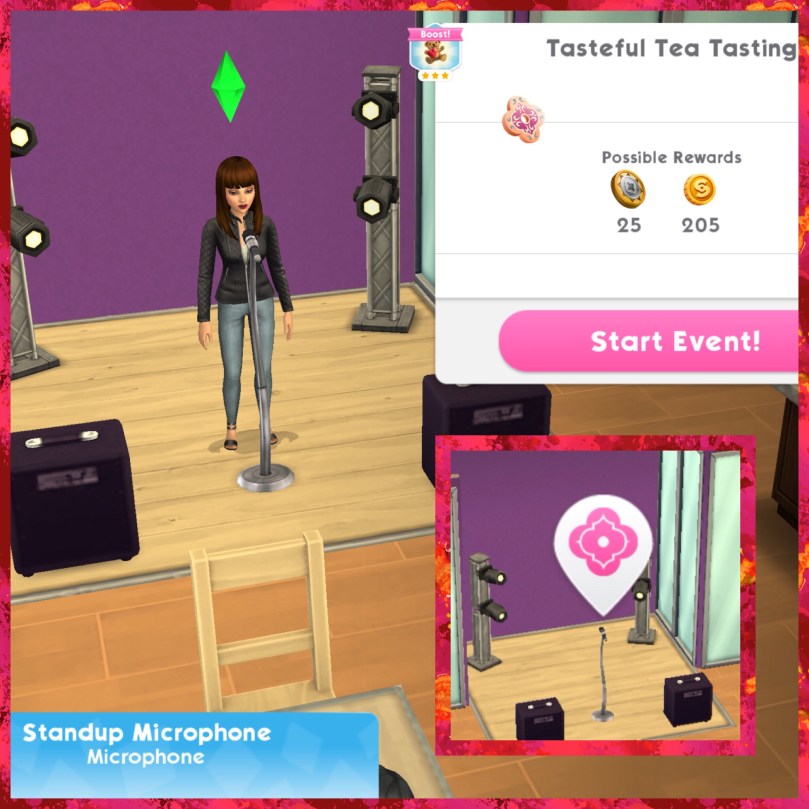
  • Completing the Tasteful Tea Tasting Event (at the cafe)- every 8 hours
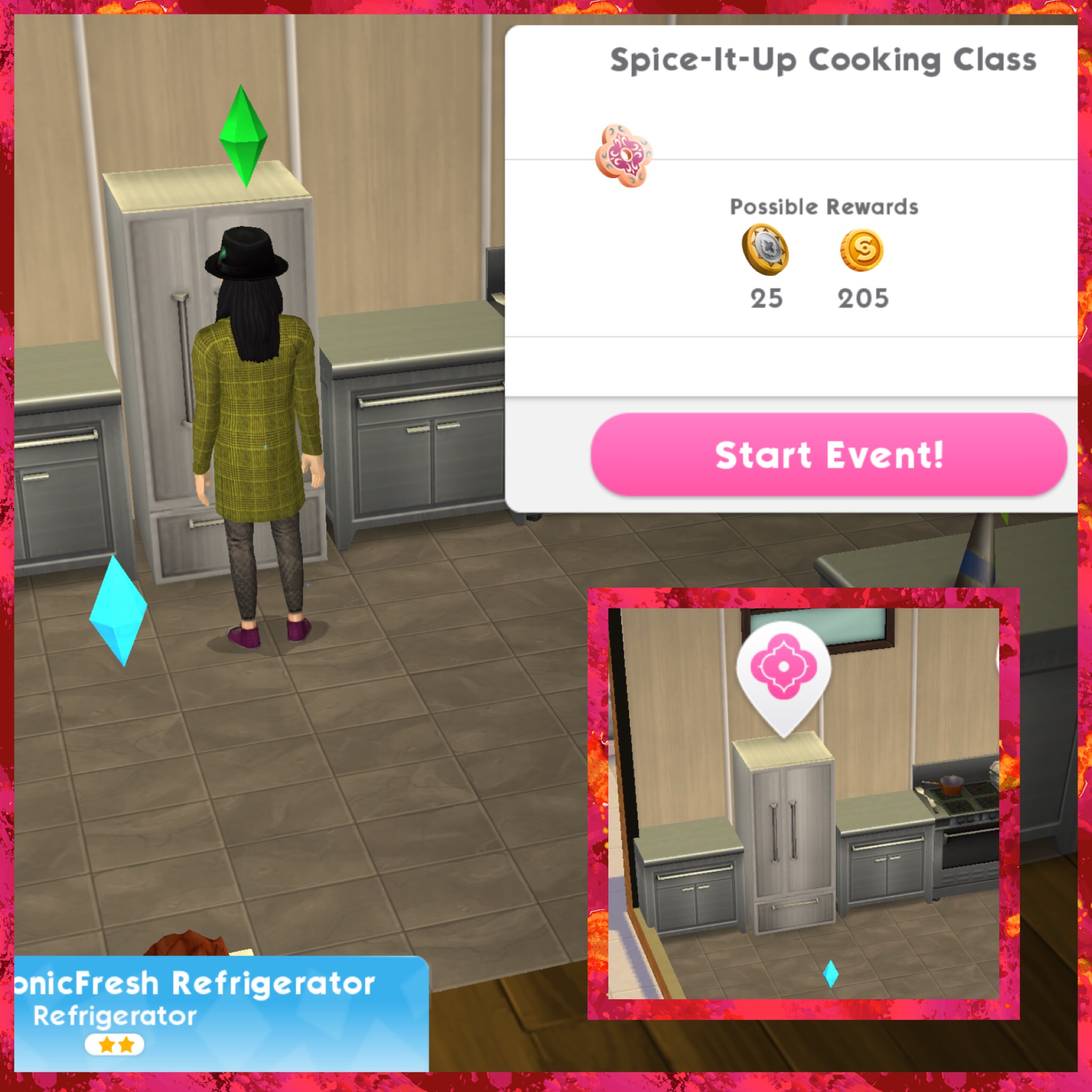
  • Completing the Spice-It-Up Cooking Class (at the restaurant)- every 8 hours
  • Completing the Friendly Insights Event (relationship event)- every 8 hours
  • Also complete career, hobby and relationship events to receive a few extra coins!
  • Complete the Extravagant Ideas Quest, there are 14 parts to complete:

1.Spread the world about the World of Luxury Event- 5 seconds, costs 3 energy each (select blue interaction with 5 other sims) Reward: 15 deluxe coins

2.Complete the Tasteful Tea Tasting event at the Cafe. Tap the Microphone to start the event- go to the cafe and click on the symbol and select start event (your sim doesn’t have to work at the cafe to do this) You can complete this event every 8 hours Reward: Little Luxuries Tea Set

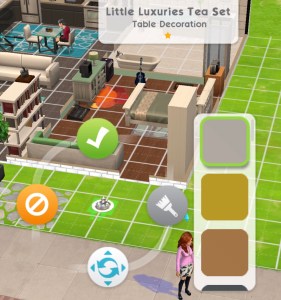
3.Take Little Luxuries Tea Set out of Storage and place it at Home Reward: 15 deluxe coins

4.Use the Little Luxuries Tea Set to share your tea knowledge- 5 seconds, costs 3 energy (click on the tea set and select a sim to share tea knowledge with) Reward: 15 deluxe coins

5.Complete the next Luxurious Leisure event at Home. Tap a Sofa to start the event. You can complete this event every 20 hours Reward: 15 deluxe coins

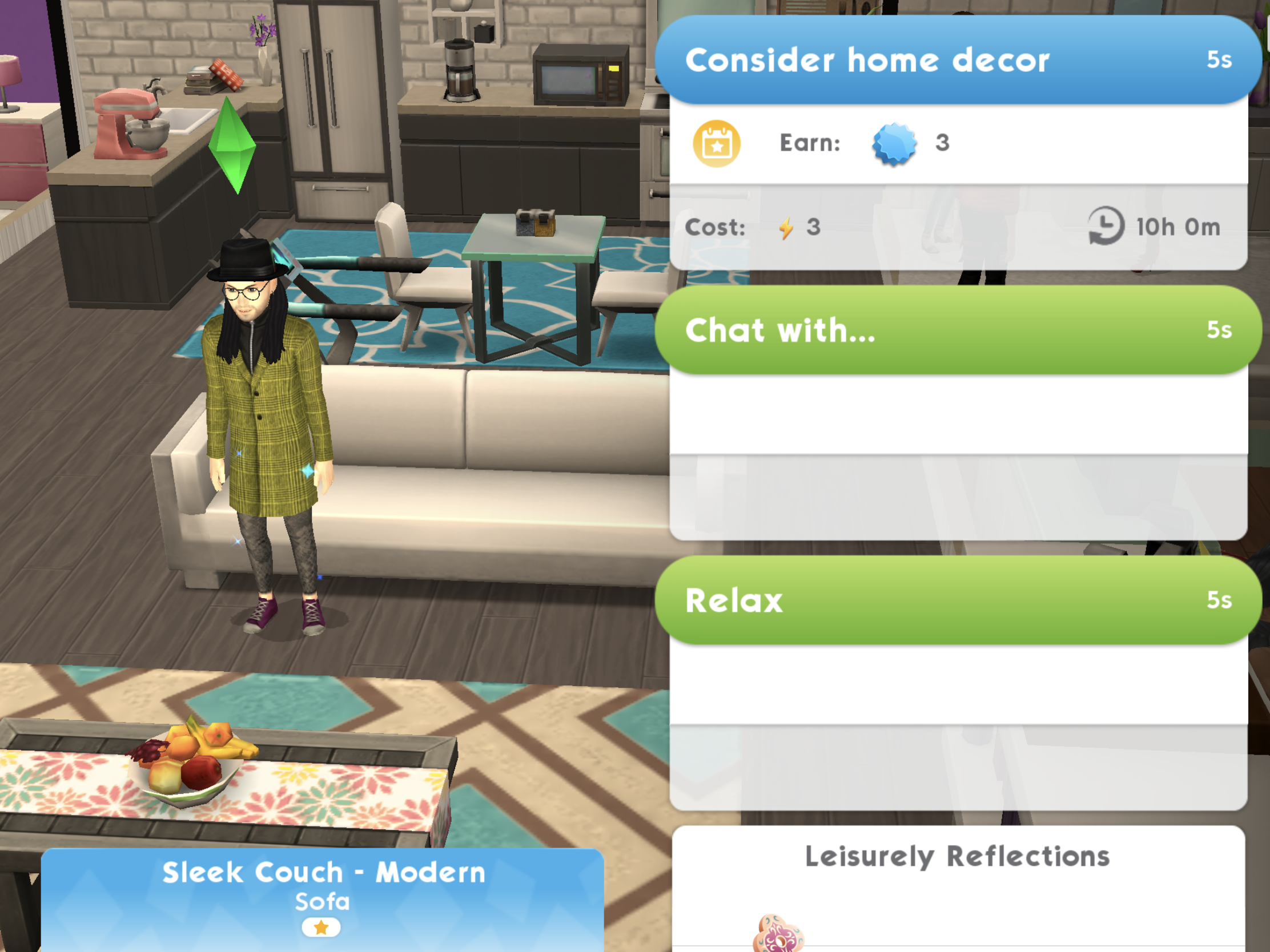
6.Tap on the sofa and consider your current home decor- 5 seconds, costs 3 energy Reward: 15 deluxe coins

7.Attend 1 foodie, concert or studio party (go to the party tab and find a foodie, concert or studio party to attend) Reward: 15 deluxe coins

8.Complete the next Luxurious Leisure event at Home. Tap a sofa to start the event. You can complete this event every 20 hours Reward: 15 deluxe coins

9.Complete your to do list Reward: 15 deluxe coins

10.Complete the Spice-It-Up Cooking Class at the Restaurant. Tap the fridge to start the event. You can complete this event every 8 hours Reward: 15 deluxe coins 

11.Complete your to do list again Reward: 15 deluxe coins

12.Complete the next Luxurious Leisure event at Home. Tap on a sofa to start the event. You can complete this event every 20 hours  Reward: 15 deluxe coins

13.Complete the Friendly Insights event with another sim. You can complete this event every 8 hours Reward: 15 deluxe coins

14.Complete more events to earn 1,700 deluxe coins Reward: 10 simcash 

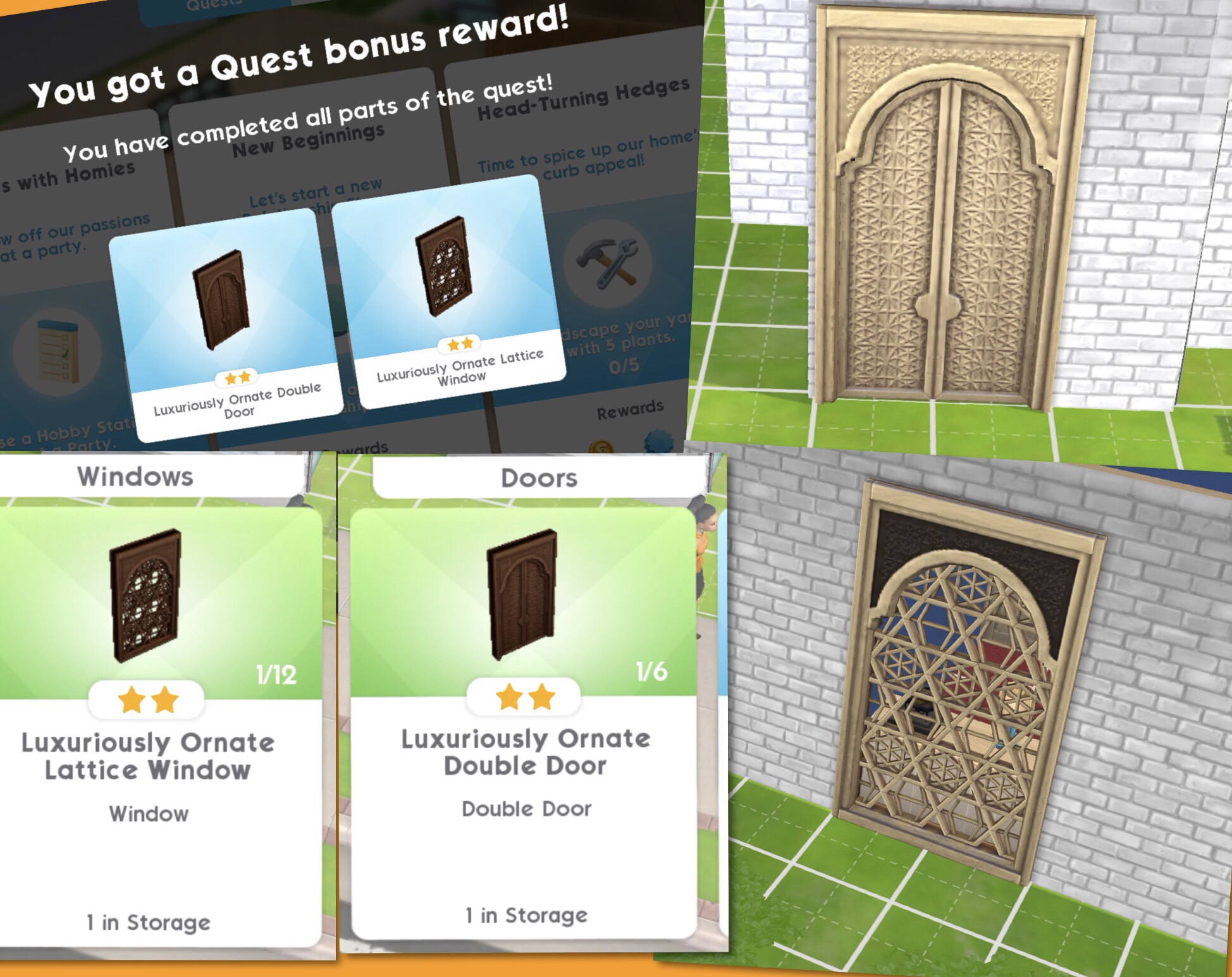
If you complete the whole quest you unlock the Luxuriously Ornate Double Door and Lattice Window


Buying Ornate Boxes

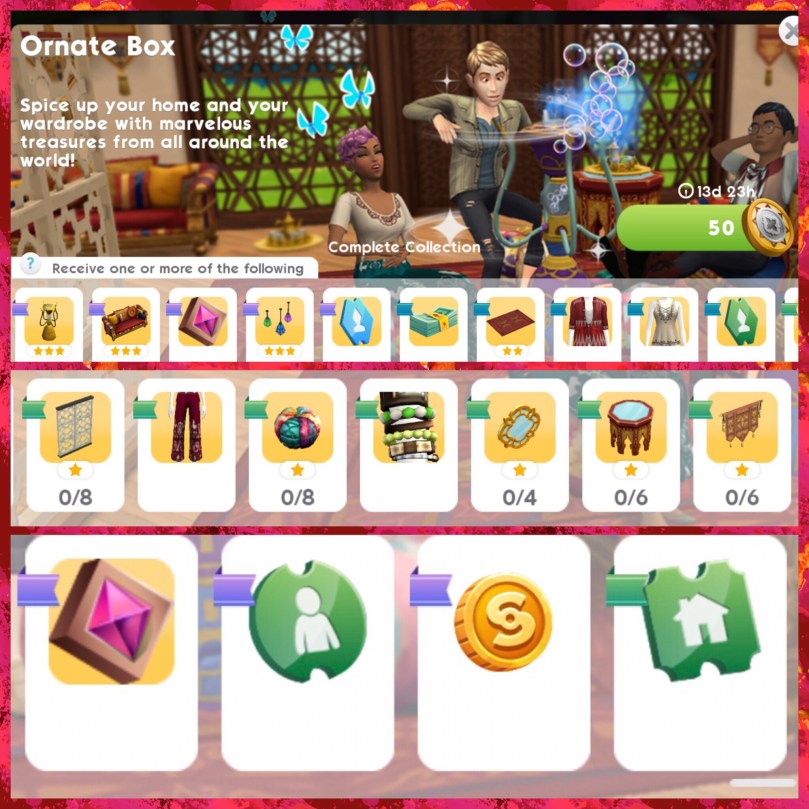
You can either buy an ornate box for 50 deluxe coins or 75 simcash. You will get an item at random each time,  you can get some of them more than once, for example you could win 2 bubble blowers, 6 hanging lanterns or boho themed clothes

Each item pictured has a ribbon next to it which shows you the rarity of that item, this shows you how likely it is you will earn that item. I’m glad the box that costs simcash now has better odds at unlocking the rare items:

Once you have unlocked an item there will be a tick on that item, the aim is to unlock all the items before the time limit is up!

What did you think about this event?

I was disappointed with the hot tub event, the odds were terrible so I was really hoping this one was going to be better. My first 3 boxes were simcash and heirloom tickets so I was not happy, it was fourth time lucky for me to actually unlock an item from this event! I really like the items and I am glad they have reduced the cost of the simcash box and made the odds better this time. I am just hoping that the 3 boxes at the beginning isn’t a sign of things to come and this event has been improved and tweaked after our feedback on the hot tub event.

Thanks for reading!


My Sims Mobile Posts

© COPYRIGHT PROTECTED

The Sims Freeplay- Kids Party Live Event

Early Access to Beta Provided by EA/ Firemonkeys- may differ from actual version


THIS EVENT IS NOW OVER


ONCE THE 9 DAY TIME LIMIT IS UP YOU WILL HAVE 2 DAYS TO PURCHASE ANY PACKS YOU HAVE LEFT– you will not be able to collect anymore arts and crafts items or coins, you have to use the resources you have, if you don’t have enough resources all you can do is use social points to buy the requirements or wait until the event returns!


The Kids Party Live Event unlocks party items for preteen sims to enjoy, this event will be available between May 1st-4th for 9 days!

Live Events are very similar to a community event but this time you don’t need help from everyone who plays the sims freeplay to unlock the prizes, there are only personal prizes this time!

Check out my Guide to Completing Live Events (including tips!) HERE!

This event is only here for 9 days and the aim of it is to collect enough arts and crafts items from the arts and crafts stations (found in the event tab of buy mode) to unlock all the items in this event

NOTE: if you did another Live Event then you will find your arts and crafts stations in your inventory (or in the house you left them at) you will only be able to use the candle ones until you unlock the other stations in this event

Can’t find your arts and crafts stations? Click on the craft station in your event tab to get the option to find your station, it will take you to the house where your stations can be found!

NOTE: I completed this on the Early Access Beta so some information may be slightly different but I will update the post as I complete the event.

Place a crafting station (find the candle station in the events tab of buy mode (or your inventory)- you can only buy 4)

Make some arts and crafts items (click on the candle station to make)- 23 seconds

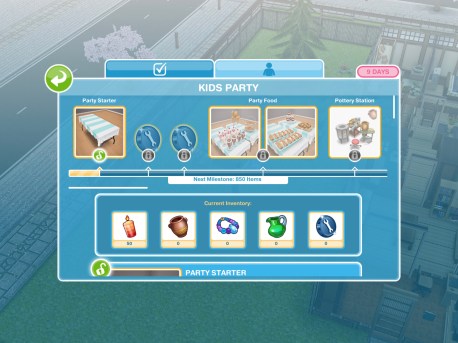
This takes you to the prize progress tab (you can get to it by clicking on the party event button in the corner of the screen)

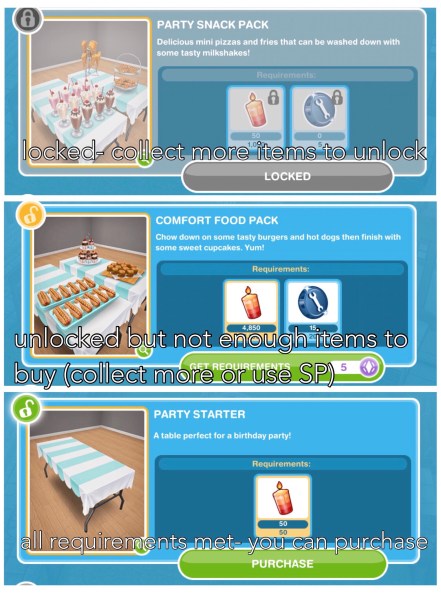
Here you will see you have collected enough items to unlock the Party Starter pack! When you unlock each pack, before the items are available in your home store you need to purchase them with the arts and crafts items you make- this goal is coming up!

Restock a crafting station (when the stock runs out you will have to restock before you can make anymore arts and crafts items)- You can restock instantly for 18 uses for 10SPs or restock for 2 uses which will take 10 seconds this time

Buy the party starter pack (click on the party event button, scroll down and click purchase- this will cost you 50 candles)

Use a coin flower patch (buy the coin flower patch from the event tab and select the spin plant option)

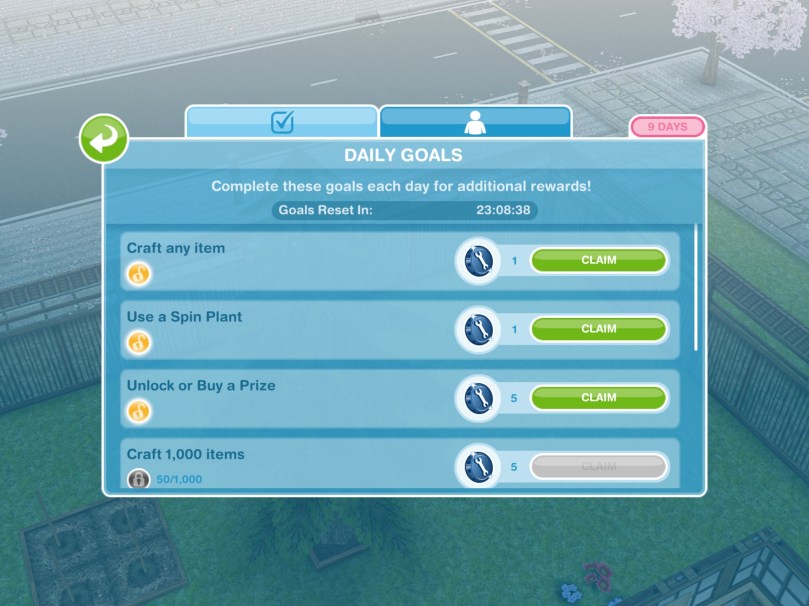
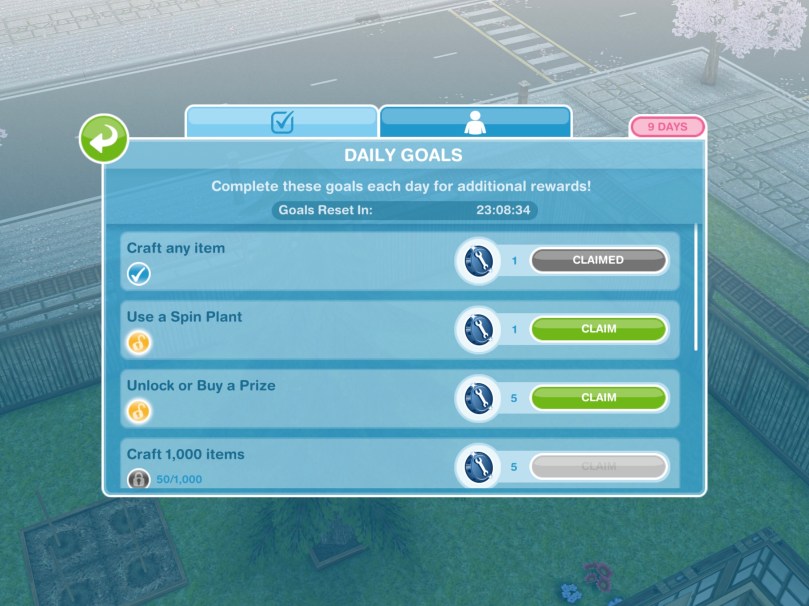
Check the daily goals (click on the party event button and find the daily goals tab- claim the ones you can!)

Remember to claim your rewards each day!

Collect bonuses (while collecting after a certain amount of time you will see the arts and crafts item appear above that sims head, click to collect the bonus item!)

Continue collecting arts and crafts items- this is the last step but the event is not over, keep collecting the arts and crafts to unlock everything!

If you want to speed up a collecting arts and crafts action it will cost you SPs, you will get the bonus gems as well if you speed it up!

Stuck on these tasks? Watch my video here:


Arts and Crafts Stations

Candle Station costs:

1st- Free
2nd- S2,000
3rd- S4,000
4th- S10,000

(maximum of 4)

  • Collect 250 Candles- 2 hours 30 minutes
  • Collect 360 Candles- 4 hours 30 minutes
  • Collect 455 Candles- 6 hours 30 minutes
  • Collect 510 Candles- 8 hours 30 minutes

Pottery Station costs:

1st- S5,000
2nd- S7,500
3rd- S10,000
4th- S15,000

(maximum of 4)

  • Collect 375 Pottery- 2 hours 30 minutes
  • Collect 540 Pottery- 4 hours 30 minutes
  • Collect 680 Pottery- 6 hours 30 minutes
  • Collect 765 Pottery- 8 hours 30 minutes

Jewelry Station costs:

1st- S7,500
2nd- S15,000
3rd- S20,000

(maximum of 3)

  • Collect 565 Jewelry- 2 hours 30 minutes
  • Collect 810 Jewelry- 4 hours 30 minutes
  • Collect 1025 Jewelry- 6 hours 30 minutes
  • Collect 1150 Jewelry- 8 hours 30 minutes

Glassware Station costs:

1st- S7,500
2nd- S25,000

(maximum of 2)

  • Collect 620 Glass- 2 hours 30 minutes
  • Collect 890 Glass- 4 hours 30 minutes
  • Collect 1125 Glass- 6 hours 30 minutes
  • Collect  1260 Glass- 8 hours 30 minutes

Restocking

Each station (apart from the first candle one) comes with a stock of 9 which means you can use the station 9 times before it needs to be restocked (if you got your stations out of your inventory they will all need restocking first (apart from the first candle one) When you need to restock you will have two options:

  • Restock 18 uses which happens instantly but will cost you 10SPs

or

  • Restock 9 uses which will take you 2 hours 30 minutes but will be free

NOTE:

  • if you store the station you will lose all the stock so when you place it again you will need to restock
  • if you cancel making something using a station you will lose that stock so if you had one stock left and then you cancelled that action you would need to restock before you can create anymore arts and crafts items

Your Progress:

Click the party event button in the top corner of your game to see your progress

Daily Goals

Check on the first tab every day because if you complete all the daily goals you will get additional constructor coins

NOTE: remember to click CLAIM once you have completed a daily goal to collect the reward and remember to claim your free constructor coins and free items each day!

Prize Progress

The prize progress is how far you have got on this event, the more arts and crafts items you make the more prizes you will unlock
NOTE: the bar at the top of the personal progress tab shows you how close you are to unlocking an item, the more arts and crafts items you collect the more the bar will fill up. Once you have unlocked an item on the bar at the top you will be able to use the arts and crafts items you have collected and constructor coins to purchase that pack which you will then be able to find in the home store.
Prizes:

1.Party Starter- requires 50 candles to buy

Dining room: Aqua Birthday Table Short (S10,000)

2.Constructor Coins

3.Constructor Coins

4.Party Food- Party Snack Pack and Comfort Food Pack

Party Snack Pack- requires 1,050 candles and 5 constructor coins to buy

Decorations and Kitchen: Party Fries (S11,000) and Party Pizzas (2LP)

Decorations: Party Milkshakes (2SP)

Your sims can eat and drink for 5 minutes

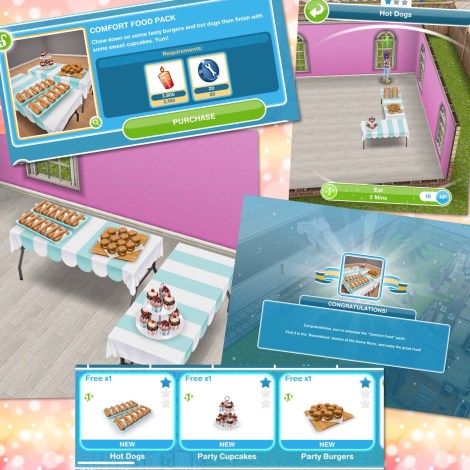
Comfort Food Pack- requires 3,100 candles and 20 constructor coins to buy

Decorations and Kitchen: Hot Dogs (S12,000) Party Cupcakes (S13,000) and Party Burgers (2LP)

Your sims can eat for 5 minutes

5.Pottery Station

6.Constructor Coins

7.Constructor Coins

8.Party Decorations- Birthday Preparations and House Decorations

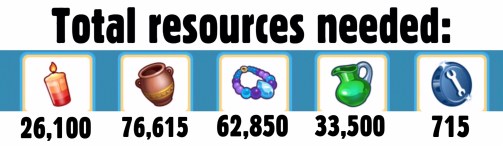
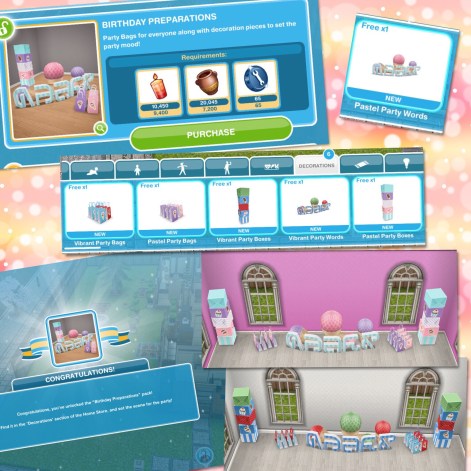
Birthday Preparations- requires 9,400 candles, 7,200 pottery and 65 constructor coins to buy

Decorations: Vibrant Party Bags (S13,000) Boxes (S13,000) and Words (S15,000)

Pastel Party Bags (2LP) Boxes (2LP) and Words (3SP)

House Decorations- requires 12,500 candles, 9,600 pottery and 85 constructor coins to buy

Decorations: Red (S16,000) and Purple (3LP) Candy Jars

Blue (S20,000) and Aqua (4LP) Shop Poster

Blue (S21,000) and Aqua (4LP) Ice Cream Poster

9.Jewelry Station

10.Constructor Coins

11.Social Points

12.Constructor Coins

13.Tables and Games- Pinata Pack and Pin the Tail Pack

Pinata Pack- requires 13,565 pottery, 14,350 jewelry and 125 constructor coins to buy

Dining Room: Blue (S23,000) and Aqua (4LP) Birthday Tables Medium

Decorations: Vibrant (S12,000) and Pastel (2LP) Refreshments

Outdoor Decorations: Ice Cream Pinata (30LP)

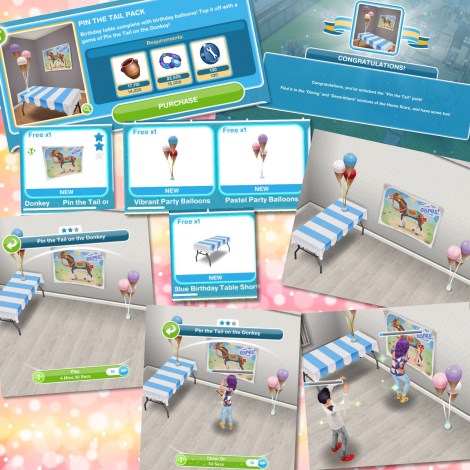
Pin the Tail Pack- requires 14,250 pottery, 15,000 jewelry and 130 constructor coins to buy

Dining Room: Blue Birthday Table Short (S15,000)

Decorations: Vibrant (S20,000) and Pastel (3SP) Balloons

Preteen: Pin the Tail on the Donkey (25SP)

Preteens can play pin the tail on the donkey for 4 minutes 30 seconds while other sims cheer them on!

14.Glassware Station

15.Constructor Coins

16.Social Points

17.Constructor Coins

18.Celebration Set- Cakes and Drones and Party Tables

Cakes and Drones- requires 15,000 pottery, 16,000 jewelry, 16,000 glassware and 135 constructor coins to buy

Decorations: Birthday Presents (5SP)

Spearmint Green (S25,000) and Pink (4LP) Party Cakes

Outdoor Decorations: Drone (35LP)

Sims can open the birthday presents and blow out candles and eat the cake. Sims can fly the drone for 4 minutes

Party Tables- 17,000 pottery, 17,500 jewelry, 17,500 glassware and 150 constructor coins to buy

Dining Room: Vibrant Party Table Short (S30,000) Medium (S35,000) and Large (S40,000)

Pastel Party Table Short (5LP) Medium (5SP) and Large (6SP)

Sims can sit and eat at the tables for 4 minutes

19.Constructor Coins

20.Social Points

21.Constructor Coins

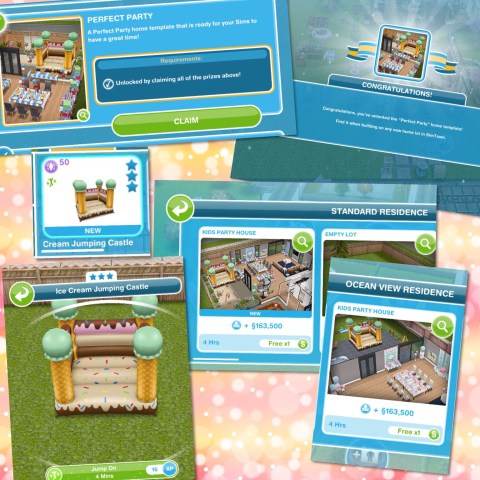
22.Perfect Party House Template

You will only unlock the perfect party house if you manage to buy all the other prizes in the time limit, the first one built is free after that they will cost simoleons

You also unlock the ice cream bouncy castle when you claim this template, it will cost 50SP and can be found in the outdoor decorations section, only one sim can use the bouncy castle at a time

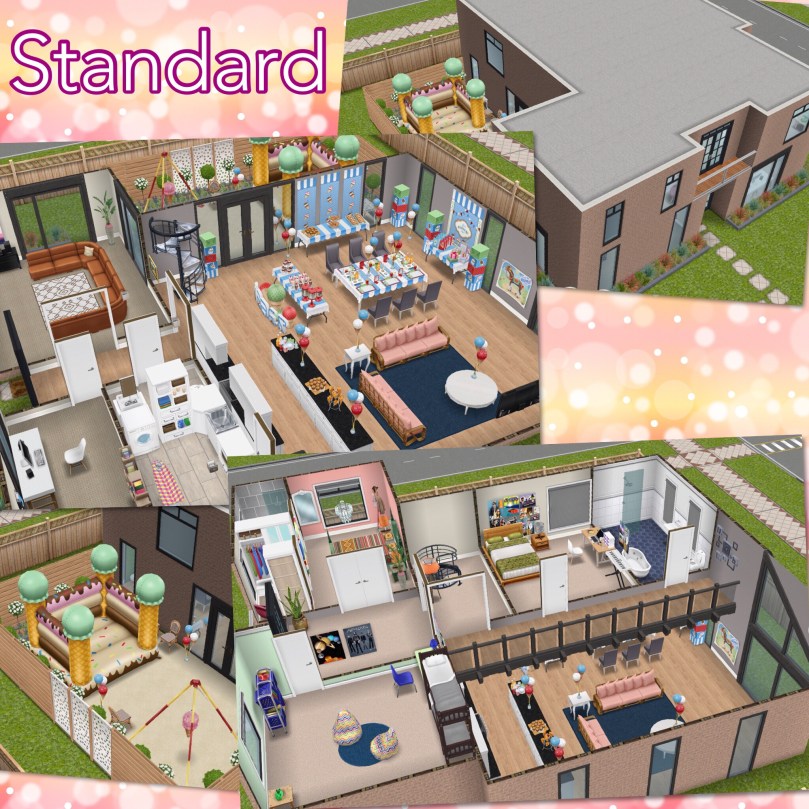
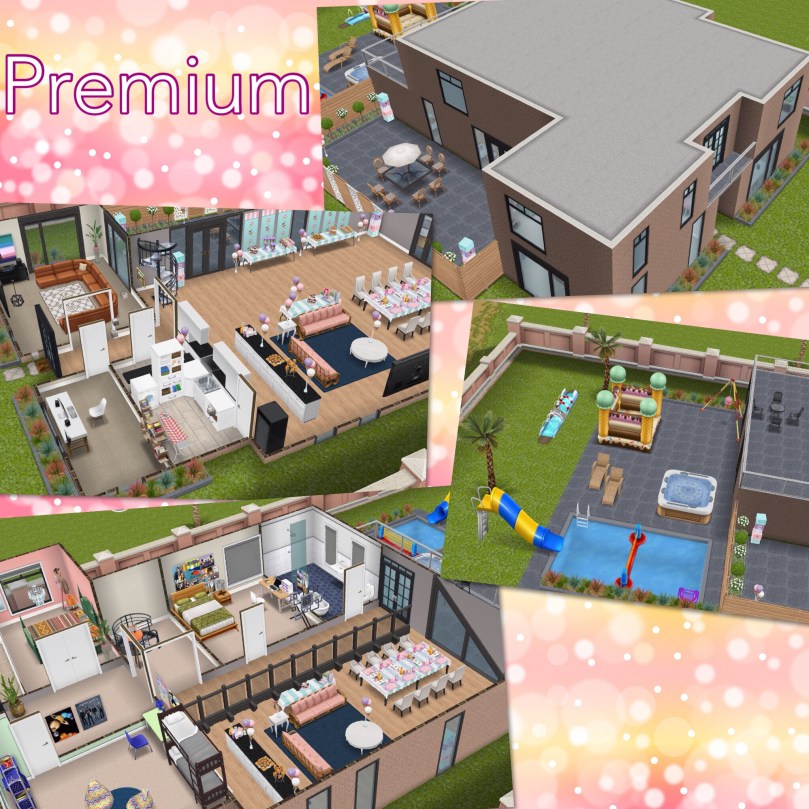
What is the difference between the standard and premium residence?  The kitchen/dining room is larger on the premium residence and there is a balcony at the back of the house. The party items in the standard are the vibrant ones whereas the pastel ones are in the premium house.

There is also a bigger garden on the premium residence but it does look a bit of a mess!

Perfect Party House Tour Video:


Constructor Coins

You earn constructor coins by:

Personal Progress prizes
Completing Daily Goals

Coin Plant Patches

Earning Construtor Coins? Previously on these events I used social points on the Mega Spin Plant to win constructor points. I earn social points by completing the cooking hobby and earning LPs, I can then turn the LPs into SPs using the social point plant on a normal garden patch- this was when it cost 5LPs- the social point plant now costs 20LPs so you may want to try the option below first instead:

Or you can use 450 candles for the Spin Plant (a good way to use up any spare candles) which will also earn you constructor coins but the amounts are less than they are from the Mega Spin Plant
What is the minimum and maximum amount of coins you can earn on the mega spin plant? The minimum is 10 and the maximum is 500
Now on the coin flower patch you can see the chances of getting the different combinations on each spin plant, click on the green i button to see:

Personally I don’t really see the point in seeing this now, it definitely wasn’t an 18% chance before of getting the 3 different ones as that it what I got the most! We will have to wait and see if they have made changes to the spin plant for this new event!


Laura Craft? You may have noticed at the front of one of your houses there is a board with a bubble of a person holding arts and crafts items above it, this is Laura Craft, you can buy her for real money to help you complete the event. When you buy her, you select the item you want her to make from the options: 200 candles,  300 pottery, 450 jewelry or 500 glassware (the amounts seem to differ for most of you and I have no idea why that is!) (you will unlock all the options once you have unlocked all the stations) and you will be able to collect them after 2 hours.

Do I think she is worth it? They have improved Laura Craft a lot since the first event (although it would be great if she made constructor coins) she used to be able to collect every 8 hours, they have now changed this to 2 hours so she is more useful now so if you are struggling then you may want to splash out and give her a try but remember you will only get her for this event, you will have to buy her again to use her for a live event in the future.

If I brought Laura Craft in the last event do I get her for free or do I have to buy her again? You have to buy her again for this event.

Check out my Guide to Completing Live Events (including tips!) HERE!


Find this post helpful?

© COPYRIGHT PROTECTED

http://smarturl.it/sfpggwg